
A gaming laptop around the 600-dollar class has to balance graphics, memory, display quality, and everyday portability without wasting money on features that rarely get used. I compared six options for students, casual players, creators, and mixed-work setups, paying close attention to the parts that affect daily ownership. The real decision comes down to whether a discrete graphics card, expandable storage, or a faster display matters most.
A Snapshot Of The Selections

MALLRACE 2026 AMD Ryzen 7 5700U Gaming Laptop 15.6-inch

Lenovo IdeaPad Gaming 3 15 FHD GTX 1650 Laptop

Acer Nitro 5 AN515-54-5812 15.6-inch FHD GTX 1650
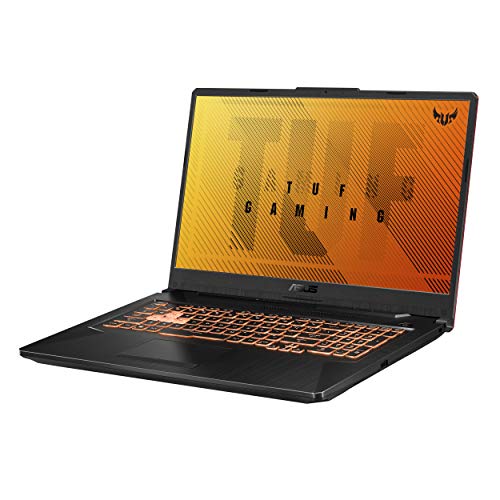
ASUS TUF Gaming F17 FX706LI-ES53 17.3-inch 144Hz GTX 1650 Ti

NIMO 15.6 FHD AI Gaming Laptop 32GB 1TB SSD

ASUS TUF Gaming A15 FA506IH-AS53 15.6-inch 144Hz GTX 1650
A Breakdown Of The Leading Choices
The MALLRACE 2026 AMD Ryzen 7 5700U Gaming Laptop 15.6-inch makes sense for a student moving between classes, notes, browser tabs, and lighter gaming sessions. Its 15.6-inch Full HD panel, backlit keyboard, and metal body give it a practical everyday character, while the eight-core Ryzen 7 chip handles multitasking without demanding a discrete graphics card.
Unlike the Lenovo IdeaPad Gaming 3 15 FHD GTX 1650 Laptop, this MALLRACE uses Radeon integrated graphics, so I would not treat it as the stronger choice for graphics-heavy games. The advantage is flexibility: 16GB of dual-channel DDR4 memory, a 512GB NVMe drive, and broad port coverage create a useful school and work machine.
Noteworthy Benefits
- Memory can expand to 64GB, giving long-term multitasking room.
- The NVMe storage can reach 2TB, which is helpful for game libraries and project files.
- Two USB ports, HDMI, full-function Type-C, and a card slot reduce adapter clutter.
- Wi-Fi 6 and a backlit keyboard support mobile study sessions.
Trade Offs
- Integrated Radeon graphics make the discrete-GTX options better for demanding 3D games.
- The 15.6-inch metal chassis needs more desk space than a compact classroom notebook.
Feature Snapshot
Who It Suits Best
I recommend this model for students and office-focused shoppers who play lighter games and value expandable memory, storage, and ports.
Look Elsewhere When
The Lenovo IdeaPad Gaming 3 15 FHD GTX 1650 Laptop suits players who need discrete graphics for more demanding games.
The Ryzen 5 5600H and GTX 1650 combination gives the Lenovo IdeaPad Gaming 3 15 FHD GTX 1650 Laptop a clear advantage for games that need dedicated graphics. The six-core processor handles ordinary schoolwork and gaming, while the 15.6-inch Full HD IPS display gives games and video a clear, wide viewing area.
A 120Hz refresh rate, meaning the screen can redraw up to 120 times per second, makes fast movement appear smoother than a conventional 60Hz panel. Compared with the Acer Nitro 5 AN515-54-5812 15.6-inch FHD GTX 1650, this Lenovo uses a newer Ryzen 5000-series processor, though both rely on 8GB memory and 256GB storage.
The Upside
- GTX 1650 graphics provide a clear path beyond integrated-laptop gaming.
- The 120Hz display improves the feel of competitive shooters and action games.
- Full HD IPS visuals suit both entertainment and everyday productivity.
Points To Keep In Mind
- 8GB of memory is modest for heavy multitasking and modern games.
- 256GB storage fills quickly with large game installations.
- The discrete GPU adds more weight and heat than an integrated configuration.
Quick Facts
Made For
This Lenovo fits casual and competitive players who want a dedicated GPU, a high-refresh screen, and a familiar 15.6-inch footprint.
Another Choice May Suit
The ASUS TUF Gaming A15 FA506IH-AS53 15.6-inch 144Hz GTX 1650 offers a faster 144Hz display and twice the listed storage for shoppers prioritizing motion and capacity.
The Acer Nitro 5 AN515-54-5812 15.6-inch FHD GTX 1650 is a practical entry point for someone moving from a basic home computer to a dedicated gaming laptop. Its GTX 1650 includes 4GB of dedicated graphics memory, and the Full HD IPS display gives games and everyday tasks a clear presentation.
The most attractive ownership detail is storage expansion. This model includes 256GB of NVMe storage and a second available M.2 slot, so I can add another drive without replacing the first one. That makes it more adaptable than the Lenovo IdeaPad Gaming 3 15 FHD GTX 1650 Laptop, which carries only 256GB of listed storage.
Positive Points
- The GTX 1650 provides 4GB of dedicated graphics memory for games.
- A second M.2 slot supports a straightforward storage upgrade.
- Wi-Fi 6 helps keep wireless connections current.
- The backlit keyboard is useful in dim study or work settings.
- Full HD IPS viewing suits gaming, classes, and media.
Worth Noting
- 8GB DDR4 memory offers little room for demanding multitasking without expansion.
- The ninth-generation Core i5 is older than the Ryzen 5000-series chip in the Lenovo model.
Right Fit For
I see this Acer as a good starting point for first-time gaming laptop owners who want a dedicated GPU and plan to add storage or memory later.
Swap It Out When
The NIMO 15.6 FHD AI Gaming Laptop 32GB 1TB SSD better serves creators who need 32GB of memory and 1TB of storage from the start.
The 17.3-inch display makes the ASUS TUF Gaming F17 FX706LI-ES53 17.3-inch 144Hz GTX 1650 Ti feel more like a portable desktop than a conventional laptop. At 144Hz, the panel refreshes substantially faster than the 120Hz Lenovo display, a difference that matters most in competitive games with quick camera movement.
The GTX 1650 Ti also separates this model from the standard GTX 1650 configurations in the Acer and Lenovo. Between those two, the F17 adds a larger screen, 512GB of PCIe storage, and an RGB keyboard, although its 8GB memory remains modest for a machine of this size.
Useful Strengths
- The 17.3-inch panel creates a more immersive gaming and media area.
- GTX 1650 Ti graphics suit a step up from entry-level gaming.
- 144Hz motion is valuable for competitive and fast-paced titles.
- 512GB storage provides room for games and larger applications.
- The RGB keyboard adds visible controls for different lighting profiles.
Small Caveats
- 8GB DDR4 memory is limited for heavy multitasking and new games.
- The large chassis is less convenient for backpacks and shared desks.
- GTX 1650 Ti still targets an older generation of gaming hardware.
Technical Highlights
Who Will Love This
I recommend the F17 to competitive players and enthusiasts who value screen size, smooth motion, and a roomy desktop-style setup.
Consider Something Else When
The ASUS TUF Gaming A15 FA506IH-AS53 15.6-inch 144Hz GTX 1650 is easier to carry while retaining a 144Hz display and dedicated graphics.
The NIMO 15.6 FHD AI Gaming Laptop 32GB 1TB SSD stands apart for students and creators who need memory and storage more than a dedicated gaming GPU. The Ryzen 7 8745HS provides eight cores and 16 threads, a combination I appreciate for compiling software, editing timelines, and keeping several demanding applications open.
Its 32GB of DDR5 memory runs at 5600MHz, while the 1TB SSD removes much of the immediate storage pressure found in the 256GB Acer and Lenovo configurations. Radeon 780M integrated graphics use system memory and can handle lighter games, but the dedicated GTX 1650 options remain more appropriate for 3D-intensive titles.
Useful Touches
- 32GB of DDR5 memory supports heavy multitasking and large projects.
- A 1TB SSD provides useful space for projects, applications, and media.
- The eight-core Ryzen 7 8745HS handles demanding productivity tasks.
- Radeon 780M graphics offer a capable integrated option for lighter games.
- The 15.6-inch Full HD display keeps the overall format familiar and portable.
Possible Compromises
- Integrated Radeon graphics are not a substitute for a dedicated gaming GPU.
- The AI branding does not change the need to check game graphics requirements.
Built With In Mind
This NIMO fits software developers, video editors, and technical students who need substantial memory and storage for demanding workflows.
Reach For A Different Pick When
The ASUS TUF Gaming F17 FX706LI-ES53 17.3-inch 144Hz GTX 1650 Ti better serves gamers who need discrete graphics and a large high-refresh display.
The ASUS TUF Gaming A15 FA506IH-AS53 15.6-inch 144Hz GTX 1650 combines a fast screen with a manageable 15.6-inch footprint. For a student carrying a laptop between classes, that display size feels more practical than the 17.3-inch ASUS TUF Gaming F17, while the 144Hz refresh rate remains a step above the Lenovo’s 120Hz panel.
The Ryzen 5 4600H and GTX 1650 provide a recognizable gaming configuration, while the 512GB PCIe SSD has twice the listed capacity of the Acer Nitro 5. The tradeoff is the 8GB memory configuration, which can restrict heavy multitasking and some newer games until more memory is added.
Benefits That Matter
- A 144Hz display keeps fast movement smooth in competitive games.
- The 15.6-inch size balances screen space with easier portability.
- GTX 1650 graphics provide dedicated performance for lighter gaming.
- 512GB storage leaves room for several game installations and applications.
Less-Strong Areas
- 8GB DDR4 memory is limited for modern games and heavy multitasking.
- Wi-Fi 5 is older than the Wi-Fi 6 connection in the MALLRACE and Acer models.
- The Ryzen 5 4600H is an older platform for demanding new releases.
Core Details
The Right Fit
This ASUS TUF suits students and commuters who want dedicated graphics, a 144Hz screen, and a more manageable chassis than the F17.
Where A Sibling Pick Shines
The Lenovo IdeaPad Gaming 3 15 FHD GTX 1650 Laptop offers a similarly portable 15.6-inch design with a newer Ryzen 5000-series processor.
What Matters Before Buying In This Price Class
Start With The Graphics Requirement
A dedicated GPU, such as a GeForce GTX 1650, handles 3D rendering separately from the processor. Integrated Radeon graphics can run lighter games, office applications, and media, but shoppers should check the graphics requirements of each game. A dedicated card is the safer starting point for competitive titles or settings above the lowest presets.
Treat Memory As The Expansion
16GB of RAM gives newer systems a comfortable baseline for browsing, office work, streaming, and several background applications. An 8GB laptop can still work well, but heavy multitasking and newer games may justify an upgrade. I also check whether the memory is soldered in, since that determines whether an increase remains possible later.
Compare The Display By Motion And Size
A high refresh rate, measured in hertz, controls how often the panel redraws. The 120Hz Lenovo and 144Hz ASUS panels can make movement look smoother, while the 17.3-inch F17 offers more visual space at the expense of portability. The 15.6-inch options are easier to move between a backpack, desk, and classroom.
Account For Storage And Connections
NVMe storage is faster than older SATA drives, but 256GB can feel cramped once several large games and creative applications are installed. A second M.2 slot, as found in the Acer Nitro 5, offers added flexibility. Ports also matter for daily ownership, particularly for students using displays, external storage, headphones, and accessories regularly.
Key Checks Before Checkout
Mistakes Worth Dodging
I would avoid judging a gaming laptop by processor speed alone. A fast CPU cannot compensate for unsuitable integrated graphics, and a high-refresh display does not guarantee smooth performance when the game exceeds the GPU’s capabilities. I also compare the exact memory and storage configuration, since model pages can show several hardware variations.
Where The Extra Money Goes
Additional spending may buy a faster GPU, more memory, a higher-refresh screen, or a larger display. Those upgrades matter for demanding games, competitive play, and creative workloads. For document editing, classes, and lighter games, spending less on excess processing power can leave more room in the overall budget for accessories or software.
Frequently Asked Questions
Is A Dedicated Graphics Card Necessary In This Budget Range?
A dedicated GPU is advisable for most modern 3D games and competitive titles. Integrated Radeon graphics work well for light games, video playback, and ordinary productivity, but game-specific requirements remain the deciding factor.
Does A Higher Refresh Rate Matter For Gaming?
A higher refresh rate can make fast movement and aiming feel smoother, particularly in competitive games. The benefit depends on the game, graphics settings, hardware performance, and whether the display is paired with a capable GPU.
Should I Choose 8GB Or 16GB Of Memory?
16GB is the more comfortable choice for heavy multitasking, newer games, and creative applications. An 8GB configuration can work for lighter use, particularly when the model supports a practical memory upgrade.
Is 256GB Of Storage Enough For Gaming?
That amount can become tight with several modern games, updates, and other applications. 512GB offers more breathing room, while a second M.2 slot allows additional storage without replacing the original drive.
Which Screen Size Works Best For A Gaming Laptop?
A 15.6-inch display balances gaming space with easier carrying, while 17.3 inches feels more immersive but takes up more room. I choose 15.6 inches for frequent travel and 17.3 inches for a permanent desk setup.
Final Verdict
I would choose the Lenovo IdeaPad Gaming 3 15 FHD GTX 1650 Laptop for straightforward gaming, the ASUS TUF Gaming A15 FA506IH-AS53 15.6-inch 144Hz GTX 1650 for smooth motion and portability, and the NIMO 15.6 FHD AI Gaming Laptop 32GB 1TB SSD for heavy productivity work. The MALLRACE and Acer models make more sense when expandable memory or storage leads the shopping list, while the ASUS TUF Gaming F17 serves desktop-style gaming with a large high-refresh screen.
