
A strict gaming-laptop budget turns every component choice into a tradeoff. I focus on the details that shape daily use: processor capability, memory, storage, display size, battery capacity, and whether the graphics can handle light gaming without turning the machine into a desk-only computer.
An Overview Of The Picks

MALLRACE 18.5-Inch 7430U Laptop
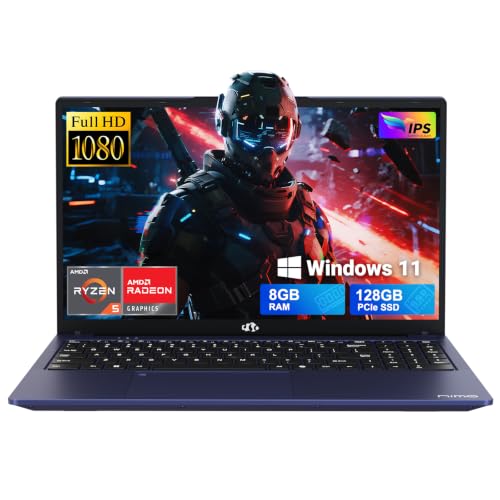
NIMO 15.6-Inch Light Gaming Laptop, Ryzen 7, 16GB DDR5, 512GB SSD

Apple 2026 MacBook Neo 13-inch Laptop, A18 Pro, 8GB Unified Memory, 512GB SSD, Indigo

NIMO 15.6-Inch R7-8745HS Laptop

NIMO 17.3-Inch 8745HS Laptop

NIMO 15.6-Inch N150 8GB Laptop
A Breakdown Of The Leading Choices
The MALLRACE 18.5-inch display is unusually large for a general-purpose notebook, making it useful for split-screen research, spreadsheets, and coursework. The IPS panel, meaning In-Plane Switching, provides a conventional viewing experience, while the 1920 by 1080 resolution keeps text and video sharp at the native display size.
Its Ryzen 5 7430U processor and Radeon integrated graphics suit office work, streaming, and lighter games rather than demanding 3D titles. I appreciate the 7000mAh battery for long study sessions, although the large screen makes the 18.5-inch footprint less convenient than the smaller alternatives here.
Everyday Wins
- The 18.5-inch IPS screen gives documents, lessons, and movies more room.
- 16GB of DDR4 memory supports heavy browser and office multitasking.
- A 512GB M.2 solid-state drive keeps files compact and responsive.
- The 7000mAh battery suits full-day study and remote-work routines.
- RJ45 Ethernet provides a stable wired connection for large transfers.
Things To Consider
- Integrated Radeon graphics place this model in the light-gaming category, not the high-settings category.
- The broad display may demand more bag space than a 13-inch or 15.6-inch notebook.
Key Specs
Made For
Students, remote workers, and casual gamers benefit most from the large screen and long-lasting battery.
Look Elsewhere When
Apple MacBook Neo 13-inch suits mobile-first users who prioritize portability and a more compact aluminum design.
The NIMO 15.6-inch model balances gaming intent with conventional laptop proportions better than the MALLRACE 18.5-inch option. Its Ryzen 7 7735HS processor offers eight cores, while Radeon 680M integrated graphics make it a credible choice for esports titles, older games, and moderate graphical settings.
I would pair this configuration with browser-based lessons, note-taking apps, and a few lighter games rather than expecting dedicated high-end gaming performance. The 100W fast charging and backlit keyboard are useful additions for students moving between classes, late-night study sessions, and shared workspaces.
Strong Points
- The eight-core Ryzen 7 chip handles multitasking more comfortably than a four-core alternative.
- Radeon 680M graphics support casual and esports gaming at practical settings.
- 16GB DDR5 memory is well suited to modern applications.
- Fast charging reduces downtime between study sessions.
Worth Noting
- The 512GB SSD offers less room for a large game library than the 1TB configurations.
- Integrated graphics still place limits on newer titles with demanding graphics settings.
Who Will Love This
Students and casual gamers who want capable multitasking and occasional gaming benefit most from this balanced setup.
A Better Fit Elsewhere
NIMO 15.6-Inch R7-8745HS Laptop better serves creators who need more storage, memory, and processor headroom.
Apple MacBook Neo 13-inch takes a different approach from the Windows gaming choices. Its 13-inch Liquid Retina display and aluminum enclosure make it the most compact option here, a sensible fit for commuting, classes, and work away from a desk.
The A18 Pro chip supports Apple Intelligence features such as class-note summaries, and the listed battery life reaches up to 16 hours. I see this as a strong everyday companion for Mac users, though 8GB of unified memory, meaning shared memory for the processor and graphics, is modest for heavy creative multitasking.
Good Reasons To Consider
- The compact 13-inch form fits more easily into small bags.
- A18 Pro hardware targets everyday AI-assisted study and organization.
- Up to 16 hours of battery life supports mobile workdays.
- The Touch ID-equipped 512GB model combines storage with convenient unlocking.
Small Caveats
- Integrated Apple graphics favor general entertainment and Apple Arcade over demanding PC gaming.
- Shared 8GB memory is a practical constraint for large projects and many heavy applications.
Quick Facts
Built With In Mind
Mobile students, commuters, and Mac users appreciate the compact aluminum design and long stated battery life.
Another Choice May Suit
MALLRACE 18.5-Inch 7430U Laptop better serves users who prioritize a larger screen and a wired network connection.
NIMO 15.6-Inch R7-8745HS Laptop shifts from general-purpose computing toward heavier creative and development work. The eight-core, 16-thread Ryzen 7 8745HS processor reaches up to 4.9GHz, giving it more parallel processing power than the earlier NIMO configuration.
For a student editing video or a developer compiling several projects, 32GB of DDR5 and a 1TB SSD provide practical breathing room. Radeon 780M graphics use RDNA 3 architecture, which supports better light gaming than basic integrated graphics, although the machine still targets modest settings rather than intensive 3D rendering.
What Earns Its Place
- The eight-core processor handles compilation, spreadsheets, and media tasks efficiently.
- 32GB of DDR5 reduces pressure during heavy multitasking.
- The 1TB SSD provides useful room for projects and a larger game library.
- Radeon 780M graphics make casual gaming a more realistic objective.
- The 15.6-inch FHD panel balances screen space with a manageable footprint.
Practical Considerations
- The 45W processor is strong but produces more heat and power demand than lower-wattage alternatives.
- High-detail games still require reduced settings because the graphics are integrated.
Feature Breakdown
Right Fit
Developers, video editors, and technical students benefit most from the processor and memory combination.
Reach For A Different Pick When
NIMO 15.6-Inch N150 8GB Laptop suits basic home study with fewer demanding applications.
NIMO 17.3-Inch 8745HS Laptop keeps the strong core configuration of the preceding model but gives it a noticeably larger FHD display. I see that as useful for timeline previews, code, spreadsheets, and coursework displayed side by side.
The Ryzen 7 8745HS operates at 54W here, compared with 45W in the 15.6-inch version, while retaining eight cores and 16 threads. With 32GB of DDR5 and a 1TB SSD, the laptop is well equipped for AI-assisted workflows, simulations, and 4K media projects, subject to software and cooling behavior.
Advantages To Know
- The 17.3-inch display offers more room for detailed creative work.
- The higher 54W processor power supports sustained demanding tasks.
- 32GB DDR5 handles several large applications at once.
- A 1TB SSD reduces storage pressure during media projects.
Possible Compromises
- The larger chassis is less convenient for frequent commuting than either 13-inch or 15.6-inch options.
- Integrated Radeon 780M graphics still require conservative settings in demanding games.
- The 17.3-inch footprint needs more room on a desk or inside a bag.
Best Suited To
Video editors, engineering students, and remote professionals gain the most from the large workspace and processing headroom.
Swap It Out When
NIMO 15.6-Inch R7-8745HS Laptop is the better match for users who need similar power in a more compact chassis.
NIMO 15.6-Inch N150 8GB Laptop is the simplest daily-use machine in this group. Its Intel N150 is a four-core, 15W processor designed for efficient routine computing, including web browsing, document work, and video calls rather than intensive games.
Windows 11 Home comes preinstalled, which keeps setup straightforward for a first laptop or a family study machine. The 15.6-inch FHD display provides a practical work area, although 8GB of RAM and 256GB of storage place firm limits on heavy multitasking and large game installations.
The Case For It
- The low-power processor supports routine office and school tasks efficiently.
- Windows 11 Home is ready for use after initial setup.
- The 15.6-inch FHD display offers a useful balance of screen space and size.
Factors To Consider
- 8GB of memory becomes restrictive when several demanding applications remain open.
- The 256GB SSD leaves limited room for large software libraries and game files.
- This configuration is better suited to casual games than sustained 3D gaming.
Core Details
Who Should Grab It
Students, families, and remote workers handling documents, browsing, and video calls benefit most from this straightforward setup.
Consider Something Else When
NIMO 15.6-Inch Light Gaming Laptop, Ryzen 7, 16GB DDR5, 512GB SSD serves gamers and multitaskers who need more headroom.
What Matters Before Buying a Budget Gaming Laptop
Processor Headroom
An 8-core Ryzen 7 chip offers more room for browser tabs, creative software, coding, and light gaming than a four-core N-series processor. I prioritize 8 cores and 16GB of memory for a mixed-use machine, especially when game development or video editing joins the daily routine.
Graphics Expectations
Integrated Radeon graphics can handle esports titles, older games, and many games at reduced settings. They do not provide the headroom expected from a dedicated gaming graphics card, so realistic settings matter more than the word “gaming” on a listing.
Memory and Storage
16GB of RAM is a more comfortable floor for mixed workloads, while 32GB gives editors and developers additional breathing room. Storage needs depend on the game library, but 512GB suits a modest collection, whereas 1TB reduces the pressure to delete files regularly.
Screen, Battery, and Portability
Screen size changes the character of every session. A 17.3-inch panel favors detailed work, a 15.6-inch model balances space and portability, and a 13-inch laptop travels more easily. Battery capacity, wired Ethernet, charging speed, and keyboard lighting also matter more in real routines than a long list of secondary features.
Avoiding Common Gaming-Laptop Mistakes
Pitfalls Shoppers Hit
A “gaming” label can hide weak integrated graphics, so I check the graphics model before considering frame-rate expectations. Another common mistake is ignoring the screen size, which affects both desk space and portability. Storage and memory deserve equal attention because inexpensive-looking upgrades are rarely needed at purchase time.
What The Higher Tier Buys
Moving up usually brings faster processors, more memory, larger storage, or stronger integrated graphics. Those gains matter for editing, compiling, large game libraries, and sustained multitasking; they matter less for browsing, documents, and occasional streaming. I would spend more only after identifying the workload that needs the additional capacity.
Frequently Asked Questions
Which laptop here is best suited for casual gaming?
NIMO 15.6-Inch Light Gaming Laptop, Ryzen 7, 16GB DDR5, 512GB SSD offers the clearest balance for casual and esports gaming. Its Radeon 680M graphics and Ryzen 7 processor provide more capability than the N150 model while remaining within the practical limits of integrated graphics.
Is 8GB of RAM enough for a gaming laptop?
8GB of RAM can support basic games and everyday tasks, but 16GB is more comfortable for modern games, browser use, and background applications. I prefer 16GB or more for a machine intended to handle both schoolwork and gaming.
Does a larger screen improve gaming?
A larger display can make menus, maps, and split-screen work easier to see, but screen size alone does not improve game performance. The MALLRACE 18.5-Inch 7430U Laptop and NIMO 17.3-Inch 8745HS Laptop favor visual space, while the 13-inch and 15.6-inch models are easier to carry.
Which model is the most portable?
Apple MacBook Neo 13-inch has the smallest display in the group and is the most natural travel choice. Among the Windows options, the 15.6-inch NIMO models offer a more manageable balance than the 17.3-inch and 18.5-inch alternatives.
Do these laptops handle video editing and programming?
NIMO 15.6-Inch R7-8745HS Laptop and NIMO 17.3-Inch 8745HS Laptop have the strongest processor and memory combinations for demanding creative or development work. Actual project size and software requirements still determine whether the experience feels comfortable.
Final Verdict
I would choose the NIMO 15.6-Inch R7-8745HS Laptop for serious multitasking, the 15.6-inch Light Gaming model for balanced casual gaming, and MacBook Neo 13-inch for portability. The MALLRACE 18.5-inch model prioritizes screen space and battery life, while the 17.3-inch NIMO serves creators who prefer a larger workspace. For basic home computing, the N150 model remains the straightforward option.
