
A gaming laptop around the 600-dollar mark has to balance graphics capability, memory, display quality, and everyday portability. I focus on six options that cover different priorities, from dedicated gaming graphics and high-refresh screens to compact workstations and inexpensive daily-use machines. The right fit depends on the games, screen size, and how much room the budget leaves for storage or memory.
Your Options, Compared

Apple 2023 MacBook Pro Laptop M3 Pro 18GB Unified Memory 512GB SSD Space Black

NIMO 15.6 R7-8745HS 32GB 1TB

Acer Predator Helios 300 i7-9750H GTX 1660 Ti 15.6-inch 144Hz PH315-52-710B
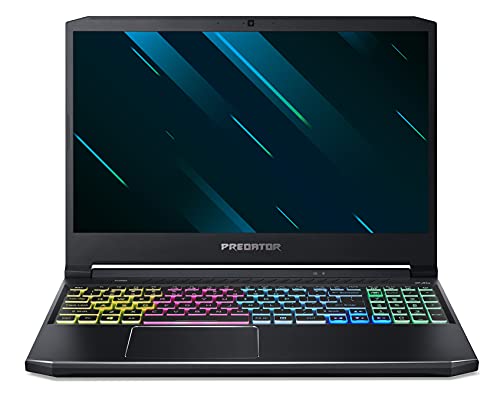
Acer Predator Helios 300 i7-10750H RTX 2060 15.6-inch 144Hz PH315-53-72XD

Acer Nitro 5 i5-10300H GTX 1650 Ti 8GB 256GB 15.6-inch 144Hz AN515-55-59KS

NIMO 15.6 Intel N150 8GB 256GB
A Deeper Look At The Lineup
The 14.2-inch MacBook Pro feels closer to a refined portable workstation than a conventional gaming machine. Its XDR display uses extreme dynamic range to preserve detail in bright and dark areas, while the 14-core M3 Pro GPU gives creative applications substantial graphics power. I favor it for video editing, photo work, and portable productivity.
Compared with the 15.6-inch NIMO R7-8745HS, this Apple offers a smaller footprint and a more vivid display, plus the claimed battery life of up to 22 hours. That battery figure varies with workload and configuration, and a strict 600-dollar ceiling may place this configuration beyond a typical gaming budget.
Good Reasons To Consider
- The 14.2-inch XDR screen supports 1,000 nits of sustained brightness for HDR content and 600 nits for standard dynamic-range material.
- Eighteen gigabytes of unified memory helps apps and editing timelines share one pool of memory.
- The M3 Pro includes a 14-core GPU suited to demanding creative workloads.
- A claimed battery life of up to 22 hours favors mobile work and long sessions away from an outlet.
- The compact 14.2-inch chassis is easier to carry than the 15.6-inch alternatives in this lineup.
Things To Weigh Up
- Game support depends on the individual title, so the favorite Windows releases deserve a compatibility check before purchase.
- The 512GB solid-state drive leaves less room than the 1TB NIMO configuration for large game libraries.
Quick Facts
Made For In Mind
Creative professionals, students, and travelers who value a compact screen and battery life benefit most from this configuration.
A Better Fit Elsewhere
Students focused on code, large project files, and Windows software may find the NIMO 15.6 R7-8745HS 32GB 1TB more practical.
Code, spreadsheets, and 4K timelines place more pressure on memory and processor capacity than a casual game ever will. The NIMO combines a 45-watt Ryzen 7 8745HS processor with 32GB of DDR5 memory and a 1TB solid-state drive, making it a persuasive workstation-style option for students and remote workers.
Its Radeon 780M graphics use integrated RDNA 3 architecture rather than a dedicated gaming card. That distinction matters for rendering, game settings, and sustained graphical workloads, so I would not position this as the strongest dedicated gaming choice in the group.
Notable Upsides
- Thirty-two gigabytes of 5,600MHz DDR5 memory supports heavy multitasking without relying on virtual memory for routine work.
- The 1TB solid-state drive provides useful room for project files, applications, and a moderate game library.
- Eight CPU cores and 16 threads benefit compilation, spreadsheet analysis, and video editing.
- The 15.6-inch Full HD panel gives project timelines and documents more room than the Apple display.
Honest Caveats
- Integrated Radeon 780M graphics offer less gaming headroom than the dedicated GTX and RTX options here.
- The 15.6-inch footprint is less convenient for train travel than the 14.2-inch MacBook Pro.
Who It Suits Best
Software developers, architecture students, and remote workers who regularly switch between demanding applications benefit most from the memory and storage allocation.
Where A Sibling Pick Shines
Competitive gamers who need stronger graphics and a high-refresh display may prefer the Acer Predator Helios 300 i7-9750H GTX 1660 Ti 15.6-inch 144Hz PH315-52-710B.
A fast display can make competitive games feel more responsive even before a graphics upgrade enters the conversation. This Predator pairs a 15.6-inch Full HD IPS panel with a 144Hz refresh rate, meaning the image can update 144 times per second for smooth movement in fast-paced titles.
Inside, the ninth-generation Core i7 and GTX 1660 Ti with 6GB of video memory create a recognizable gaming configuration. Compared with the newer RTX 2060 Predator, this model trades some graphics capability for a potentially more accessible purchase point.
The Practical Payoff
- The 144Hz panel and 3ms overdrive response suit competitive shooters and fast sports games.
- Six gigabytes of dedicated video memory provides a defined graphics pool for compatible games.
- Sixteen gigabytes of DDR4 memory handles gaming, background applications, and voice chat comfortably.
- The RGB-backlit keyboard adds visible controls for play in dim rooms.
Small Caveats
- The ninth-generation processor and GTX 1660 Ti lack the extra graphics headroom of the RTX 2060 configuration.
- A 512GB drive is modest for several modern titles, so storage expansion may become necessary.
Feature Snapshot
Right Fit For
Competitive gamers, students, and casual players who value a fast 15.6-inch screen benefit from this balanced Predator configuration.
Swap It Out When
Players who need stronger ray-tracing-era graphics may prefer the Acer Predator Helios 300 i7-10750H RTX 2060 15.6-inch 144Hz PH315-53-72XD.
The RTX 2060 gives this Predator a clear graphics advantage over the GTX 1660 Ti model, which makes it the stronger choice for rendering, demanding games, and creative work that benefits from dedicated hardware. The 10th-generation Core i7 also brings a newer processing platform than the earlier Helios configuration.
Both Predators use a 15.6-inch Full HD IPS display with a 144Hz refresh rate and 3ms response, so the major distinction sits inside the chassis. I see this model as a sensible middle ground for a gamer who wants dedicated graphics and expandable memory without moving to a larger chassis.
Notable Gains
- The RTX 2060 includes 6GB of dedicated video memory and a more capable graphics architecture than the GTX 1660 Ti option.
- Dual-channel 16GB DDR4 memory supports multitasking and gives the system two populated memory channels.
- The 144Hz IPS display remains well suited to competitive games, and the RGB keyboard improves visibility in dim settings.
Possible Compromises
- The 512GB NVMe drive may need expansion for a collection of large game files.
- The 15.6-inch chassis offers less portability than the 14.2-inch MacBook Pro.
Technical Reference
Who Should Grab It
Gamers who value dedicated graphics, high-refresh visuals, and 16GB of memory benefit most from this Predator.
Reach For A Different Pick When
Lightweight mobile work and creative productivity without intensive gaming suit the Apple 2023 MacBook Pro Laptop M3 Pro 18GB Unified Memory 512GB SSD Space Black.
The Nitro 5 keeps several important gaming elements in a straightforward package. Its 15.6-inch Full HD IPS screen runs at 144Hz, while the GTX 1650 Ti supplies 4GB of dedicated graphics memory and a backlit keyboard supports low-light play.
This is the leaner option beside the two Predator models. The 8GB of system memory and 256GB NVMe drive leave less room for modern games and background software, so I would treat the configuration as a starting point rather than a long-term library machine.
A Few Highlights
- The 144Hz IPS display offers a competitive advantage that remains visible even with a midrange graphics card.
- Wi-Fi 6 and a backlit keyboard add practical features for daily study, work, and gaming.
Trade Offs
- Eight gigabytes of RAM becomes restrictive when games, browsers, and communication apps run together.
- The 256GB solid-state drive offers little room after the operating system and several large games are installed.
- The GTX 1650 Ti has 4GB of video memory, which can constrain texture-heavy titles and newer releases.
Best Suited To
Budget-conscious students and casual players primarily interested in esports and lighter games will find the essential features useful.
Consider Something Else When
Players with a larger game library benefit more from the Acer Predator Helios 300 i7-9750H GTX 1660 Ti 15.6-inch 144Hz PH315-52-710B and its 16GB memory.
A classroom, homework desk, and video-call routine require very different hardware from a demanding game. This NIMO pairs a 15-watt Intel N150 processor with 8GB of memory and a 256GB solid-state drive, making it an inexpensive daily-use machine for documents, browsing, and remote classes.
I would not treat it as a serious gaming option. The integrated processor graphics favor general computing rather than sustained 3D rendering, and the limited memory and storage become noticeable once several browser tabs or large applications compete for resources.
Where It Delivers
- The 15.6-inch Full HD screen provides a practical work area for lessons, documents, and video calls.
- Windows 11 Home supports the familiar desktop software expected in school and office environments.
- The low-power Intel N150 processor is suited to routine tasks that rarely require heavy graphics performance.
Where It May Fall Short
- The integrated graphics and 8GB of memory make this configuration unsuitable for demanding games.
Core Details
Whose Shelf It Belongs On
Students, remote workers, and households needing a secondary laptop for browsing, documents, and calls benefit most from this configuration.
Look Elsewhere When
Regular gamers should move up to the Acer Nitro 5 i5-10300H GTX 1650 Ti 8GB 256GB 15.6-inch 144Hz AN515-55-59KS for dedicated graphics.
How To Match A 600-Budget Laptop To Real Games
Start With The Graphics
Dedicated graphics matter more than processor branding for most modern games. The GTX 1650 Ti, GTX 1660 Ti, and RTX 2060 each include their own video memory, while the NIMO R7-8745HS uses integrated Radeon 780M graphics and the NIMO N150 is built around basic processor graphics. I compare the target game’s recommended graphics settings before considering the rest of the hardware.
Give Memory And Storage Room
Sixteen gigabytes of RAM gives games and background applications more breathing room than 8GB, while 32GB is valuable for coding and creative software. Storage needs vary just as sharply. A 256GB drive fills quickly, whereas 512GB or 1TB leaves more room for installations, updates, and project files.
Check The Screen And Chassis
A 144Hz panel can make fast movement look smoother, although the underlying graphics card still determines the frame rates. A 15.6-inch display offers more room for games and documents, while a 14.2-inch chassis is easier to carry. I also consider keyboard lighting, wireless standards, and the games or programs that must run during travel.
Making More Sense Of The Specs
Mistakes Worth Dodging
A large screen does not automatically produce a better gaming experience, and a high refresh rate cannot compensate for insufficient graphics power. I would also avoid choosing on processor generation alone, since the dedicated graphics card and available video memory often influence game settings more directly.
What Separates Premium From Basic
Additional money may bring stronger dedicated graphics, more system memory, a faster display, or a larger SSD. Those upgrades matter most for demanding games, modern titles, and large project files, while lighter use can get by with a more basic configuration.
Frequently Asked Questions
Which Laptop Is Best For Gaming Around 600?
The Acer Predator Helios 300 i7-9750H GTX 1660 Ti 15.6-inch 144Hz PH315-52-710B offers the most balanced combination of dedicated graphics, memory, and a high-refresh display. The RTX 2060 Predator is the stronger alternative when the budget stretches further.
Is 8GB Of RAM Enough For Gaming?
Eight gigabytes can run lighter games, but it leaves little capacity for browsers, voice chat, and background applications. I favor 16GB for regular gaming and multitasking.
Should A 600-Dollar Gaming Laptop Have A 144Hz Screen?
A 144Hz display improves the smoothness of supported games, but graphics capability remains the deciding factor. A faster screen paired with an entry-level graphics card may still limit frame rates.
Is An SSD Necessary For Gaming?
A solid-state drive provides faster loading and transfers than a mechanical hard drive, making it the better choice for games and system responsiveness. Capacity also matters because modern titles can consume a large amount of space.
Are Integrated Graphics Good Enough For Gaming?
Integrated Radeon graphics can handle some lighter titles and everyday graphics tasks, but dedicated cards provide more consistent performance. Competitive or modern games generally benefit more from the GTX 1650 Ti, GTX 1660 Ti, or RTX 2060 options.
Final Verdict
I would choose the Acer Predator Helios 300 GTX 1660 Ti for balanced gaming, the RTX 2060 version for stronger graphics, and the NIMO R7-8745HS for demanding study and creative work. The NIMO N150 works best as a basic secondary computer rather than a gaming machine. Matching the laptop to the intended workload matters more than chasing a particular badge or processor number.
