
A college laptop has to handle notes, video calls, research, and late-night gaming without becoming a desk-bound brick. I focused on processor capability, memory, screen quality, portability, and practical connectivity, since no single specification covers every student’s schedule. The MALLRACE model stands apart for gaming, while the Apple MacBook Air options prioritize portability and the MELIUNA and NIMO machines target coursework efficiency. These options cover distinct needs, but most require a realistic understanding of what “gaming laptop” means in a college setting.
The Leading Options At A Glance

MALLRACE 2026 AMD Gaming Laptop Ryzen 7 5700U 16GB RAM 512GB NVMe SSD Radeon 15.6-inch
MELIUNA 15.6-inch AI Laptop
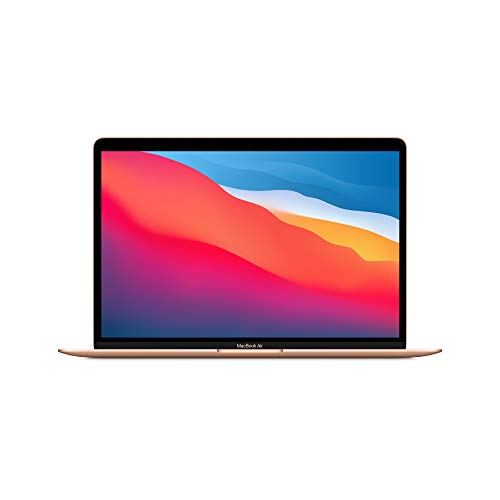
Apple 2020 MacBook Air M1 13-inch Retina 8GB RAM 256GB SSD Gold Backlit Touch ID

NIMO 15.6-inch IPS FHD Laptop Intel N150 16GB RAM 256GB SSD Fingerprint

Apple MacBook Air M1 13-inch 8GB Renewed

NIMO 15.6-inch Copilot AI Laptop
The Strengths Of Each Pick
Among these six machines, the MALLRACE 2026 AMD Gaming Laptop is the one explicitly designed around gaming and demanding coursework. Its Ryzen 7 5700U has eight cores and 16 threads, while Radeon graphics keep the gaming emphasis clear without adding a separate desktop tower. For a student balancing lectures, browser research, and evening play, that combination feels more purposeful than a basic study machine.
The 16GB of dual-channel DDR4 memory gives applications and browser tabs more room to coexist, while the 512GB NVMe drive provides fast local storage. Compared with the MELIUNA 15.6-inch AI Laptop, this model offers considerably more processor headroom, although a demanding modern game may still require reduced settings because Radeon graphics are integrated rather than a separate gaming card.
What Pays Off
- The eight-core Ryzen 7 5700U provides a more convincing balance for coursework, multitasking, and lighter games.
- Sixteen gigabytes of dual-channel DDR4 RAM helps keep lecture software, notes, and multiple browser tabs responsive.
- The 512GB M.2 NVMe SSD uses fast flash storage, and the listed configuration supports expansion up to 2TB.
- The 15.6-inch 1920 x 1080 display offers a useful full-size canvas for classes, documents, and entertainment.
- Wi-Fi 6, a backlit keyboard, HDMI, two USB 3.2 ports, a full-function Type-C port, and an audio jack cover common dorm and classroom needs.
Trade Offs
- Radeon integrated graphics are less suitable for demanding recent games than the hardware in a dedicated gaming notebook.
- The listed battery runtime of up to eight hours will vary with gaming load, screen brightness, and Wi-Fi use.
Key Specs
Built With In Mind
This model suits students who want meaningful gaming capability alongside full-time college coursework and regular travel between classes.
Another Choice May Suit
The Apple 2020 MacBook Air M1 13-inch Retina 8GB RAM 256GB SSD Gold Backlit Touch ID better serves students who value a compact macOS machine and strong battery endurance over gaming performance.
The MELIUNA 15.6-inch AI Laptop makes more sense for a lecture-heavy schedule than for demanding games. Its Celeron J4105 processor handles the routine work associated with Office 365, browsing, note-taking, and online classes, while 12GB of DDR4 memory is more comfortable than the 8GB found in two other picks. That makes it a plausible study companion for students whose gaming expectations are modest.
Built-in AI features, meaning software assistance for writing, summarizing, and task organization, complement the Office 365 subscription. I would also appreciate the 180-degree hinge during a group presentation, because the display can lie flat for sharing. The Celeron probably becomes the limiting factor in demanding games, but most of this machine’s strengths are aimed at finishing coursework efficiently.
What Works In Its Favor
- Twelve gigabytes of DDR4 memory offers a useful buffer for Office applications and numerous browser tabs.
- The 7000mAh battery and low-power processor target long classes, study sessions, and meetings away from an outlet.
- USB 3.2, Type-C, Mini HDMI, 5G Wi-Fi, Bluetooth 4.2, and a 3.5mm audio jack provide practical connectivity.
Points To Note
- The Celeron J4105 is aimed at everyday productivity rather than processor-intensive games.
- The 256GB SSD may become tight once large project files, course software, and downloaded media are stored.
- The 15.6-inch IPS panel offers wide viewing angles, but the laptop is less compact than the 13-inch Apple MacBook Air options.
Right Fit
This laptop fits office-heavy college students who mainly need documents, web research, Office 365, and video calls with modest gaming expectations.
Where A Sibling Pick Shines
The MALLRACE 2026 AMD Gaming Laptop Ryzen 7 5700U 16GB RAM 512GB NVMe SSD Radeon 15.6-inch is a better fit for students whose games require substantially more processing power.
The Apple 2020 MacBook Air M1 13-inch Retina 8GB RAM 256GB SSD Gold Backlit Touch ID shifts the emphasis from gaming to portability and macOS efficiency. Its 13.3-inch Retina display, 8-core M1 processor, and listed battery runtime of up to 18 hours suit a student moving between lectures, libraries, and long study sessions. For a Mac user, that combination remains pleasantly simple to carry.
The M1’s unified memory, a shared architecture that lets the processor and graphics access the same pool of memory, helps keep the system responsive. Touch ID provides convenient sign-in, while the backlit keyboard supports late-night work. Gaming is the compromise, since 8GB of shared memory and M1-integrated graphics may constrain recent titles with demanding graphics settings.
Useful Strengths
- The eight-core M1 chip provides efficient performance for writing, browsing, media, and general creative work.
- The 13.3-inch Retina display delivers sharp text and a compact viewing area for classes and documents.
- Backlit keys, Touch ID, and a FaceTime HD camera support everyday mobile use.
- Compatibility with iPhone and iPad creates a smoother setup for students already invested in Apple devices.
Where It May Fall Short
- Eight gigabytes of unified memory may be tight when running a demanding game alongside several heavy applications.
- The 256GB SSD offers limited room for a large media library or an extensive collection of course projects.
Essential Details
Who Will Love This
Apple users who carry a laptop between classes appreciate the compact body, sharp display, and efficient M1 platform for everyday college work.
Swap It Out When
The NIMO 15.6-inch IPS FHD Laptop Intel N150 16GB RAM 256GB SSD Fingerprint better serves Windows-focused students who need more RAM and a larger screen.
The NIMO 15.6-inch IPS FHD Laptop Intel N150 16GB RAM 256GB SSD Fingerprint offers more memory than the Apple models without adopting a gaming-focused specification. Its Intel Twin Lake N150 is a four-core processor designed around efficient daily computing, and 16GB of RAM gives browser-heavy students useful breathing room. For lectures, writing, and routine applications, that balance looks sensible.
The IPS panel, which provides wide viewing angles, suits shared tables and dorm rooms, while the backlit keyboard helps during late-night study. A 53.58Wh battery supports mobile use, and the fingerprint reader provides a convenient way to unlock the machine. Compared with the NIMO 15.6-inch Copilot AI Laptop, this version is the more practical pick whenever several applications need to remain open together.
Noteworthy Benefits
- Sixteen gigabytes of RAM is the most generous memory configuration among the NIMO alternatives in this roundup.
- The four-core Intel N150 uses a 15W low-power design suited to quiet study and office use.
- A 15.6-inch 1920 x 1080 IPS display offers more workspace than a compact 13-inch notebook.
- The backlit keyboard and fingerprint reader are useful additions for daily campus use.
- The 53.58Wh battery balances portability with a larger 15.6-inch screen.
Practical Considerations
- The N150 is a basic-efficiency processor and not a strong choice for demanding modern games.
- The 256GB SSD may need expansion as course materials and media accumulate.
- A student should confirm access to a compatible 65W USB-C charging setup for the most convenient daily use.
Quick Facts
Made For In Mind
Course-heavy students who want a roomy Windows display, ample memory, and a practical typing experience fit well with this NIMO.
Reach For A Different Pick When
The MALLRACE 2026 AMD Gaming Laptop Ryzen 7 5700U 16GB RAM 512GB NVMe SSD Radeon 15.6-inch suits players who need substantially stronger processor performance.
The renewed Apple MacBook Air M1 13-inch 8GB Renewed brings the familiar M1 platform to a more cost-conscious route, but condition deserves careful attention. The machine is described as professionally inspected and cleaned, with no visible cosmetic flaws when viewed from arm’s length. Its battery is specified to retain more than 80% of its original capacity, which is useful context for a portable college computer.
The 13-inch form factor, M1 processor, 8GB unified memory, and 256GB SSD closely reflect the standard MacBook Air experience, including its suitability for writing, browsing, and light games. I would favor this version mainly for everyday coursework rather than intensive gaming. Included accessories may not be original, so a student with specific charger or adapter requirements should check the listing before committing.
Where It Helps
- Professional inspection and cleaning support the renewed condition described in the listing.
- The battery retains more than 80% of its capacity relative to a new unit.
- The M1 chip and compact 13-inch body remain useful for writing, browsing, media, and light games.
Less Ideal Details
- The renewed status introduces more variation in physical condition and accessory inclusion than a new configuration.
- Eight gigabytes of unified memory and 256GB of storage remain modest for modern games and large project collections.
Made For In Mind
Cost-conscious students already comfortable with macOS and a compact Apple notebook will find this renewed configuration easier to justify.
A Better Fit Elsewhere
The NIMO 15.6-inch IPS FHD Laptop Intel N150 16GB RAM 256GB SSD Fingerprint better serves students who prefer Windows, more memory, and a larger display.
The NIMO 15.6-inch Copilot AI Laptop is built for uncomplicated daily computing rather than gaming. Its Intel Twin Lake N150 uses a four-core, 15W design, and the 8GB of memory is intended for applications such as browsing, video calls, and Windows 11 tasks. In a quiet dorm or library, that low-power approach may be more valuable than extra graphics capability.
The 15.6-inch full HD display provides comfortable room for shared documents and online classes, while Copilot adds another route to on-device study assistance. Compared with the NIMO 15.6-inch IPS FHD Laptop Intel N150 16GB RAM 256GB SSD Fingerprint, this model has less memory and omits the listed fingerprint reader, backlit keyboard, and larger 53.58Wh battery. I would choose it mainly for simple, affordable productivity.
A Strong Showing
- The low-power four-core N150 supports everyday browser, document, and video-call workloads without a gaming-focused design.
- Windows 11 Home provides the familiar desktop environment expected by many college courses.
- The 15.6-inch full HD display offers useful space for lectures, research, and shared worksheets.
- Copilot adds built-in AI assistance within the stated software environment.
Points To Keep In Mind
- The Intel N150 is not well suited to demanding games or heavy creative workloads.
- Eight gigabytes of RAM and 256GB of storage place clear limits on multitasking and file accumulation.
Core Details
The Right Fit
Students seeking a straightforward Windows machine for note-taking, browsing, and video calls will find this configuration easy to work with.
Look Elsewhere When
The MALLRACE 2026 AMD Gaming Laptop Ryzen 7 5700U 16GB RAM 512GB NVMe SSD Radeon 15.6-inch better serves students who expect gaming to be a substantial part of the experience.
What Matters Most for a College Gaming Computer
Start With the Actual Workload
I would begin by separating coursework from gaming. Ryzen 7 5700U hardware gives the MALLRACE model more headroom for processor-heavy games, while Celeron J4105 and Intel N150 configurations suit documents, browsing, and video calls. Students playing competitive or graphically demanding titles need to account for graphics capability as well as the processor.
Match Memory and Storage to Coursework
Sixteen gigabytes of RAM provides a comfortable buffer for research, browser tabs, and office applications, especially in the MALLRACE and NIMO 15.6-inch IPS FHD models. Eight gigabytes can handle standard college work, but shared memory on the MacBook Air may become tight during gaming and heavier multitasking. A 256GB drive also calls for regular attention to downloaded files and large course materials.
Check the Screen, Ports, and Battery
A 15.6-inch full HD display feels more spacious during long notes, while the 13-inch MacBook Air is easier to carry between buildings. USB-A, HDMI, Type-C, and audio connections affect which accessories work smoothly, and Wi-Fi 6 can take advantage of a compatible campus or home router. Battery claims provide a useful baseline, although screen brightness, video calls, and gaming workloads change the result.
Avoiding Costly College Laptop Mistakes
Common Shopping Slip Ups
The most common mistake is treating every “gaming” label as equivalent. Processor and graphics capability matter more than RGB styling or a broad product description. I also avoid assuming that 8GB of memory is sufficient for years of heavy browsing, nor choosing a compact model without considering screen comfort during long lectures.
What Separates Premium From Basic
Higher-tier configurations add stronger processors, more memory, larger storage, or dedicated graphics. That extra capability matters for demanding games, creative projects, and heavy multitasking, but it is unnecessary for basic courseware. The M1 MacBook Air and Ryzen-based MALLRACE cover different upgrade paths, so the better choice depends on whether portability or gaming takes priority.
Frequently Asked Questions
Is the Ryzen 7 5700U Good Enough for College Gaming?
The Ryzen 7 5700U is well suited to coursework, multitasking, and lighter games. Its Radeon graphics are less capable than dedicated gaming hardware, so demanding recent titles may require lower settings. It remains the strongest processor-based option in this roundup.
Is the M1 MacBook Air Good for College Gaming?
The M1 MacBook Air handles everyday college work, older games, and less demanding titles well. Its 8GB shared memory and integrated graphics limit some modern games. Students primarily interested in macOS portability will find that balance useful.
Does 8GB of RAM Matter for College?
Eight gigabytes works for standard documents, browsing, and video calls, though numerous tabs and heavier applications can consume it quickly. Sixteen gigabytes offers more headroom for long study sessions. The MALLRACE and NIMO 15.6-inch IPS FHD models provide that larger memory allowance.
Are the NIMO Laptops Suitable for Gaming?
The NIMO configurations are better suited to browsing, Office 365, lectures, and video calls than demanding games. The Intel N150 prioritizes efficiency rather than graphics performance. They work well as study computers, with the 16GB NIMO model offering the stronger multitasking setup.
Should a College Student Consider a Renewed MacBook Air?
A renewed M1 MacBook Air can make sense for a cost-conscious student who values portability and macOS. The renewed condition, battery capacity, and included accessories deserve careful review before purchase. It is less attractive for someone expecting a new exterior, specific accessories, or heavy gaming.
Wrap Up
I would choose the MALLRACE model for the strongest gaming-focused configuration, while the M1 MacBook Air fits portable Apple-oriented study. The 16GB NIMO laptop serves Windows students who value memory and screen space, and the MELIUNA option makes sense for office-heavy schedules. The right choice depends less on the “gaming” label than on the software, classes, and games that will fill each week.
