
Choosing among I7 6700t Processors gets tricky because socket compatibility matters more than a familiar model name. You need to match the chip to your motherboard, memory type, workload, and cooling setup before replacing an older desktop CPU. This shortlist includes the i7-6700T itself, compatible refurbished options, newer 12th and 13th generation alternatives, and a complete Lenovo mini desktop for tight workspaces. You’ll find suitable choices for office multitasking, home media, light creative work, repairs, and compact desktop setups.
The Shortlist At A Glance

Intel Core i7-12700 Desktop Processor

Intel Core i7-7700 Desktop Processor (Renewed)
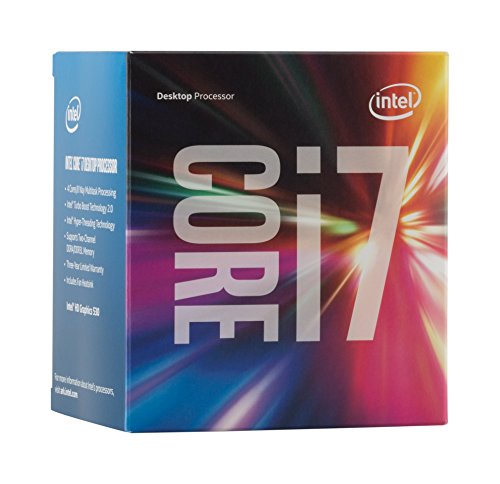
Intel Core i7-6700 Processor BX80662I76700 (Renewed)

Intel Core i7-13700 Desktop Processor

Intel Core i7-6700T 2.8GHz Tray CPU

Lenovo ThinkCentre M910Q Tiny Desktop i7-6700T 32GB 1TB SSD

Intel Core i7-6700T Desktop Processor (Renewed)
More Details On Our Top Picks
For a modern desktop that handles office work, gaming, photo editing, and heavy multitasking, the Intel Core i7-12700 gives you a substantial step beyond the older i7-6700T choices here. Its 12th generation platform supports DDR4 or DDR5 memory, while PCIe 4.0 and PCIe 5.0 support gives newer storage and graphics hardware room to grow.
Turbo Boost Max Technology 3.0 raises clock speed for demanding bursts, and the included Intel Laminar RM1 cooler simplifies a standard installation. You’ll need an Intel 600-series chipset motherboard, so this isn’t a drop-in answer for an older LGA 1151 system. For most home workstations, the mix of compatibility options and processing capacity feels sensibly balanced.
Strong Points
- DDR4 and DDR5 support gives you more motherboard and memory choices.
- PCIe 4.0 and 5.0 support suits newer graphics cards and storage devices.
- The included RM1 cooler can reduce the number of separate installation parts.
- 65 W base power suits many conventional desktop builds.
- High boost speed helps applications that rely on quick bursts of processing.
Things To Consider
- Its 600-series motherboard requirement makes it unsuitable for direct i7-6700T replacement work.
- The included cooler keeps setup straightforward, though demanding sustained workloads may lead you toward a more substantial cooling solution.
Key Specs
Who It Suits Best
You’ll get the most from this processor in a new productivity, gaming, or creative desktop using an Intel 600-series motherboard.
Consider Something Else When
Choose the Intel Core i7-6700 Processor BX80662I76700 (Renewed) for a repair involving an existing Intel 100-series board.
Older office towers and home desktops can still benefit from a four-core, eight-thread processor, especially for browsing, document work, streaming, and light photo tasks. The Intel Core i7-7700 fits LGA 1151 boards built around Intel 100- or 200-series chipsets, making motherboard identification the first task before installation.
Integrated Intel UHD Graphics 630 lets you run a display without a separate graphics card, which is handy for a basic office rebuild. You may find its four-core design less comfortable for current heavy rendering than the i7-12700, but it remains a sensible platform-matched replacement for compatible systems.
What We Like
- Four cores and eight threads support common multitasking without requiring a new platform.
- UHD Graphics 630 can handle everyday display duties in a basic desktop.
- Support for DDR4-2133/2400 or DDR3L memory helps with some legacy builds.
Worth Noting
- Compatibility is restricted to Intel 100- and 200-series chipset boards.
- A renewed CPU may require careful inspection of contact pads and packaging during installation.
- Its older four-core layout offers less room for demanding future software.
Feature Snapshot
Made For
You’re a strong match for this option with a compatible 100- or 200-series desktop that needs a straightforward processor replacement.
Not Your Match When
The Intel Core i7-12700 Desktop Processor suits you better for a new build with current expansion and memory standards.
That familiar 6th generation platform makes the Intel Core i7-6700 a useful option for restoring an older desktop without replacing every internal component. It supports Intel 100-series chipset motherboards and works with either DDR4 or DDR3L memory, depending on the board.
Turbo Boost helps the four-core processor respond to short bursts, while integrated graphics support resolutions up to 4096×2304. Compared with the i7-7700, this model is a little older and slower, yet its broader listed memory flexibility may help during a mixed-parts repair. The honest trade-off is the age of the platform, not the basic fit for office work.
Highlights
- DDR4 and DDR3L support can simplify upgrades around existing memory.
- Integrated graphics support a high-resolution display setup without a separate graphics card.
- Turbo Boost adds responsiveness during short demanding tasks.
- Its LGA 1151 interface matches many 6th-generation desktop repairs.
Trade Offs
- Only Intel 100-series chipset compatibility is specified, so board matching matters closely.
- Renewed hardware deserves careful installation and fresh thermal paste during a rebuild.
Technical Sheet
Right Fit For
You’ll appreciate this choice for a home or office desktop repair involving an Intel 100-series motherboard and existing DDR3L or DDR4 memory.
Look Elsewhere When
Reach for the Intel Core i7-7700 Desktop Processor (Renewed) for a compatible 100- or 200-series system where higher listed turbo speed matters.
Sixteen cores divide into eight performance cores and eight efficiency cores, a hybrid arrangement that gives the Intel Core i7-13700 considerable capacity for video work, code builds, large spreadsheets, and gaming alongside background tasks. You also get 24 threads, which helps software divide compatible workloads across the processor.
Its 30 MB cache and boost speed up to 5.2 GHz place it well above the older i7-6700T options for demanding desktops. Integrated UHD Graphics 770 handles display output, while support for Intel 600- and 700-series boards leaves some platform flexibility. You may need to plan cooling and motherboard firmware carefully for a high-load workstation, so this choice makes less sense for a basic office tower.
Upsides
- 16 cores and 24 threads suit intensive multitasking and content creation.
- Hybrid core design assigns demanding and lighter tasks across different core types.
- UHD Graphics 770 supports display output without a separate graphics card.
- DDR4 and DDR5 support gives new-build flexibility.
- PCIe 4.0 and 5.0 support accommodates newer expansion hardware.
Minor Gripes
- This level of processing capacity can be unnecessary for email, documents, and basic browsing.
- Long rendering sessions may call for more cooling attention than a compact older desktop provides.
- Motherboard compatibility still requires an Intel 600- or 700-series chipset platform.
Core Details
Who Will Love This
You’re best served by this processor for demanding creative, development, gaming, or workstation tasks on a compatible modern desktop platform.
A Better Fit Elsewhere
The Intel Core i7-12700 Desktop Processor is a better fit for you when strong multitasking matters but your workload doesn’t justify this higher core count.
The Intel Core i7-6700T targets compact desktops and low-power system designs that still use the LGA 1151 socket. Its Skylake four-core layout, 8 MB L3 cache, and 65 W rating make it a practical match for office work, media playback, and light multitasking in a small enclosure.
Unlike the newer i7-12700, this tray CPU belongs to an older platform and provides less processing headroom. The tray format also means you should confirm what cooling hardware your system already uses before installation. For a small business PC or home server-style desktop, that restrained design may be exactly the point.
Plus Points
- 65 W power rating suits many compact desktop designs.
- Four Skylake cores handle everyday productivity and media tasks.
- 8 MB L3 cache supports repeated access to commonly used data.
- LGA 1151 fit makes it relevant to specific older system upgrades.
Room For Improvement
- Tray packaging means you should confirm cooler and installation accessories before opening the system.
- Its older four-core architecture is less suitable for heavy modern rendering.
- Compatibility depends on the exact LGA 1151 motherboard and firmware combination.
At A Glance
Best Suited To
You’ll find the right fit here for a compact LGA 1151 desktop where power-conscious operation and a tray replacement matter.
Swap It Out When
The Lenovo ThinkCentre M910Q Tiny Desktop i7-6700T 32GB 1TB SSD suits you more when you need a complete ready-to-use compact computer rather than a CPU alone.
A processor upgrade only helps once you have a compatible computer around it, and this Lenovo bundles the i7-6700T into a tiny desktop package. You get 32 GB of RAM, a 1 TB SSD, integrated graphics, Wi-Fi, Bluetooth, and Windows 11 Pro, so a small office desk can gain a complete workstation without a separate tower.
The SSD, which uses flash storage rather than a spinning disk, should make everyday startup and file access feel more direct than older hard-drive setups. Compared with the standalone tray CPUs, this option is much easier for you to place in a cramped workspace, though compact hardware can leave less room for internal expansion. Depending on your workload, the older four-core processor may be the limiting factor before the generous memory capacity is.
Bright Spots
- 32 GB RAM supports browser-heavy office work and broad multitasking.
- 1 TB SSD provides substantial built-in file storage and quick access.
- Tiny form factor works well on crowded desks and reception counters.
- Wi-Fi and Bluetooth reduce the need for extra connectivity adapters.
- Windows 11 Pro arrives ready for business-oriented desktop use.
Points To Note
- Integrated graphics and the older i7-6700T are not aimed at demanding modern gaming.
- Small enclosures can make cleaning and internal upgrades more involved than tower maintenance.
Feature Rundown
Whose Shelf It Belongs On
You’ll benefit most from this mini desktop in a small office, study, counter workstation, or home setup that needs a complete computer.
Reach For A Different Pick When
The Intel Core i7-13700 Desktop Processor is a stronger fit for you when intensive creation work or substantial parallel processing matters more than compact size.
For a targeted LGA 1151 repair, this renewed Intel Core i7-6700T keeps the focus on the processor itself. The four-core Skylake chip runs at 2.8 GHz and can reach 3.6 GHz through Turbo Boost, giving an older office or compact desktop a useful replacement path.
Its OEM tray format makes the listing details especially worth checking because cooling hardware and other installation parts aren’t the focus of the package. Compared with the i7-6700T tray CPU above, this listing presents a renewed replacement route rather than a new tray designation. You may prefer that simplicity for a repair bench, provided the motherboard, cooler, and socket all line up.
Best Bits
- 2.8 GHz base speed and 3.6 GHz Turbo Boost suit everyday desktop work.
- Four Skylake cores match the requirements of many older LGA 1151 systems.
- Renewed availability can help extend the useful life of an existing computer.
Small Caveats
- OEM tray presentation means you should confirm the cooler and thermal materials needed for installation.
- Older platform limits expansion compared with the i7-12700 and i7-13700.
- Inspecting the processor and cleaning the cooler during installation is sensible for refurbished hardware.
Quick Facts
Who Should Grab It
You’re a good match for this processor when you’re restoring an older LGA 1151 desktop and already understand the required cooler and motherboard fit.
Where A Sibling Pick Shines
The Lenovo ThinkCentre M910Q Tiny Desktop i7-6700T 32GB 1TB SSD is better suited to you when a complete compact computer matters more than a component-only repair.
How To Choose The Right I7 6700t Processors
Start With The Motherboard
Socket type describes the physical connection between the processor and motherboard, but it doesn’t tell the whole compatibility story. The i7-6700 and i7-6700T require LGA 1151 systems tied to specific Intel chipset generations, while the i7-12700 and i7-13700 belong to newer platforms. Check the motherboard model, chipset, firmware support, and memory standard before you choose a replacement.
Match Cores To Your Workload
Four cores remain suitable for documents, web apps, media playback, and light multitasking. Video editing, software development, large spreadsheets, and simultaneous background tasks benefit from the higher core and thread counts in the i7-12700 and i7-13700. For a family computer, the older chips can make sense; for a workstation that earns its keep through demanding software, newer architecture gives you more breathing room.
Plan Cooling And The Case
A CPU’s power rating helps you plan heat management, but the case still controls airflow, cooler clearance, and cleaning access. The 65 W i7-6700T suits compact designs, while a newer high-capacity desktop processor deserves careful cooler and motherboard planning during sustained workloads. Tray and OEM formats also deserve extra attention because the package may not include every installation accessory you expect.
Decide Between A Chip And A Complete PC
A standalone processor works best for you when you already have a compatible case, board, memory, storage, and power supply. The Lenovo ThinkCentre M910Q bundles the i7-6700T with 32 GB RAM, a 1 TB SSD, wireless connectivity, and Windows 11 Pro, reducing the number of separate parts to source. That convenience matters in a home office or small business, while a component-only choice gives you more control over the final build.
Things Worth Knowing First
Mistakes Worth Dodging
A familiar “i7” label doesn’t confirm compatibility. Match the exact socket, chipset family, memory type, and motherboard firmware before removing the old chip. You should also account for cooler fit, thermal paste, case airflow, and the tray format, especially with the i7-6700T listings.
Refurbished processors deserve careful visual inspection around the contact area and a clean installation surface. Keep the old CPU safely stored until the replacement boots and the system recognizes its memory and display output.
The Upgrade Payoff
Higher-tier processors cost more because newer designs add cores, threads, cache, faster interfaces, and broader memory support. The i7-13700 makes the most sense for sustained creative or development work, while the i7-12700 gives you a more moderate modern-platform step.
Paying more makes less sense for a basic office tower or an older LGA 1151 repair. In those cases, a correctly matched i7-6700, i7-6700T, or i7-7700 can solve the actual problem without forcing a complete platform change.
Final Verdict
You should start with compatibility, not the model number. The i7-6700T options fit targeted LGA 1151 repairs and compact systems, while the i7-12700 and i7-13700 suit newer desktops with more demanding workloads. The Lenovo ThinkCentre M910Q makes the simplest route to a complete small computer, especially with its 32 GB RAM and 1 TB SSD. Match the processor to your motherboard, cooling, memory, and daily software, and your choice becomes much clearer. A careful platform match is worth more than extra capability you won’t use.
