
Choosing an I9 for gaming gets complicated once you compare a standalone processor with a ready-to-use desktop or laptop. You need to match processing power with graphics hardware, cooling, storage, display quality, and the space available for your setup. This shortlist covers upgrade-friendly CPUs, complete gaming systems, and a portable option for gaming away from your desk. You’ll find practical fits for competitive play, demanding single-player titles, streaming, creative workloads, and everyday multitasking.
The Shortlist At A Glance
Intel Core i9-14900K Desktop Processor

Intel Core i9-14900KF Gaming Desktop Processor

MSI Katana 15 HX Gaming Laptop
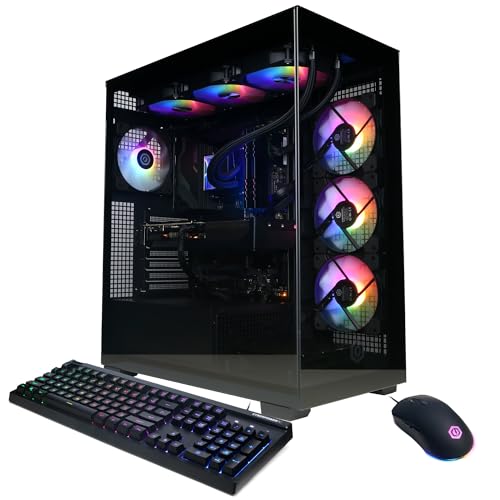
CyberPowerPC Gamer Xtreme VR Gaming PC

Suevery Prebuilt Gaming PC Core i9 RTX 5060 Ti
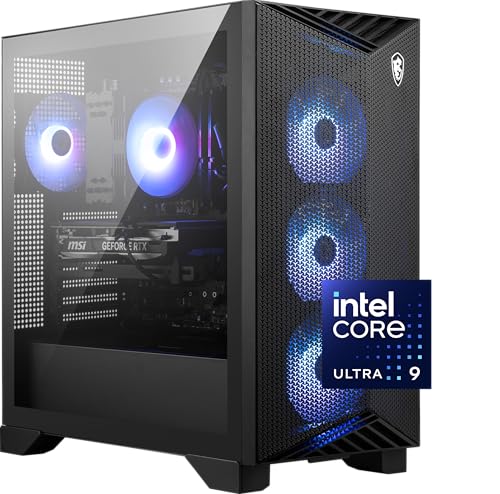
MSI Aegis R2 AI Gaming Desktop

The Horizon Autherium Dragon RGB i9 Gaming PC
More Details On Our Top Picks
Custom desktop builders get a flexible foundation here: 24 cores split between 8 performance cores and 16 efficiency cores, with speeds reaching 6.0 GHz. Performance cores handle demanding game tasks, while efficiency cores help with background work such as voice chat, recording, and browser tabs.
The unlocked design suits enthusiasts who want tuning control, though you’ll need a compatible motherboard and serious cooling planning. Compared with the i9-14900KF, this version makes more sense for a build that needs processor graphics available as a fallback. For most gaming towers, that extra flexibility is useful during troubleshooting.
Strong Points
- Twenty-four cores support gaming alongside streaming and creative software.
- Up to 6.0 GHz gives demanding games strong single-threaded headroom.
- The unlocked design gives experienced PC builders room to tune performance.
- Compatibility with Intel 600 and 700 series chipsets broadens motherboard choices.
Things To Consider
- A 125 W base power rating calls for careful cooler and airflow selection.
- Manual tuning adds setup work and can complicate troubleshooting for beginners.
Key Specs
Who It Suits Best
Experienced desktop builders creating a powerful gaming and content-creation system will get the most from this processor.
Consider Something Else When
Choose the CyberPowerPC Gamer Xtreme VR Gaming PC when you want a complete tower with graphics, memory, storage, and operating system already included.
For a gaming build paired with a dedicated graphics card, the i9-14900KF keeps the focus on CPU output. Its 24-core, 32-thread design and boost speed up to 6.0 GHz suit high-refresh gaming, live streaming, and heavy multitasking without moving to a different platform.
The key distinction from the i9-14900K is the absence of integrated graphics. That isn’t a concern in a system built around a discrete GPU, but it removes a convenient diagnostic fallback. Depending on your motherboard and cooler, installation may also involve a BIOS check and careful heat management.
What We Like
- Thirty-two threads help with streaming, rendering, and game capture.
- Support for DDR4 or DDR5 memory gives you more platform flexibility.
- PCIe 4.0 and 5.0 support leaves room for newer storage and expansion hardware.
Worth Noting
- No integrated graphics means a discrete graphics card is required for display output.
- High-end cooling and a compatible LGA1700 board add to build complexity.
- You may find the extra cores unnecessary for a basic gaming-only setup.
Feature Snapshot
Made For
Enthusiast gamers assembling a dedicated-GPU desktop with serious multitasking demands are the natural fit.
Not Your Match When
The MSI Aegis R2 AI Gaming Desktop suits you better when you want newer-platform hardware in a complete, assembled tower.
Desktop-level component choices aren’t your only route to an i9 gaming setup. The MSI Katana 15 HX combines an i9-14900HX processor with an RTX 5070, 32GB of DDR5 memory, and a 1TB NVMe solid-state drive, giving you a portable system for dorm rooms, travel, or shared spaces.
The 15.6-inch QHD+ panel uses a 165Hz refresh rate, which means it can show more motion updates per second than a standard 60Hz screen. That helps fast games feel clearer, though the sharper resolution also asks more from the graphics hardware. You’ll want access to wall power during long sessions, and the compact chassis leaves less upgrade freedom than a desktop.
Highlights
- QHD+ resolution gives fine game details more definition than a typical Full HD panel.
- A 165Hz refresh rate suits competitive games with rapid camera movement.
- Thirty-two gigabytes of DDR5 memory supports gaming, streaming, and heavy browser use.
- The 1TB NVMe drive provides quick access to games and applications.
- RGB keyboard lighting adds useful visibility for evening play.
Trade Offs
- Laptop cooling and battery limits make long unplugged gaming sessions a poor fit.
- Its 1TB drive can fill quickly after installing several large modern games.
Technical Sheet
Right Fit For
Students, commuters, and gamers who need strong performance in a transportable 15.6-inch format will appreciate this layout.
Look Elsewhere When
The Horizon Autherium Dragon RGB i9 Gaming PC fits you better when desk space is permanent and abundant storage matters more than portability.
A complete tower can save you from matching a processor, motherboard, graphics card, memory kit, and storage drive yourself. CyberPowerPC pairs the i9-14900KF with an RTX 5070 12GB, 32GB DDR5, a 2TB PCIe 4.0 NVMe SSD, and Windows 11 Home, so you get a balanced starting point for a dedicated gaming desk.
The liquid-cooled CPU, tempered side panel, custom lighting, keyboard, and mouse give the system a finished feel beside the more hands-on Intel processor picks. Six display outputs are provided through HDMI and DisplayPort connections, while WiFi 5, Bluetooth 4.2, and broad USB connectivity support a busy setup. The honest trade-off is a larger, less portable footprint than the MSI Katana 15 HX.
Upsides
- The 2TB NVMe SSD gives you more room for a substantial game library.
- Liquid CPU cooling supports a high-output processor in a preassembled system.
- Multiple USB-C and USB-A ports simplify connections for controllers and accessories.
- Keyboard and mouse help you start using the tower without gathering every peripheral first.
- The tempered side panel and RGB lighting suit visible desk setups.
Minor Gripes
- Liquid cooling can require more attention during cleaning than a basic air cooler.
- WiFi 5 and Bluetooth 4.2 are older connectivity standards than newer desktop options.
- The i9-14900KF still needs the dedicated RTX card for display output.
Quick Facts
Best Suited To
Desktop gamers who want strong components assembled into one ready-to-use system will find the clearest fit here.
A Better Fit Elsewhere
The Intel Core i9-14900K Desktop Processor is better for you when you already own a suitable graphics card and prefer to design every part of the tower.
For a first desktop, the Suevery bundle keeps the parts list straightforward: a 14th-generation 14900HX processor, RTX 5060 Ti 8GB graphics, 16GB DDR5 memory, and a 1TB NVMe SSD. That combination targets everyday gaming and general desktop work without the larger memory and storage allocation found in the CyberPowerPC tower.
You may find 16GB enough for gaming, voice chat, and ordinary multitasking, while the 1TB drive gives you a manageable starting library. The smaller allocation also makes future upgrades more likely as game installs grow. Set-up assistance and coverage for power-surge damage are useful ownership considerations, though you should confirm the exact terms shown with the listing.
Bright Spots
- The prebuilt format removes most component-matching work for new desktop owners.
- RTX 5060 Ti graphics provide dedicated rendering hardware for current games.
- An NVMe SSD helps the operating system and installed games feel responsive.
Room For Improvement
- 16GB of memory gives you less headroom than the 32GB systems in this shortlist.
- The 1TB drive may need expansion sooner for a large game collection.
- Less source detail is available about the case and cooling layout, so check the listing carefully before installation.
Details At A Glance
Who Will Love This
New desktop owners who want a straightforward gaming tower for school, home use, and regular play are the strongest match.
Another Choice May Suit
The CyberPowerPC Gamer Xtreme VR Gaming PC suits you more when you want 32GB memory, 2TB storage, and stronger graphics in the same general desktop format.
The Aegis R2 takes a newer direction than the 14th-generation desktops above, using an Intel Core Ultra 9 285 processor with an RTX 5070 Ti, 32GB DDR5, and a 2TB M.2 NVMe SSD. An M.2 NVMe drive is a compact solid-state storage module that connects directly to the motherboard, helping keep the interior tidy while providing quick access to games.
Air cooling keeps the design mechanically simpler than CyberPowerPC’s liquid-cooled tower, which can make routine dust removal less involved. The RTX 5070 Ti and 32GB memory fit demanding gaming and creative workloads, while USB Type-C helps with newer accessories. Depending on your room and ambient noise tolerance, air cooling may be preferable to a liquid loop, though it can still produce audible fan activity under sustained loads.
Plus Points
- The Core Ultra 9 285 brings a newer processor platform to this shortlist.
- RTX 5070 Ti graphics suit high-detail gaming and demanding visual settings.
- Two terabytes of M.2 storage gives you room for numerous large installs.
- Air cooling keeps the cooling layout more straightforward for routine cleaning.
Points To Note
- Air cooling may be less appealing than liquid cooling for users prioritizing a quieter sustained-load setup.
- The newer platform may offer fewer familiar upgrade paths than an established LGA1700 build.
Core Details
The Right Fit
You’ll get the strongest match as a desktop gamer who wants a current platform, substantial storage, and a simpler air-cooled layout.
Swap It Out When
The Horizon Autherium Dragon RGB i9 Gaming PC is a stronger fit for you when 64GB memory, 5TB total storage, and liquid cooling matter more than the newer processor platform.
Large libraries and creative projects change what you need from a gaming tower. The Horizon Autherium Dragon combines 64GB of memory, 5TB of total storage, an RTX 5070 OC graphics card, a 360mm all-in-one cooler, Windows 11 Pro, and 2.4Gbps WiFi, creating a spacious setup for gaming, streaming, editing, and local media storage.
The storage split matters: the system includes a 1TB M.2 NVMe SSD and a 4TB 7200RPM hard drive, so fast access and bulk capacity serve different roles. You may appreciate the additional M.2 and hard-drive ports for future expansion, though the larger case and liquid cooler demand more room and routine dust checks. Compared with the MSI Aegis R2, this tower gives you more memory and storage, while the Aegis uses the newer Core Ultra platform.
Best Bits
- 64GB RAM gives you generous room for streaming, editing, and many open applications.
- Five terabytes split between SSD and hard-drive storage suit large libraries.
- The 360mm all-in-one cooler is matched to an unlocked i9 desktop processor.
- Extra M.2 and hard-drive ports leave room for future capacity expansion.
- Windows 11 Pro adds advanced system-control features for compatible home setups.
Small Caveats
- The hard drive is slower than the NVMe SSD, so your most-played games belong on the faster storage.
- A 360mm cooler needs a case with suitable clearance and adds more maintenance points.
- The larger memory and storage configuration may exceed the needs of a gaming-only setup.
Feature Rundown
Whose Shelf It Belongs On
Streamers, creators, and desktop gamers with large libraries will benefit most from this high-capacity configuration.
Where A Sibling Pick Shines
The MSI Aegis R2 AI Gaming Desktop suits you better when you prefer air cooling and a newer Core Ultra platform with less storage overhead.
How To Choose The Right I9 For Gaming
Start With The Full System
An i9 label tells you about the processor, not the entire gaming experience. A desktop CPU paired with modest graphics can deliver less visual performance than a balanced system with a slightly different processor and a stronger graphics card. For complete towers, compare the CPU and GPU together, then check memory and storage before making your choice.
Standalone processors suit you when you already have a case, power supply, motherboard, cooler, and graphics card. Prebuilt systems reduce assembly work, but you give up some control over the exact supporting components. The MSI Katana 15 HX makes the decision easier for portable use because its processor, display, graphics, memory, and storage arrive together.
Match Graphics To Your Screen
The graphics processor, or GPU, renders the game image. A high-resolution QHD+ screen needs more graphics capacity than a basic Full HD panel, while a 165Hz display benefits from a frame rate high enough to use its refresh potential. The MSI laptop pairs those ideas directly, whereas desktop towers let you connect the display that suits your desk.
Competitive players often value consistent motion and quick response, while story-focused players may prefer sharper detail and richer visual effects. Your monitor resolution should guide your GPU choice before you spend extra on CPU headroom.
Plan Cooling And Power
High-output processors need a cooling solution that can move heat away from the chip during long sessions. Air cooling uses heatsinks and fans, while liquid cooling circulates fluid through a radiator, often requiring more case clearance and additional maintenance points. The CyberPowerPC uses liquid cooling, the MSI Aegis R2 uses air cooling, and the Horizon system specifies a 360mm all-in-one cooler.
Check your case dimensions, motherboard socket, power supply capacity, and cooler compatibility before installing either Intel processor. The 14900K and 14900KF also carry a 125 W base power specification, so a small cooler may leave you with limited sustained performance.
Think Beyond Game Launches
Modern gaming often includes voice chat, streaming, browsers, recording tools, and creative software running together. That makes core count and memory useful beyond frame rates. Systems with 32GB or 64GB leave more breathing room than the Suevery tower’s 16GB configuration, while 2TB or 5TB storage reduces the need to manage installs constantly.
You’ll also want to consider portability, upgrade access, wireless standards, and available USB connections. A custom processor build gives you the most control, while a complete desktop or laptop saves time and reduces compatibility decisions.
What To Weigh Before You Commit
Mistakes Worth Dodging
A common mistake is focusing on the i9 name while overlooking the graphics card. You should also check whether a processor includes integrated graphics, since the i9-14900KF does not and needs a dedicated GPU for display output.
Storage deserves equal attention. A 1TB SSD can work for a smaller library, but larger game collections fit more comfortably on the 2TB and 5TB systems. Finally, confirm motherboard socket support, cooler clearance, memory type, and case ventilation before choosing a standalone CPU.
Where The Extra Money Goes
Higher-tier systems often cost more because they combine stronger graphics, larger memory, faster solid-state storage, improved cooling, or added expansion capacity. Those extras matter most during high-resolution gaming, streaming, editing, and long sessions where heat management affects the overall experience.
You don’t need every upgrade for casual play. Spending more makes sense for you when your workload includes several demanding applications, a large game library, high-refresh gaming, or content creation that benefits from additional cores and memory.
Final Verdict
Your best fit depends on the system you want to own, not just the processor name. Choose the Intel Core i9-14900K or 14900KF for a hands-on custom build, the MSI Katana 15 HX for portable QHD gaming, or the CyberPowerPC tower for a balanced ready-made setup. The MSI Aegis R2 brings a newer platform, while The Horizon Autherium Dragon gives you expansive memory and storage. The Suevery tower keeps entry into i9 gaming straightforward, so you can match your choice to your space, skills, and daily workload.
