
Shopping for a 27 inch all-in-one usually comes down to space, speed, and how much clutter you want to avoid. You get a monitor-sized footprint with the computer built in, so a home office, dorm desk, or family workspace stays cleaner without sacrificing a full desktop feel. The choices below focus on what matters in daily use, from quick logins and video calls to spreadsheets, streaming, and light creative work.
The Shortlist At A Glance

Lenovo IdeaCentre 27″ All-in-One Desktop PC, Intel Core i7-13620H, 8GB DDR5, 512GB PCIe SSD, 5MP Webcam, Luna Grey
Lenovo IdeaCentre 27″ All-in-One Desktop PC, Intel Core i7-13620H, 16GB DDR5, 512GB PCIe SSD, 5MP Webcam, Luna Grey

Lenovo IdeaCentre All-in-One Desktop Computer, 8GB RAM, 512GB SSD, Intel 4-Core Processor, 24″ FHD IPS
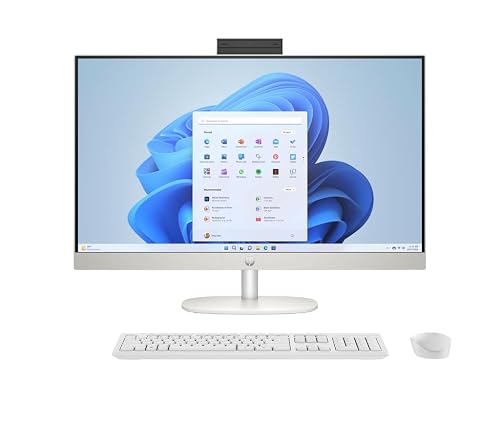
HP 27 inch All-in-One Desktop PC, FHD Touchscreen, AMD Ryzen 5 7520U, 16 GB RAM, 1 TB SSD, AMD Radeon Graphics
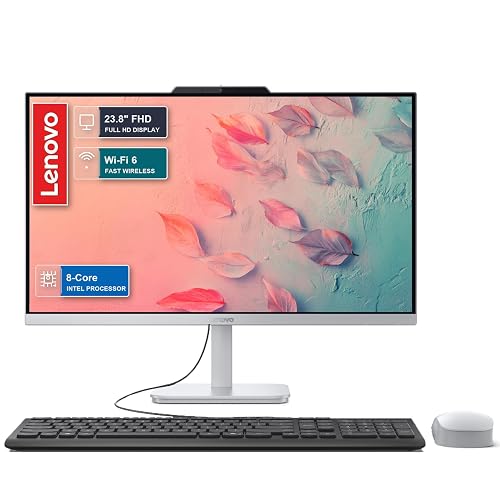
Lenovo 2026 27″ FHD All-in-One Desktop Computer, 16GB DDR5 RAM, 512GB SSD, Intel Core i7-13620H, IdeaCentre Copilot AI
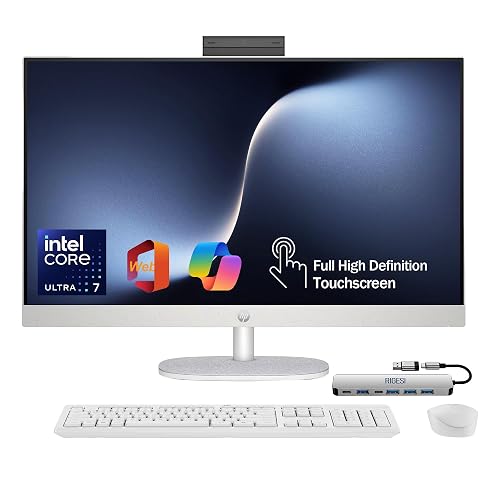
HP 27” FHD Touchscreen All-in-One, Intel Core Ultra 7 155U, 16GB DDR5, 1TB SSD, Windows 11 Pro
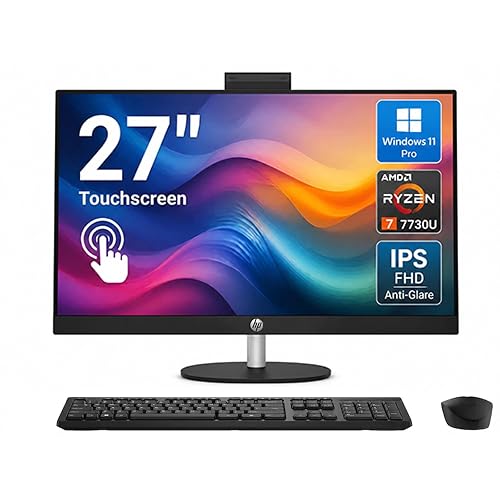
HP 27″ Touchscreen All-in-One Desktop Computer, AMD Ryzen 7 7730U, 32GB RAM, 1TB SSD, FHD IPS
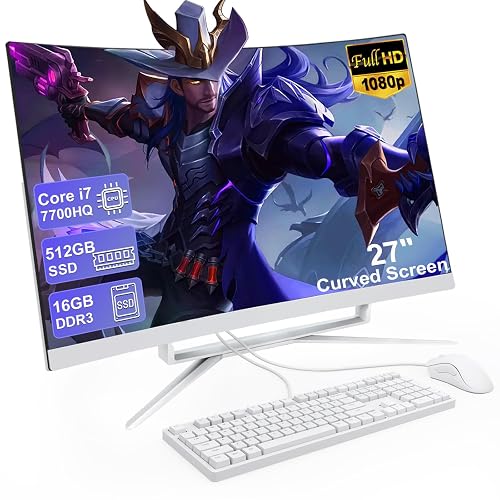
All in One Desktop Computer 27 Inch Curved FHD, Core i7 CPU, 16GB DDR, 512GB SSD, WiFi 6, Blue
More Details On Our Top Picks
The first Lenovo lands in the sweet spot for a home office that needs real speed without turning into a cable nest. The Core i7-13620H is a 10-core mobile processor, which means it can keep more work moving at once, while the 512GB PCIe SSD gives you brisk boot times and quicker file access than a plain hard drive. The trade-off is the 8GB memory ceiling, so heavy browser tab stacks or large creative projects may feel tighter than they would on the 16GB version.
You also get a 5MP webcam, which is a practical step up for frequent video calls, plus Harman Audio and WiFi 6 for a cleaner daily setup. For most desks, the Luna Grey finish keeps the look calm rather than flashy, and Windows 11 Pro leans toward people who want business tools baked in. Compared with the next Lenovo, this one makes more sense for lighter multitasking and tighter budgets.
Strong Points
- Core i7 power suits spreadsheets, browser work, and busy call days.
- 512GB PCIe SSD helps the system feel quick from the first login.
- The 5MP webcam makes remote meetings look cleaner than basic laptop cameras.
- Harman Audio suits everyday music, calls, and streaming in a small office.
Things To Consider
- 8GB RAM is serviceable, though large multitasking sessions can press it hard.
- The source data does not list a touchscreen, so touch-first workflows are a mismatch.
- Like most all-in-ones, later upgrades tend to be less flexible than with a tower.
Feature Rundown
Who It Suits Best
This fits home office users who want quick responsiveness, a clean desk, and a machine that feels more serious than entry-level gear.
A Better Fit Elsewhere
Lenovo IdeaCentre 27" All-in-One Desktop PC with 16GB DDR5 is the better call for people who keep many apps open at once.
This Lenovo keeps the same Core i7 and 5MP webcam formula as the first model, but the 16GB DDR5 memory changes the feel in daily use. That extra headroom matters most for people juggling browsers, office apps, chat windows, and a few media tabs at the same time, because memory affects how many tasks stay open smoothly. The 512GB SSD keeps storage practical for documents, photos, and a fair amount of software, though it still asks you to stay organized.
The honest read is simple, this is the one that feels more settled for long workdays without moving into a bulkier category. Luna Grey still keeps the look restrained, and Windows 11 Pro is a good match for business-leaning setups or shared family spaces. Compared with Item 1, the memory bump is the meaningful upgrade, not a dramatic redesign.
What We Like
- 16GB DDR5 makes multitasking feel more relaxed in real office use.
- Core i7 performance is strong enough for busy household and work routines.
- 5MP webcam suits frequent calls, virtual classes, and team meetings.
- 512GB SSD keeps startup and file opening snappy.
- Windows 11 Pro helps separate home use from work-focused needs.
Minor Gripes
- The storage size is practical, but large media libraries can fill it fast.
- It still lacks the touch angle that some all-in-one shoppers prefer.
- All-in-one servicing is less convenient than swapping parts in a tower PC.
Core Details
Who Should Grab It
This suits home workers and multitaskers who want more breathing room than 8GB systems provide.
Where A Sibling Pick Shines
Lenovo IdeaCentre 27" All-in-One Desktop PC with 8GB DDR5 is enough for lighter users who mostly live in email and web apps.
After the two 27-inch Lenovos, this 24-inch model trims the footprint and makes more sense for tighter desks, shared rooms, or a small apartment corner. The anti-glare IPS display is the practical part here, since IPS, or in-plane switching, usually gives wider viewing angles and more consistent color than bargain panels, while the matte finish helps tame reflections from windows and lamps. You give up screen size, but the desk feels less crowded and the whole setup is easier to place.
The 4-core processor and 8GB of RAM point this one toward everyday work, browsing, classes, and video calls rather than heavy creative work. Wi-Fi 6 and Bluetooth 5.2 round out a sensible package for a small household, especially one that wants something simple and tidy. Compared with Item 2, it gives up muscle for a calmer, smaller presence.
Bright Spots
- 24-inch size is easier to fit on smaller desks or shared surfaces.
- Anti-glare IPS panel helps in bright rooms with lots of daylight.
- 512GB SSD keeps boot time and app loading pleasantly quick.
- Wi-Fi 6 and Bluetooth 5.2 support current wireless accessories and networks.
Areas To Watch
- The 4-core processor is better suited to routine use than heavier workloads.
- 8GB memory is fine for basics, though it leaves less room for multitasking.
- Smaller screen real estate means less room for side-by-side windows.
Details At A Glance
Made For
This fits students, casual home users, and anyone with a small desk who wants a simpler all-in-one setup.
A Better Fit Elsewhere
HP 27 inch All-in-One Desktop PC with 16 GB RAM is a better match for shared workstations that need a larger screen and more memory.
The HP touchscreen model leans into convenience in a way the Lenovo picks do not. A 27-inch FHD panel gives you more room to work, and the touchscreen adds a more direct feel for scrolling, signing, and quick taps in family or front-desk style use. The Ryzen 5 7520U is aimed at everyday tasks, so it’s a sensible match for web work, documents, and media rather than heavy editing.
16GB of RAM and a 1TB SSD make the ownership experience easier because you can keep more files, photos, and programs on hand without micromanaging storage. Built-in speakers keep the desk tidy, though built-in audio usually stays practical rather than room-filling. Compared with Item 3, this one gives you the larger 27-inch layout and touchscreen convenience instead of a smaller, more compact chassis.
Upsides
- Touchscreen control feels natural for quick navigation and shared use.
- 1TB SSD offers comfortable storage room for a family or home office.
- 16GB RAM supports smooth everyday multitasking.
- 27-inch screen makes side-by-side work less cramped.
- Built-in speakers help keep the setup simple and tidy.
Small Caveats
- The Ryzen 5 chip is fine for daily work, not for demanding creative loads.
- Touchscreens can show fingerprints, so a soft cloth may become part of routine care.
- Built-in audio is useful, though separate speakers still sound fuller for music.
Feature Snapshot
Right Fit For
This suits families, shared desks, and anyone who wants a larger display with the ease of touch input.
Look Elsewhere When
Lenovo IdeaCentre 27" All-in-One Desktop PC with Core i7 makes more sense for heavier office multitasking and sharper video-call priorities.
This Lenovo is built for a desk that does a little bit of everything and needs the ports and memory to keep up. The 16GB DDR5 memory and Core i7-13620H pairing is familiar by now, but the USB-C support gives the setup a more modern edge for docks, phones, and newer accessories. WiFi 6 keeps it current on the networking side, which matters in homes where several devices fight for attention.
IdeaCentre Copilot AI is the feature that sets the tone, even though the practical value depends on how you use your PC day to day. For office work, school tasks, and mixed home use, the stronger point is the overall blend of speed, connectivity, and a 27-inch FHD panel. Compared with Item 2, this one gives you a bit more versatility at the desk without changing the core Lenovo feel.
Reasons To Buy
- 16GB DDR5 and Core i7 hardware support busy work sessions well.
- USB-C adds more flexibility for docks and newer accessories.
- WiFi 6 is a practical fit for modern home networks.
- 27-inch FHD display gives you comfortable room for multitasking.
- IdeaCentre branding keeps the layout focused on home office use.
Points To Note
- Copilot AI is useful only for people who plan to lean on those tools.
- The storage size is fine, though power users may still want more room later.
- As with most all-in-ones, cable management is easy, but deep hardware changes are not.
Feature Card
Built With In Mind
This is a solid fit for home offices that want a current feature mix without moving into a workstation-style machine.
Another Choice May Suit
HP 27” FHD Touchscreen All-in-One makes more sense for households that prefer touch input over a more feature-dense port setup.
The HP with the Core Ultra 7 feels aimed at people who want the desk to stay simple from day one. A 1TB SSD, 16GB DDR5 memory, and touchscreen support cover the everyday bases, while the included USB-C docking station gives this model a more complete setup story than Item 4. HDMI and Ethernet matter too, especially in home offices where wired stability still counts.
The source positioning around “everything to just work” matches its practical lean, though the real value is in the bundled connectivity rather than any dramatic headline trick. Free web office support may appeal to light document users, but the stronger case is for someone who wants fewer separate purchases and fewer setup headaches. Compared with Item 5, this HP leans more toward an all-in-one bundle than a feature-forward Lenovo.
Standout Traits
- USB-C docking station included, which simplifies desk setup.
- Ethernet and HDMI make wired connections easy to plan around.
- 1TB SSD gives you generous room for work files and media.
- Touchscreen support is handy for quick taps and shared use.
- Core Ultra 7 is a strong fit for everyday productivity.
Worth Noting
- The bundled extras are useful, though they also make the package more specific to a certain setup style.
- Touch surfaces will need regular wiping in busy households.
- People who prefer pure keyboard-and-mouse workflows may not use the touchscreen much.
Technical Sheet
The Right Fit
This suits desk users who want a bundled, ready-to-set-up machine for work, school, or a shared family corner.
Swap It Out When
HP 27 inch All-in-One Desktop PC with Ryzen 5 is a better fit for people who want a simpler, less accessory-heavy layout.
This HP stands out because 32GB of RAM is a serious step up for heavy multitasking. RAM, or random access memory, is the working space your apps use while they’re open, so extra capacity matters when you keep many tabs, windows, and programs active all day. Pair that with a Ryzen 7 7730U, and you have a machine that feels more comfortable under constant load than the 16GB models above it.
The 27-inch FHD IPS anti-glare screen keeps the work area spacious and easier on the eyes in bright rooms, while the FHD IR camera is useful for sign-in and video calls. The trade-off is straightforward, this level of headroom is most sensible for demanding users rather than casual email-only setups. Compared with Item 6, it spends more on performance depth and less on bundled extras.
Positives
- 32GB RAM is excellent for heavy browser and app multitasking.
- Ryzen 7 7730U gives the machine strong everyday responsiveness.
- 1TB SSD keeps large files and software within easy reach.
- Anti-glare IPS panel helps in bright workspaces.
- FHD IR camera adds a more polished login and call experience.
Trade Offs
- The extra memory matters most when you actually push multitasking hard.
- Touchscreen glass attracts fingerprints in high-use areas.
- People using it mostly for basic email and browsing may not need this much hardware.
Core Details
Whose Shelf It Belongs On
This fits power users, multitaskers, and home professionals who keep a lot open at once and want the desk to stay tidy.
Reach For A Different Pick When
Lenovo IdeaCentre 27" All-in-One Desktop PC with 16GB DDR5 is enough for standard office work and costs less performance headroom.
This curved 27-inch all-in-one brings a friendlier visual shape than the flat-panel options above, and that curved FHD screen can feel nice for long typing sessions or casual media use. The bundle also includes a wired mouse and keyboard, which makes it easier to set up a student desk or a simple office corner without hunting for accessories. That convenience is the main appeal, not deep customization.
The Core i7, 16GB DDR memory, 512GB SSD, WiFi 6, and Bluetooth 5.3 give it enough substance for coursework, office documents, and general household tasks. The trade-off is that the unusual brand name and more generic listing style offer less polish than the Lenovo and HP models above. Compared with Item 4, this one feels more starter-friendly because the input devices are included.
Highlights
- Curved 27-inch screen may feel comfortable for long desk sessions.
- Core i7 and 16GB memory cover school work and office basics well.
- 512GB SSD keeps the system responsive for everyday use.
- Wired mouse and keyboard reduce the number of extra purchases.
- WiFi 6 and Bluetooth 5.3 keep the wireless setup current.
Room For Improvement
- The generic branding gives less clarity than the better-known Lenovo and HP models.
- Curved screens are a preference item, so some desks may not need that shape.
- Included peripherals are handy, though they may not match a more upgraded setup later.
Core Details
Who Will Love This
This fits students, starter home offices, and anyone who wants a simple all-in-one with accessories already included.
Where Shoppers Go Wrong
HP 27 inch Touchscreen All-in-One is a better match for people who want a more polished brand ecosystem and touch input.
How To Choose The Right 27 Inch Alls In One Desktop
Match The Memory To Your Habit
RAM is the part that keeps open programs moving, so it matters more than many shoppers expect. 8GB suits email, web browsing, and school assignments, while 16GB makes a real difference once you keep several apps active. 32GB is the comfort zone for heavier multitasking, especially for workdays that never seem to close.
The processor matters too, but not every desk needs the fastest chip in the pile. A Core i7 or Ryzen 7 class machine helps when you juggle meetings, documents, and browser tabs at once. For lighter use, a simpler processor can be enough, and that keeps the setup easier to live with.
Choose The Screen For Your Space
A 27-inch display gives you room to spread out, which is why this size is so popular for home offices. A 24-inch model fits tighter desks more comfortably, and it can feel less overwhelming in a shared room. Touchscreen panels help in family spaces and front-desk setups, though they also collect fingerprints more quickly.
Anti-glare screens make sense in bright rooms with windows or overhead light. IPS panels are worth watching for because they usually offer better viewing angles than cheaper display types, which helps when more than one person is looking at the screen. Curved panels are mostly about comfort and preference, not necessity.
Look Past The Screen And Check The Extras
Storage is the quiet detail that shapes daily ownership. A 512GB SSD is enough for most productivity users, while 1TB gives you more breathing room for photos, downloads, and larger software libraries. The SSD part matters because solid-state storage keeps the machine feeling quick and quiet.
Also check the ports and wireless options. USB-C, HDMI, Ethernet, WiFi 6, and Bluetooth 5.2 or 5.3 can make life easier with docks, monitors, and accessories. A webcam with a higher megapixel count helps regular video callers, and built-in speakers are handy when you want less clutter.
Think About Upgrades And Long-Term Use
All-in-ones are neat, but that neatness comes with a trade-off. Compared with a tower, they usually leave you with fewer easy upgrade paths, so it helps to choose enough RAM and storage on day one. That’s especially true for work-from-home setups that tend to grow over time.
Maintenance is simple, though. You mainly keep the screen clean, manage cables, and give the vents room to breathe on the desk. The right machine is the one that matches your routine without asking for constant fiddling.
Things Worth Knowing First
Hidden Buying Traps
Shoppers often focus on screen size and forget the memory ceiling. That’s where an 8GB model can feel fine on paper but cramped in a busy browser-and-app day.
Another common miss is choosing a touch model without thinking about upkeep. Fingerprints, smudges, and extra cleaning become part of ownership in a way they never do on a plain non-touch panel.
Where The Extra Money Goes
Higher-tier models usually pay you back with more RAM, stronger processors, bigger storage, and more useful ports. Those parts do not sound exciting in a storefront listing, but they affect how long the machine stays comfortable as your workload grows.
The upgrade makes sense for remote work, shared family use, and anyone who dislikes closing tabs just to keep the machine calm. For lighter email-and-browsing use, the more expensive tier can feel like more machine than you need.
Frequently Asked Questions
What size desk works best with a 27-inch all-in-one?
A standard home office desk usually works fine, as long as there’s room for the base and keyboard. You’ll want some space behind the screen for airflow and cable routing.
Is 8GB of RAM enough for everyday use?
Yes, for simple browsing, schoolwork, and email, 8GB can be enough. It becomes tighter once you keep many tabs, chats, and apps open together.
Does touchscreen control make a real difference?
Touch input helps with quick taps, scrolling, and shared household use. It matters less for keyboard-heavy work, so the value depends on how hands-on your routine is.
Why choose an all-in-one instead of a tower PC?
An all-in-one keeps the desk cleaner because the computer sits inside the display. A tower gives you more expansion room, but it also needs more space and more cables.
What storage size should you target?
512GB works for many office users, especially when documents live in cloud storage. 1TB is easier to live with for photo libraries, downloads, and larger app installs.
Closing Thoughts
A good 27 inch all-in-one should make your desk feel calmer, not busier. The Lenovo picks are strongest for straight productivity, the HP touchscreen options bring more convenience, and the curved blue bundle is the easiest starter setup. Your best match comes down to how much multitasking, touch input, and storage room you actually use. Choose the one that fits your day, and the rest tends to fall into place.



