
Portable gaming machines have closed the gap with their bulkier siblings, and 14 inch gaming laptops now deliver real desktop-class frame rates in a chassis that fits a backpack. You no longer need to choose between smooth gameplay and a machine you can actually carry through an airport. This roundup breaks down six options spanning dedicated gaming rigs, versatile 2-in-1 convertibles, and budget-friendly everyday notebooks that handle lighter titles. Whether you are a student, a creative pro who games after hours, or someone who wants one do-everything laptop, you will find a fit below.
The Shortlist At A Glance
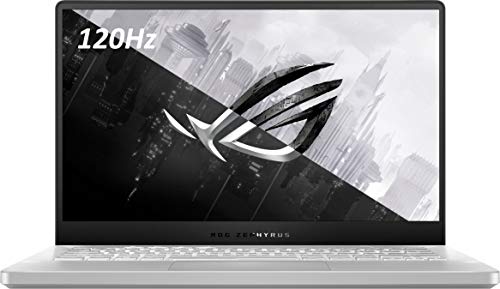
ASUS ROG Zephyrus G14 Moonlight White
Acer Aspire FHD Touchscreen Laptop

ASUS ROG Flow Z13 2.5K 180Hz Convertible

HP 14 Laptop Intel N150
ASUS Vivobook 14 FHD Quiet Blue
Acer Predator Helios Neo 14 RTX 4070
More Details On Our Top Picks
The Zephyrus G14 arguably defined the 14 inch gaming category, proving you could pack serious hardware into a sub-four-pound chassis. Its Moonlight White finish stands out in a sea of black gaming laptops, and the magnesium-alloy build keeps weight down without feeling flimsy. With a Ryzen 9 processor and 16GB of memory, you get enough headroom for modern AAA titles at medium-to-high settings. The 1TB SSD holds a respectable library of games without needing an external drive immediately.
The RTX 2060 GPU is where this machine shows its age. It still handles 1080p gaming competently, but newer titles may require dialing back settings to maintain smooth frame rates. For commuters and students carrying a laptop daily, the weight savings alone make it a compelling choice. You may find the thermal fans get loud under sustained load, which is typical for thin gaming laptops.
Strong Points
- Lightweight magnesium chassis makes daily transport genuinely practical
- Ryzen 9 CPU with 8 cores handles multitasking and productivity workloads well
- 1TB SSD provides ample storage for a sizable game library
- Distinctive Moonlight White finish resists the usual fingerprint smudges
Things To Consider
- RTX 2060 is an older architecture that struggles with the latest AAA releases at high settings
- Fan noise ramps up noticeably during extended gaming sessions
- Thermal throttling can reduce performance during prolonged heavy workloads
Key Specs
Who Will Love This
Students and commuters who want a capable gaming laptop they can actually carry in a backpack without shoulder strain.
A Better Fit Elsewhere
Shoppers who prioritize raw GPU power for current-gen titles should look at the Acer Predator Helios Neo 14 with its RTX 4070.
This Aspire leans into AI-assisted productivity rather than raw gaming horsepower. The Intel Core Ultra 7 258V chip includes a dedicated NPU (Neural Processing Unit), which handles AI tasks like background blur and auto-framing locally without taxing the main processor. With 32GB of RAM and a 1TB SSD, you get a configuration that handles heavy multitasking, large photo editing projects, and casual gaming after hours. The FHD touchscreen adds flexibility for creative workflows.
Unlike the dedicated GPUs in the Zephyrus G14 or the Predator Helios Neo, this Aspire relies on integrated graphics. That means you can run lighter titles and older games comfortably, but demanding AAA releases will need significant setting reductions. The generous memory configuration is the real story here, giving you headroom for dozens of browser tabs alongside creative applications. You may find the integrated GPU limits gaming to 720p or older titles for playable frame rates.
Highlights
- 32GB of RAM is generous for this price tier and supports heavy multitasking
- Dedicated NPU enables local AI features without cloud dependency
- 1TB SSD offers fast boot times and ample storage for projects and media
- FHD touchscreen adds creative flexibility for drawing and annotation
Trade Offs
- Integrated graphics limit gaming performance to lighter or older titles
- Not suited for competitive multiplayer games requiring high frame rates
Right Fit For
Remote workers and creative professionals who want AI-accelerated productivity tools and only game casually.
Reach For A Different Pick When
Shoppers wanting a dedicated GPU for serious gaming should consider the Acer Predator Helios Neo 14.
The Flow Z13 takes a radically different approach to portable gaming by packing hardware into a tablet form factor with a built-in kickstand. A 13.4 inch touchscreen with a 180Hz refresh rate and 3ms response time delivers smooth visuals for fast-paced games. The 2.5K ROG Nebula Display covers 100% of the DCI-P3 color gamut, making it equally capable for color-accurate creative work. AMD’s Ryzen AI MAX+ 395 processor brings 16 Zen 5 CPU cores to bear on both gaming and compute tasks.
Quad-channel LPDDR5X unified memory totaling 32GB serves both system and graphics needs. The convertible design means you can detach the keyboard for tablet use or prop it up at various angles. That versatility comes with a trade-off, as the compact tablet chassis limits sustained thermal performance compared to traditional laptop designs like the Zephyrus G14. The 170-degree adjustable kickstand helps airflow, though you may still notice heat buildup during extended sessions.
Plus Points
- 2-in-1 convertible design offers tablet, stand, and laptop modes
- 180Hz refresh rate with 3ms response delivers competitive gaming visuals
- 100% DCI-P3 color coverage suits professional creative workflows
- 32GB quad-channel memory provides substantial multitasking headroom
- Adjustable kickstand allows flexible positioning for various environments
Small Caveats
- Tablet chassis limits thermal headroom during extended gaming sessions
- 13.4 inch screen is slightly smaller than the 14-14.5 inch norm in this category
- Detached keyboard adds bulk to carry separately
Feature Snapshot
Who Should Grab It
Creative professionals and hybrid users who want a single device for drawing, media consumption, and gaming in a tablet-first form.
Look Elsewhere When
Those who prefer a traditional clamshell laptop with better sustained cooling should consider the ASUS ROG Zephyrus G14.
This HP 14 sits at the entry-level end of the spectrum, built for basic computing rather than serious gaming. The Intel N150 processor reaches speeds up to 3.6GHz across four cores, which handles email, document editing, and web browsing without trouble. With 4GB of RAM and 128GB of UFS storage, the specifications reflect the budget positioning. UFS (Universal Flash Storage) offers faster read speeds than older eMMC storage but trails a proper SSD.
Included Office 365 and Copilot AI integration add productivity value for students and office workers. WiFi 6 connectivity ensures stable wireless performance for video calls and streaming. Realistically, this machine handles browser-based games and very light indie titles but will not run AAA releases. The limited RAM means you need to manage tab counts carefully, and the 128GB storage fills up quickly with media files. For the price, you get a straightforward everyday laptop with no gaming pretensions.
Bright Spots
- Included 1-year Office 365 subscription adds immediate productivity value
- WiFi 6 provides reliable wireless connectivity for streaming and calls
- Lightweight 14 inch chassis is easy to carry between classes or meetings
Points To Note
- 4GB of RAM restricts multitasking and will bottleneck modern applications
- 128GB UFS storage is limited and slower than a standard NVMe SSD
- No dedicated GPU means gaming is restricted to browser-based or very light titles
- Intel N150 processor is an entry-level chip not designed for demanding workloads
Built With In Mind
Students and office workers who need a basic, affordable laptop for documents, email, and web browsing.
Swap It Out When
Shoppers who need a machine capable of running actual games should step up to the ASUS Vivobook 14 with its 10-core processor and 16GB of RAM.
The Vivobook 14 occupies a sensible middle ground between the budget HP 14 and the gaming-focused options. An Intel Core 5 120U processor with 10 cores provides solid productivity performance, and 16GB of RAM with a 1TB SSD means you are not constantly managing storage or closing apps. Windows 11 Pro adds business-friendly features like BitLocker encryption and remote desktop access. The included PLUSERA 8-in-1 hub solves the common problem of limited port selection on thin laptops.
A camera privacy shutter is a thoughtful physical security feature that integrated webcam users appreciate. The Quiet Blue finish is subtle enough for professional settings. Without a dedicated GPU, gaming performance mirrors the Acer Aspire, handling lighter titles but not AAA releases. Compared to the HP 14, the step up to 16GB of RAM and a proper SSD transforms the daily experience. You may notice the integrated graphics struggle with anything beyond casual gaming.
Reasons To Buy
- Included 8-in-1 hub adds ports without a separate accessory purchase
- 16GB RAM and 1TB SSD provide a comfortable configuration for productivity
- Windows 11 Pro includes business features absent in Home edition
- Camera privacy shutter offers physical security peace of mind
Softer Spots
- Integrated graphics limit gaming to lighter or older titles
- Factory seal is opened for upgrades, which may concern some shoppers
Core Details
Perfect Match For
Business users and students who want a well-equipped productivity laptop with included accessories and professional-grade software.
Another Choice May Suit
Shoppers who want AI-accelerated features and 32GB of RAM should look at the Acer Aspire FHD Touchscreen.
The Predator Helios Neo 14 brings current-generation GPU power to the compact gaming category. An NVIDIA GeForce RTX 4070 with 8GB of GDDR6 VRAM handles modern AAA titles at high settings with frame generation technology that significantly boosts smoothness. The Intel Core Ultra 7 155H processor features 16 cores, combining performance and efficiency cores to balance power consumption and heat. A 14.5 inch QHD+ display running at 120Hz with 100% sRGB coverage delivers sharp, vibrant visuals.
Compared to the Zephyrus G14’s older RTX 2060, this GPU represents a massive generational leap in gaming capability. The 16GB of LPDDR5X memory is soldered, meaning you cannot upgrade RAM later, so verify that capacity meets your long-term needs. Windows 11 Pro ships standard, adding business features alongside the gaming hardware. A microSD card reader provides expandable storage for game captures or media. The 120Hz refresh rate hits a sweet spot for gaming smoothness without the extreme power draw of higher-rate panels.
Best Bits
- RTX 4070 GPU handles current AAA titles at high settings with frame generation
- QHD+ 120Hz display balances resolution and refresh rate for gaming clarity
- 16-core Intel Ultra 7 processor provides strong gaming and productivity performance
- Windows 11 Pro included for business compatibility
Areas To Watch
- Soldered LPDDR5X memory cannot be upgraded after purchase
- Powerful GPU in a 14.5 inch chassis generates significant heat under load
- 16GB RAM is non-expandable and may feel limiting for future workloads
Whose Shelf It Belongs On
Serious gamers who want current-generation GPU performance in a portable 14.5 inch form factor.
Where A Sibling Pick Shines
Shoppers who want a lighter, more portable chassis for daily carry should consider the ASUS ROG Zephyrus G14.
What Matters Most Before Choosing 14 Inch Gaming Laptops
GPU Class Defines Your Gaming Experience
The graphics processor is the single most important component for a gaming laptop. Dedicated GPUs like NVIDIA’s RTX 4070 handle modern AAA titles at high settings, while older cards like the RTX 2060 still run 1080p games but lack the latest frame-generation technology. Integrated graphics found in productivity laptops limit you to lighter or older titles. Match the GPU class to the games you actually play, not the games you aspire to play.
Memory And Storage Strategy
RAM affects how many applications and browser tabs you can run alongside your game. 16GB is a practical minimum for modern gaming, while 32GB gives you long-term headroom. Pay attention to whether memory is soldered or upgradeable, as some compact designs prevent later expansion. For storage, a 1TB SSD holds a respectable game library, and a microSD card reader adds flexible expansion for captures without occupying internal space.
Display Quality Beyond Size
A 14 inch screen sits in a sweet spot between portability and usability. Look at refresh rate, resolution, and color coverage together. A 120Hz panel smooths fast-paced games, while 180Hz benefits competitive multiplayer. QHD+ resolution (2560 x 1600) offers sharper text and images than FHD. Color accuracy matters for creative work, so displays covering 100% of DCI-P3 or sRGB serve double duty for photo editing.
Chassis Design And Thermal Reality
Thinner laptops run hotter and louder under load. Convertible designs like tablet-form gaming laptops trade thermal headroom for versatility. Traditional clamshell chassis with proper cooling fans sustain performance longer but add thickness. Consider how you transport the laptop daily, as a magnesium-alloy build saves weight compared to standard aluminum or plastic chassis.
Before You Click Buy
Traps First Timers Fall Into
Shoppers often assume any laptop labeled “gaming” handles every modern title. Entry-level machines with integrated graphics or older dedicated GPUs play browser games and indie titles but struggle with AAA releases. Another common mistake is ignoring soldered memory, which locks you into the purchased RAM capacity permanently. Check whether the GPU architecture supports current features like frame generation, as older cards miss significant performance improvements.
The Upgrade Payoff
Higher-tier gaming laptops cost more because they pack current-generation GPUs, higher-refresh displays, and better thermal designs. The jump from an RTX 2060 to an RTX 4070 transforms gaming performance, enabling higher settings and smoother frame rates in recent releases. Spending up also typically buys better build materials, more memory, and larger SSDs. The upgrade pays off for anyone playing current AAA titles or wanting a laptop that stays relevant for several years.
Frequently Asked Questions
Can a 14 inch gaming laptop replace a desktop?
A 14 inch gaming laptop with a current-generation GPU handles most modern games at high settings. Desktops still offer better sustained performance and easier upgrades, but the gap narrows each generation.
How much RAM do you need for gaming on a 14 inch laptop?
16GB covers most current games and multitasking scenarios comfortably. 32GB provides future-proofing for heavy multitaskers, though verify the RAM is upgradeable before purchasing.
Do 14 inch gaming laptops overheat?
Compact gaming laptops generate significant heat under load due to concentrated components. Quality thermal designs with proper fan systems manage this, but expect louder fan noise during intensive gaming sessions.
Is a touchscreen worth it on a gaming laptop?
Touchscreens add creative flexibility for drawing and annotation but rarely benefit gaming directly. The Flow Z13 demonstrates how a touchscreen complements a convertible design for hybrid use cases.
Can you upgrade components in a 14 inch gaming laptop?
Storage and sometimes RAM are upgradeable in some 14 inch models. Others solder memory to the motherboard, so check specifications carefully before purchasing if expandability matters to you.
Final Verdict
Finding the right 14 inch gaming laptop comes down to matching GPU power, portability, and price to your actual routine. The Acer Predator Helios Neo 14 leads the pack for current-generation gaming performance, while the ASUS ROG Zephyrus G14 remains a proven portable choice. Creative professionals benefit from the Flow Z13’s convertible design, and budget-conscious shoppers have solid options in the HP 14 and ASUS Vivobook. Pick the one that fits your daily life, not just your benchmark aspirations.
