
You want a desktop that handles everyday work, streaming, light creative tasks, and casual gaming without requiring a separate graphics card. Integrated graphics processors make that possible by placing the graphics engine inside the CPU, which can simplify installation and keep a compact build easier to manage. Your main choices here range from entry-level AM4 chips to newer AM5 hardware, with Intel options for mixed workloads and display output. The right fit depends on your motherboard, memory, game settings, and plans for future upgrades.
The Shortlist At A Glance

AMD Ryzen 7 8700G 8-Core, 16-Thread Desktop Processor

Intel Core i7-12700K Gaming Desktop Processor with Integrated Graphics
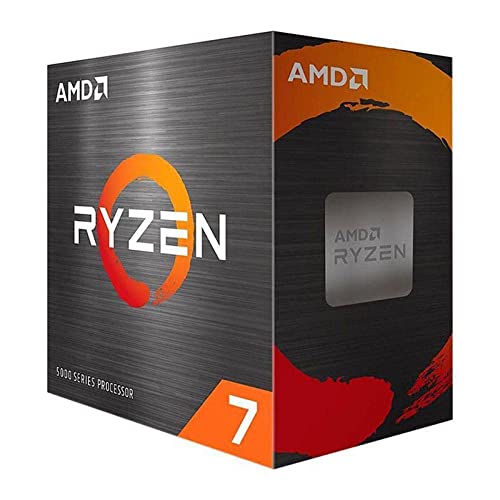
AMD Ryzen 7 5700G 8-Core, 16-Thread Desktop Processor with Radeon Graphics

AMD Ryzen 3 3200G 4-Core Unlocked Desktop Processor

AMD Ryzen 5 5600GT 6-Core, 12-Thread Desktop Processor
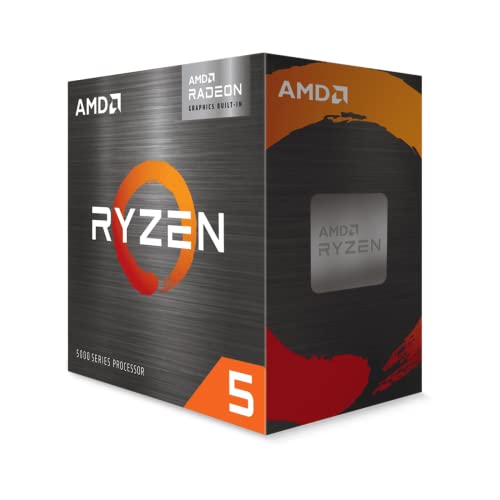
AMD Ryzen 5 5600G 6-Core, 12-Thread Desktop Processor

Intel BX80662G4400 Pentium Processor G4400
More Details On Our Top Picks
Modern small-form-factor desktops benefit from the Ryzen 7 8700G’s eight cores and 16 threads, while the built-in Radeon 780M graphics handle display duties and lighter gaming without a separate graphics card. That combination gives you a clean starting point for a living-room PC, compact workstation, or first gaming build.
The AM5 socket and DDR5 support make this a more forward-looking platform than the AM4 choices below. You may find the integrated graphics most comfortable at sensible game settings rather than demanding visual presets, but the overall design leaves room for a later graphics-card addition. Nothing flashy is required during installation, although your motherboard and memory must match the newer platform.
Strong Points
- Eight cores and 16 threads give you useful headroom for editing, streaming, and heavy multitasking.
- Radeon 780M graphics let you assemble a capable desktop before adding a separate graphics card.
- AM5 and DDR5 support suit a fresh build with longer upgrade plans.
- The unlocked design gives experienced desktop builders room to adjust settings.
- 5.1 GHz maximum boost supports quick response in lightly threaded applications.
Things To Consider
- AM5 parts can require a larger platform change than an AM4 drop-in upgrade.
- Graphics-heavy games may still call for a discrete card and careful memory selection.
Key Specs
Who It Suits Best
You’ll get the most from this chip in a new AM5 desktop for casual gaming, content work, and future expansion.
Where Another Pick Suits Better
Choose the Intel Core i7-12700K for a demanding mixed-workload desktop already built around an LGA1700 motherboard.
For demanding desktop work, the Core i7-12700K brings a hybrid layout: eight performance cores plus four efficiency cores, for 12 cores and 20 threads in total. The integrated graphics are useful for display output, media tasks, and a temporary setup while you decide on a separate card.
Compared with the Ryzen 7 8700G, this Intel option asks you to choose an LGA1700 motherboard and manage a listed 125W processor design. That extra platform detail matters in a workstation or gaming tower, especially during long rendering sessions. You may appreciate the 25 MB L3 cache, a fast-access memory pool for frequently reused instructions, during heavier application workloads.
What We Like
- Hybrid core arrangement suits video work, compiling, streaming, and many open applications.
- Up to 5.0 GHz boost supports brisk interaction during everyday desktop tasks.
- Unlocked operation appeals to experienced users who enjoy manual tuning.
- Integrated graphics keep initial setup functional before a separate card enters the build.
Trade Offs
- The 125W rating deserves a motherboard, cooler, and case with suitable thermal planning.
- LGA1700 limits your platform choice compared with newer socket families.
- Graphics capability makes sense for light gaming, but demanding games still favor a separate card.
Feature Snapshot
Made For
This fits you best as a power user with an LGA1700 desktop, strong cooling, and workloads that extend beyond casual gaming.
Consider Something Else When
The AMD Ryzen 7 8700G makes more sense for your new compact build when built-in graphics matter more than hybrid-core throughput.
AM4 owners get a particularly sensible route to eight-core computing with the Ryzen 7 5700G. You can use the Radeon graphics for popular games at 1080p settings, while 16 threads give you room for photo work, office multitasking, and occasional streaming.
Compared with the newer Ryzen 7 8700G, this model uses the established AM4 platform and DDR4 memory, so a suitable existing desktop may need fewer replacement parts. The bundled Wraith Stealth cooler simplifies a basic installation, though sustained heavy workloads may call for more cooling capacity. In most home offices, that balance keeps the build straightforward.
Highlights
- Eight cores and 16 threads support creative applications and multitasking.
- Built-in Radeon graphics let you start gaming without a separate card.
- Bundled Wraith Stealth cooler reduces the parts list for a standard desktop.
- Unlocked operation gives you tuning flexibility.
- 4.6 GHz maximum boost helps general desktop responsiveness.
Minor Gripes
- AM4 and DDR4 are older platform choices than the Ryzen 7 8700G’s AM5 and DDR5 pairing.
- Heavy workloads may benefit from a stronger cooler than the included unit.
Quick Facts
Right Fit For
You’ll find this especially suitable for an AM4 desktop refresh, a family PC, or a starter editing machine.
Not Your Match When
The AMD Ryzen 5 5600GT is a better fit for your AM4 build when six cores cover your workload and you want a less expensive step up from basic hardware.
A four-core desktop processor can still make sense for a basic family computer, office station, or small media system. The Ryzen 3 3200G adds Radeon Vega 8 graphics, so you can connect a display and handle popular lighter games without installing a separate graphics card.
Its AM4 socket gives you access to a broad older-platform ecosystem, while the included Wraith Stealth cooler keeps the first build uncomplicated. Compared with the Ryzen 5 5600G, you get fewer cores and less multitasking room, so demanding editing or modern gaming asks for patience. For web work, documents, and high-definition media, the modest design may be enough.
Upsides
- Four cores cover routine office, web, and media tasks.
- Radeon Vega 8 graphics simplify a first desktop assembly.
- Included Wraith Stealth cooler reduces installation steps.
Room For Improvement
- The four-core layout leaves less room for current multitasking than the six- and eight-core choices.
- Older AM4 hardware may require careful motherboard and memory matching.
- Long gaming sessions can expose the limits of integrated graphics, especially at higher settings.
At A Glance
Best Suited To
This choice suits you as a first-time PC builder creating a basic AM4 home, school, or office desktop.
Look Elsewhere When
The AMD Ryzen 5 5600G better suits your system for stronger multitasking and more comfortable 1080p gaming on AM4.
The Ryzen 5 5600GT gives your AM4 system six cores and 12 threads, a useful middle ground for gaming, schoolwork, and creative applications. Built-in Radeon graphics can carry a desktop while you wait to add a separate card, which keeps a gradual upgrade path practical.
Compared with the four-core Ryzen 3 3200G, this model gives you more breathing room during browser-heavy work and background tasks. The included Wraith Stealth cooler keeps installation familiar, while the unlocked design appeals to hands-on builders. You may find the older DDR4 and AM4 platform more attractive than starting over with an AM5 system.
Plus Points
- Six cores and 12 threads handle modern everyday multitasking comfortably.
- Integrated Radeon graphics let you postpone a separate graphics-card purchase.
- AM4 compatibility makes this a logical route for an existing compatible desktop.
- Included Wraith Stealth cooling keeps the initial parts list manageable.
Points To Note
- AM4 and DDR4 limit the newer-platform features available with the Ryzen 7 8700G.
- Integrated graphics remain aimed at lighter gaming rather than demanding visual presets.
Technical Sheet
Who Will Love This
You’ll appreciate this processor most as an AM4 owner seeking more cores and built-in graphics without rebuilding around AM5.
Another Choice May Suit
The AMD Ryzen 7 5700G fits you better for eight-core creative workloads and heavier simultaneous applications on AM4.
For a straightforward AM4 gaming or family desktop, the Ryzen 5 5600G keeps the formula sensible: six cores, 12 threads, and Radeon graphics in one processor. You can use the system for office work, streaming, and selected 1080p games without filling the case with extra hardware.
The 5600GT offers a similar six-core shape, so your decision may come down to the listing, motherboard support, and intended setup. This model supports DDR4-3200 and includes an unlocked design, giving you familiar parts and tuning options. Depending on your game library, the integrated graphics may be sufficient for lighter titles, while newer demanding games will benefit from a separate card.
Bright Spots
- Six cores and 12 threads suit general work, light creation, and gaming.
- Built-in Radeon graphics simplify compact desktops and temporary builds.
- DDR4-3200 support works well with a familiar AM4 parts selection.
- Unlocked operation gives you control over advanced tuning.
- The integrated design leaves more case space for storage or airflow planning.
Small Caveats
- Older AM4 compatibility limits future platform changes compared with AM5.
- Graphics output depends heavily on game settings and memory configuration.
- Long-term maintenance still includes keeping the cooler and case free of dust.
Details At A Glance
Whose Shelf It Belongs On
This is a strong fit for your first gaming desktop, compact family computer, or AM4 refresh with moderate graphics needs.
Swap It Out When
The AMD Ryzen 7 8700G suits you better for a new AM5 build with stronger built-in graphics and a longer upgrade horizon.
The Pentium G4400 belongs in a very specific kind of desktop: a basic office machine, replacement system, or home computer built around the LGA1151 platform. Its 3.0 GHz speed and 3 MB cache, a small high-speed storage area for frequently used instructions, cover documents, email, web browsing, and simple media use.
Compared with every Ryzen option here, this Intel chip has a much narrower multitasking role and an older socket requirement. That can still work well for a compatible repair or low-demand desktop, especially where existing parts matter more than gaming potential. You’ll want to confirm motherboard support before installation, since the LGA1151 platform is not interchangeable with the newer Intel socket used by the Core i7-12700K.
Best Bits
- 3.0 GHz operation fits routine office and household computing.
- Boxed processor format can simplify sourcing a replacement part.
- Its basic design suits a quiet, uncomplicated desktop role.
Areas To Watch
- The older LGA1151 socket sharply limits motherboard compatibility.
- Two cores and four threads leave little room for heavy multitasking.
- Modern gaming and creative applications are better matched to the Ryzen 5 or Ryzen 7 choices.
- For an older replacement system, inspect the socket and cooling hardware before installation.
Core Details
Who Should Grab It
This suits you as a repair-minded home or office user with a matching older LGA1151 motherboard and modest computing needs.
Reach For A Different Pick When
The AMD Ryzen 3 3200G is a better fit for your entry-level build when you need four cores and Radeon graphics for light gaming.
How To Choose the Right Integrated Graphics Processors
Match the Platform First
Your motherboard socket determines which processor can actually fit. AM4 options such as the Ryzen 5 5600G, Ryzen 5 5600GT, Ryzen 7 5700G, and Ryzen 3 3200G use a different platform from the AM5 Ryzen 7 8700G. Intel choices also split apart, with the Core i7-12700K using LGA1700 and the Pentium G4400 requiring FCLGA1151.
Existing desktop owners should start with the motherboard model, firmware support, and memory type. A processor that looks suitable on paper can still create an expensive parts change when the socket does not match.
Judge Graphics by Your Games
Integrated graphics share system memory with the CPU, so memory speed and dual-channel setup can affect the experience. Casual games, esports titles, older releases, and media playback place less pressure on the graphics engine than new visually demanding games.
The Ryzen 7 8700G’s Radeon 780M is the clearest fit for a new graphics-light gaming build. Older Radeon Vega options can still serve 1080p gaming with sensible settings, while the Intel Pentium G4400 is better reserved for basic display and office duties.
Count Cores for Your Routine
Cores are individual processing units, while threads describe the simultaneous work paths a CPU can manage. Four cores can cover documents and browsing, six cores help with gaming and background apps, and eight cores provide more comfort for editing, streaming, and compiling.
Your daily pattern matters more than a single clock figure. A home office PC may need only the Ryzen 3 3200G, while a creator handling several applications will likely appreciate the Ryzen 7 5700G, Ryzen 7 8700G, or Core i7-12700K.
Plan Cooling and Expansion
Included coolers make the Ryzen 3 3200G, Ryzen 5 5600GT, Ryzen 5 5600G, and Ryzen 7 5700G easier to assemble. Heavy sustained workloads can still justify stronger cooling, especially inside a small case with restricted airflow.
Leave room for a later graphics card when your game library may grow. AM5 and DDR5 give the Ryzen 7 8700G a newer foundation, while AM4 can be the more practical route for an existing compatible system.
Things Worth Knowing First
Mistakes Worth Dodging
You can avoid many installation headaches by checking the socket before choosing a processor. Memory support matters too, since DDR4 and DDR5 are not interchangeable. Also, match your expectations to the graphics engine, because integrated graphics are not a substitute for a dedicated card in every game.
Ignoring case airflow is another common misstep. Keep the cooler accessible, leave room around the motherboard, and plan routine dust removal, particularly in a compact desktop.
Where the Extra Money Goes
Higher-tier chips generally give you more cores, newer memory support, faster integrated graphics, or a platform with more upgrade room. The Ryzen 7 8700G earns its place in a new AM5 build, while the Core i7-12700K makes sense for demanding processor-heavy work.
Spending more pays off when you edit video, stream, compile software, or keep many applications open. Basic office use rarely needs that much capacity, so the Ryzen 3 3200G or Pentium G4400 can remain sensible in the right compatible system.
Closing Remarks
Your ideal integrated graphics processor starts with the motherboard you already own, then moves to your games and everyday workload. Choose the Ryzen 7 8700G for a newer AM5 foundation, the Core i7-12700K for demanding mixed work, or the Ryzen 5 and Ryzen 7 AM4 options for a familiar platform. Entry-level desktops can still make good use of the Ryzen 3 3200G, while the Pentium G4400 belongs to older compatible systems. Match the chip to your real routine, and your build should feel easier to plan.
