
Choosing low power Cpus can be surprisingly tricky. You need to match socket, chipset, memory support, cooling needs, and workload before a compact office PC, home server, or quiet desktop comes together properly. This shortlist covers everything from older dual-core processors for basic tasks to a modern 24-core option for demanding creative work, plus a modular power supply for efficient system building. You’ll find the right direction here for a replacement upgrade, a low-demand workstation, or a small desktop that stays practical rather than excessive.
The Shortlist At A Glance

CORSAIR RM750e (2025) Fully Modular Low-Noise ATX Power Supply
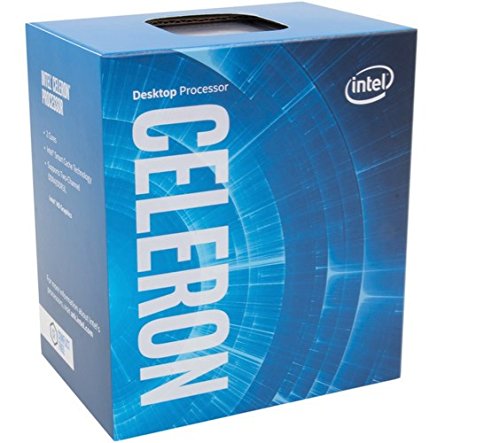
Intel CPU BX80662G3900 Celeron G3900 LGA1151

Intel Pentium Gold G5420 Desktop Processor 2 Core

Intel SR2L8 Core i5-6500T LGA 1151 Desktop CPU (Renewed)

Intel Core Ultra 7 Processor 270K Plus 24 Cores

Intel Celeron G-5900 Desktop Processor LGA1200

Intel Celeron G1610 LGA 1155 Processor
More Details On Our Top Picks
Low power Cpus still need a stable power foundation, and this fully modular ATX power supply gives you control over the cable layout. Modular cabling means you attach only the leads your build needs, which can make a compact case easier to assemble and maintain.
The native 12V-2×6 connection suits newer graphics hardware, while ATX 3.1 and PCIe 5.1 compliance point toward current platform compatibility. You may find the 750W capacity unnecessary for a basic Celeron system, but it makes more sense for a quiet desktop that could gain a stronger graphics card later.
Strong Points
- Fully modular cables reduce unused wiring inside the case.
- Low-noise operation suits bedrooms, offices, and media areas.
- 105°C-rated capacitors support a heat-tolerant internal design.
- The 12V-2×6 cable helps simplify newer graphics-card installation.
- Gold efficiency can fit a power-conscious full desktop build.
Things To Consider
- Its 750W capacity is more than a basic low-demand office PC requires.
- Cable storage still takes planning in a small chassis.
Key Specs
Who It Suits Best
You’ll benefit most from this choice during a new desktop build that pairs efficient processing with future graphics expansion.
Consider Something Else When
Intel Celeron G-5900 suits a simpler low-demand system more closely, especially for basic office work.
For a basic LGA1151 desktop, the G3900 keeps the design straightforward with two cores and two threads at 2.8 GHz. That profile fits word processing, light browsing, point-of-sale use, and classroom machines better than demanding multitasking.
The 51W thermal design power, or TDP, describes the heat level the cooling solution must be prepared to manage. In most small office cases, that modest thermal target is easier to cool quietly, though the older Skylake platform limits your upgrade path.
What We Like
- Two physical cores handle basic desktop tasks without excess platform demand.
- The 2.8 GHz clock fits routine office software and local media playback.
- LGA1151 compatibility helps replace a matching older processor.
Worth Noting
- Two threads can feel restricted during heavier multitasking.
- Socket matching alone isn’t enough, so motherboard firmware and chipset details deserve attention.
- Owners commonly need to plan cooling and case airflow around the existing system rather than assume a new installation is identical.
Technical Sheet
Made For
You’ll find the G3900 most suitable for a basic office, school, or utility desktop already built around LGA1151.
Not Your Match When
Intel Pentium Gold G5420 is a better fit for you when four threads and a faster clock matter more than maintaining the lowest-demand platform.
The G5420 gives an older LGA1151 build a more capable everyday profile than the dual-thread G3900, with two cores, four threads, and a 3.8 GHz clock. That combination suits browser tabs, documents, video calls, and light home administration.
Its 54W rating remains manageable for an ordinary desktop, but motherboard support is specific to Intel 300 Series chipsets. A BIOS update may be needed, so you’ll want to confirm the board model before opening the case.
Highlights
- Four threads make routine multitasking smoother than a two-thread entry processor.
- The 3.8 GHz clock is well suited to quick everyday application response.
- Its 300 Series compatibility gives you a clear platform target.
- It can extend the useful life of a compatible home or school desktop.
Trade Offs
- A BIOS update could be part of the installation process.
- Two cores remain limiting for modern rendering, heavy spreadsheets, and large creative projects.
Feature Snapshot
Right Fit For
You’ll get the most sensible match as a home, school, or office user refreshing a compatible Intel 300 Series desktop.
Look Elsewhere When
Intel SR2L8 Core i5-6500T suits you better for heavier multitasking on an older LGA1151 system.
Four cores give the i5-6500T a more comfortable rhythm for multitasking than the G5420, while its 2.5 GHz speed and T-series design suit compact desktops. You may find it useful in a small office PC handling documents, browser sessions, and light background services.
The renewed condition makes this a practical route for extending an existing LGA1151 machine, though cosmetic condition and included accessories can differ by listing. Plan a careful installation, clean the cooler contact area, and verify firmware support before replacing an older chip.
Upsides
- Four cores offer a stronger multitasking base than the G3900 and G5420.
- The T-series designation fits compact systems designed around restrained heat output.
- It can give an aging LGA1151 desktop a useful second life.
- Renewed availability may suit repair projects built around existing parts.
- Its 2.5 GHz base speed favors steady everyday workloads over peak enthusiast use.
Room For Improvement
- Renewed condition means you should inspect the listing carefully for included items and appearance.
- Its older platform limits future motherboard and memory upgrades.
- Installation still requires fresh thermal material and a properly seated cooler.
Quick Facts
Best Suited To
You’ll appreciate this processor most as a practical upgrade for an older compact LGA1151 office or home machine.
A Better Fit Elsewhere
Intel Core Ultra 7 Processor 270K Plus is the stronger direction for you as a creator or enthusiast building a current platform.
With 24 cores split between 8 performance cores and 16 efficiency cores, this option sits far above the basic Celeron and Pentium entries. You’ll see the appeal in video production, code compilation, large project files, and enthusiast desktops where parallel workloads keep many tasks active.
The platform requires an Intel 800 Series motherboard with an LGA1851 socket, DDR5 memory, and substantial power planning around its 125W base rating. That makes it a poor match for a tiny low-demand office PC, but a compelling upgrade path for you when modern connectivity and sustained workload capacity matter more than minimal consumption.
Bright Spots
- Eight performance cores and sixteen efficiency cores support demanding multitasking.
- Up to 5.5 GHz gives the platform strong high-speed headroom.
- PCIe 5.0 and 4.0 support suits current expansion planning.
- DDR5 support opens access to newer high-speed memory configurations.
- The 800 Series and LGA1851 platform offer a current foundation for a new build.
- Creators can gain more value from its core count than basic office users.
Points To Note
- The 125W base power calls for a capable cooler, case, and power supply.
- You must replace the older motherboard and memory platform rather than drop it into an LGA1151 system.
Core Details
Who Will Love This
You’ll gain the most from this processor as a creator, enthusiast gamer, developer, or power user building a new LGA1851 desktop.
Where A Sibling Pick Shines
Intel SR2L8 Core i5-6500T is better suited to you when an existing LGA1151 computer needs a restrained replacement rather than a full platform change.
The G-5900 targets uncomplicated desktops with two cores, two threads, and a 3.4 GHz clock. That makes sense for documents, light browsing, retail terminals, and a home computer used by one person at a time.
Its LGA1200 socket and Intel 400 Series chipset requirement clearly separate it from the LGA1151 choices above. You may find the 58W rating easy to accommodate, but the missing thermal solution means you need a compatible cooler before installation.
Plus Points
- The 3.4 GHz frequency fits ordinary single-user desktop tasks.
- LGA1200 gives you a defined entry platform for compatible 400 Series boards.
- Its two-core layout keeps the system focused on basic workloads.
Small Caveats
- A cooler isn’t included, so installation requires an additional cooling solution.
- Two threads leave little room for heavy multitasking.
- Its platform is distinct from both LGA1151 and LGA1155, making socket checks essential.
- Dust buildup around the separately sourced cooler can affect long-term maintenance.
Details At A Glance
Whose Shelf It Belongs On
You’ll find this processor suitable for a basic home or office desktop built around an Intel 400 Series motherboard.
Swap It Out When
Intel Pentium Gold G5420 is a better fit for you when your existing LGA1151 system needs four threads instead of a new LGA1200 build.
Older LGA1155 computers can still have a useful role as print servers, classroom desktops, or light document machines. The G1610’s two-core, 2.60 GHz design is aimed at exactly that sort of straightforward workload, especially during a repair where replacing the whole system makes little sense.
Its age is the central trade-off. You may find it adequate for basic applications, yet modern multitasking and current platform features sit well beyond its intended range, so careful compatibility checking matters more than chasing a newer socket.
Best Bits
- LGA1155 compatibility helps preserve an older working motherboard.
- Two cores cover documents, classroom tasks, and light administration.
- The 2.60 GHz clock gives the legacy system a defined everyday baseline.
- The listing includes a return process for handling an unsuitable match.
Areas To Watch
- Its legacy socket sharply limits platform expansion.
- Two cores and a 2.60 GHz speed are a weak fit for modern multitasking.
At A Glance
Built With In Mind
You’ll benefit most from this choice as a repair-minded owner of an older LGA1155 desktop used for simple home, office, or classroom work.
Reach For A Different Pick When
Intel Celeron G-5900 suits you more closely when your motherboard uses LGA1200 and you want a newer entry-level platform.
How To Choose The Right Low Power Cpus
Start With Socket And Chipset
The socket is the physical interface between the processor and motherboard, but matching the socket alone doesn’t confirm compatibility. The G1610 uses an LGA1155 platform, while the G3900, G5420, and i5-6500T use LGA1151 generations that aren’t interchangeable in practice. The G-5900 requires LGA1200 with an Intel 400 Series chipset, and the Core Ultra 7 270K Plus moves to LGA1851 and Intel 800 Series boards.
Check the exact motherboard chipset before choosing a replacement. A BIOS update may also be necessary for the G5420, so firmware support belongs on your installation checklist.
Match Cores To Your Routine
Two cores can handle documents, light browsing, and simple utility tasks, but two threads leave less room for simultaneous applications. The G5420’s four threads make it more comfortable for schoolwork and video calls, while the i5-6500T’s four cores offer a stronger fit for background services and broader multitasking.
Creators, developers, and anyone working with large projects need a different class of processor. The 24-core Core Ultra 7 270K Plus makes sense for parallel workloads, although its 125W base power calls for a more capable cooling and power setup.
Read Power And Cooling Together
TDP, or thermal design power, gives you a useful reference for the heat a cooling system must manage. The G3900 is rated at 51W, the G5420 at 54W, the G-5900 at 58W, and the Core Ultra 7 at 125W. Lower figures can simplify quiet small-form-factor builds, but they don’t replace motherboard, case, and cooler compatibility checks.
The RM750e is a power supply rather than a processor, yet it belongs in this discussion because efficient components still need appropriate system power. Its modular cables help reduce unused wiring, while its 12V-2×6 lead supports newer graphics hardware.
Plan For The Whole Computer
A processor upgrade can expose limitations elsewhere. DDR5 support on the Core Ultra 7 requires a newer memory platform, while older LGA1155 and LGA1151 systems may be better treated as targeted repairs. Storage speed, memory capacity, cooling clearance, and operating-system needs all affect how responsive your finished computer feels.
Things Worth Knowing First
Mistakes Worth Dodging
Socket confusion causes many avoidable returns. Write down your motherboard model, chipset, supported processor list, and required BIOS version before selecting a chip.
Cooling is another easy detail to miss. The G-5900 doesn’t include a thermal solution, so include a compatible cooler in your build plan rather than assuming the processor arrives ready to install.
Where The Extra Money Goes
Higher-tier processors cost more because they combine more cores, newer memory support, faster interconnects, and a longer-lived platform. The Core Ultra 7 270K Plus illustrates that jump with 24 cores, DDR5 support, PCIe 5.0 and 4.0 support, and LGA1851 compatibility.
Paying more makes sense for you when your work includes rendering, compiling, advanced gaming, or heavy multitasking. Basic documents and light browsing rarely justify that platform change, especially in a compact desktop.
Final Verdict
Your ideal low power Cpus choice depends less on a headline clock speed than on the motherboard already in front of you. The G1610, G3900, and G-5900 suit straightforward repairs, while the G5420 and i5-6500T offer more comfortable everyday multitasking on compatible older platforms. For a new enthusiast system, the Core Ultra 7 270K Plus brings a much broader feature set, and the CORSAIR RM750e supports a tidy, modern power layout. Match the processor to your actual workload, socket, cooling plan, and upgrade horizon.
