
You need a desktop that handles games, schoolwork, streaming, or creative apps without turning setup into a long technical project. These mid gaming CPUs and prebuilt systems cover several levels, from an entry desktop with integrated graphics to a Ryzen 7 and RTX 5070 combination for demanding 1440p play. You’ll also find a 360mm liquid cooler for custom builds, plus practical choices with generous memory and NVMe storage. The right option depends on your display resolution, game library, upgrade plans, and comfort with maintenance.
The Shortlist At A Glance




More Details On Our Top Picks
Custom gaming builds often need more thermal capacity than a basic air cooler can provide, especially during long rendering sessions or extended gaming. This 360mm liquid cooler uses a radiator with three 120mm PWM fans, where PWM lets your motherboard adjust fan speed according to demand.
The doubly isolated pump should help limit vibration, while the lighting hub supports up to six ARGB components and PWM fans. You may find installation more involved than with a tower heatsink, and radiator space must be confirmed before setup. Compared with the prebuilt systems below, this choice makes sense for you only when you already have a compatible case and want control over the whole build.
Strong Points
- A 360mm radiator gives demanding desktop processors substantial cooling surface area.
- Three Light Wings fans combine adjustable speed control with configurable ARGB lighting.
- The separate hub can simplify cable management in a lighting-heavy custom computer.
- Reduced pump vibration should suit quiet workspaces and shared rooms.
Things To Consider
- Radiator placement and tubing clearance require more planning than a conventional air cooler.
- Liquid cooling adds pump and radiator maintenance considerations, even though the loop is assembled for you.
Key Specs
Who It Suits Best
You’ll get the most from this cooler as an experienced custom-builder running a high-draw Intel or AMD processor.
Consider Something Else When
Choose the iBUYPOWER Element SE Gaming PC for a first desktop setup that arrives assembled with a Ryzen 5 8400F and RTX 3050.
For your first gaming desktop, the balance matters more than flashy extras. The Ryzen 5 8400F supplies a current six-core-class platform, while the RTX 3050 6GB provides dedicated graphics for mainstream 1080p play and common creative software.
With 16GB of DDR5 memory and a 1TB NVMe SSD, you have a useful starting point for games, school files, and everyday apps. The included keyboard and mouse reduce setup chores, although demanding new games may require careful graphics settings. Compared with the older SKYESEV configuration, this desktop gives you newer DDR5 memory but less listed memory capacity.
What We Like
- DDR5 memory gives the system a current memory platform for everyday multitasking.
- A 1TB NVMe SSD leaves room for a practical game library and large applications.
- The separate RTX 3050 graphics card suits 1080p gaming more closely than integrated graphics.
- Keyboard and mouse inclusion helps you reach a usable desk setup sooner.
- Windows 11 Home reduces the software setup burden for beginners.
Worth Noting
- The RTX 3050 6GB has less graphics headroom than the RTX 4060 and RTX 5070 systems here.
- Prebuilt desktops can make later component access dependent on the case layout and included parts.
Feature Snapshot
Made For
You’ll find the strongest fit here as a beginner seeking an assembled gaming desktop for 1080p play, study, and general home use.
Not Your Match When
The KOTIN Prebuilt Gaming PC suits you better for 1440p or 4K gaming, streaming, and heavier creative workloads.
Resolution changes the conversation, and this KOTIN desktop is built around that shift. Its Ryzen 7 9700X eight-core processor pairs with an RTX 5070 12GB graphics card, giving you much more room for 1440p gaming, 4K play, streaming, and creative workloads than the RTX 3050 systems.
The 32GB DDR5-6000 memory, 1TB PCIe 4.0 NVMe SSD, and 360mm liquid cooler create a capable foundation for a busy workstation. A built-in 11.3-inch display can show temperatures, usage, and weather, which is useful beside a main monitor, though the extra screen adds visual complexity. Depending on your desk, the mid-tower size and cooling hardware may require more placement space than a simpler prebuilt.
Highlights
- RTX 5070 12GB graphics are suited to higher-resolution gaming than the RTX 3050 and RTX 4060 options.
- 32GB DDR5-6000 memory supports demanding multitasking, streaming, and creative software.
- The 11.3-inch smart display gives you at-a-glance system information without opening monitoring software.
- An 850W 80 Plus Gold power supply provides stated capacity for this performance class.
Trade Offs
- A 360mm liquid cooler needs careful placement and occasional dust cleaning around the radiator and fans.
- The feature-heavy case may feel excessive for basic 1080p gaming.
- Long-term component upgrades still depend on the motherboard layout and available internal space.
Technical Sheet
Right Fit For
You’ll appreciate this tower most as an enthusiast using a high-resolution monitor for gaming, streaming, and demanding creative work.
Look Elsewhere When
The iBUYPOWER Element SE is a better fit for you when your target is straightforward 1080p gaming with a smaller performance ceiling.
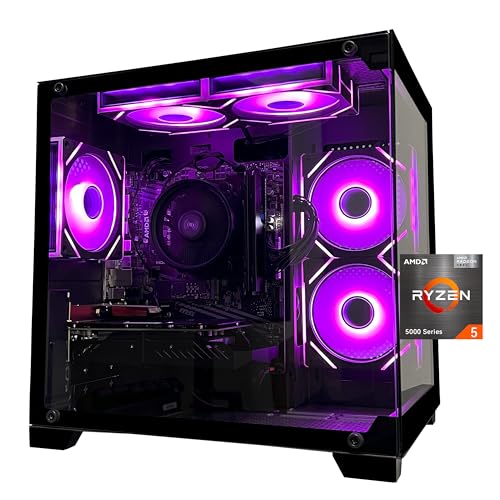
A 32GB memory allotment gives the SKYESEV desktop a practical advantage for multitasking, especially during gaming with a browser, voice chat, and recording software open together. The Ryzen 5 5600 uses six cores and twelve threads, while its RTX 3050 6GB supplies dedicated graphics for everyday 1080p gaming.
The 1TB M.2 NVMe SSD keeps your main applications together without the tight storage limit found on the DeXwtzfn PC. You may find the older DDR4 platform less appealing for a long upgrade path, but its generous memory fits busy home offices well. The ARGB fan and WiFi support add convenience, though exact component branding can matter during future replacements.
Upsides
- 32GB DDR4 memory gives you useful breathing room for games and office applications.
- A 1TB M.2 NVMe SSD accommodates a larger library than a 256GB drive.
- The six-core, twelve-thread Ryzen 5 5600 supports streaming and everyday multitasking.
Minor Gripes
- The RTX 3050 limits practical headroom for demanding 1440p gaming.
- Cleaning ARGB fans and case filters remains part of regular desktop ownership.
- The DDR4 platform is less current than the iBUYPOWER system’s DDR5 memory.
Quick Facts
Best Suited To
You’ll find this desktop most useful for 1080p gaming, home office work, and multitasking on a moderate setup budget.
A Better Fit Elsewhere
The KOTIN Prebuilt Gaming PC serves you better for high-resolution gaming and demanding creative applications.
Integrated graphics make the LXZ a sensible choice for a work desk that also handles casual games. Its Ryzen 7 5700G combines eight cores with built-in Radeon graphics, so you don’t need a separate graphics card for light gaming, office software, and media use.
The 16GB DDR4 memory and 512GB NVMe SSD create a responsive everyday configuration, while WiFi keeps cable clutter down. The 400W power supply aligns with the simpler graphics approach, but you’ll need to check future graphics-card requirements before upgrading. Compared with SKYESEV, this desktop gives you the stronger integrated-graphics concept but less memory and storage.
Plus Points
- Eight CPU cores suit office multitasking, browser-heavy work, and light content tasks.
- Built-in Radeon graphics keep the initial system design uncomplicated.
- NVMe storage helps applications and files open promptly.
- WiFi supports flexible placement in a home office.
Room For Improvement
- Integrated graphics are less suitable for demanding modern games than a dedicated RTX card.
- 512GB can fill quickly once several large games and media projects are stored.
- The 400W power supply leaves less upgrade flexibility than the KOTIN configuration.
Feature Rundown
Who Will Love This
You’ll suit this tower well as a home-office user who wants light gaming without a separate graphics card.
Skip It When
Pick the Evounic Gaming PC instead for you if dedicated RTX 4060 graphics and higher-refresh 1080p gaming matter more.
A basic desktop can still make sense for schoolwork, browsing, older games, and a first keyboard-and-monitor setup. This DeXwtzfn tower pairs an i5 processor listed up to 3.6GHz with integrated graphics, 8GB RAM, and a 256GB SSD.
Four RGB fans add airflow and visual character, while WiFi 6 and Bluetooth 5.3 provide modern wireless connections. The honest trade-off is limited capacity: 8GB memory and 256GB storage leave less room than every other dedicated-gaming option here. You may find the small starting configuration useful for light use, but larger games will quickly make storage management part of ownership.
Best Bits
- Integrated graphics keep the hardware arrangement straightforward for light gaming.
- WiFi 6 and Bluetooth 5.3 support current wireless peripherals and networking.
Points To Note
- 8GB RAM offers less multitasking room than the 16GB and 32GB desktops.
- A 256GB SSD can accommodate only a modest application and game collection.
- Four illuminated fans add cleaning surfaces and may not suit a quiet, minimal desk.
Details At A Glance
The Right Fit
You’ll suit this PC as a casual user needing light gaming, home computing, and a low-demand starter desktop.
Another Choice May Suit
The LXZ Gaming Desktop is a stronger fit for you when eight CPU cores and integrated Radeon graphics matter.
High-refresh 1080p gaming benefits from a dedicated graphics card, and the Evounic combines an RTX 4060 with an i7-11700F processor. That pairing gives you a clear step up from the RTX 3050 desktops for gaming, while 16GB DDR4 memory and a 1TB NVMe SSD keep the everyday foundation sensible.
Nine ARGB fans create a heavily ventilated case design, and WiFi 6 with Bluetooth 5.4 helps you avoid extra adapters. Depending on your room, nine illuminated fans could mean more dust-cleaning work and more visible noise than a simpler case. Windows 11 Pro and VR-ready positioning add flexibility, although the older DDR4 platform is less current than KOTIN’s DDR5 system.
Bright Spots
- RTX 4060 dedicated graphics suit high-refresh 1080p gaming.
- The i7-11700F provides substantial CPU capacity for gaming and multitasking.
- 1TB NVMe storage leaves useful room for games and software.
- WiFi 6 and Bluetooth 5.4 support current wireless connections.
- Windows 11 Pro adds the listed operating-system tier for work and gaming.
Small Caveats
- The DDR4 platform is older than the DDR5 memory used by the iBUYPOWER and KOTIN systems.
- Nine fans can increase dust-cleaning chores and make the case visually busy.
Core Details
Whose Shelf It Belongs On
You’ll suit this system as a gaming-focused user who wants dedicated RTX 4060 graphics for high-refresh 1080p play.
Reach For A Different Pick When
The KOTIN Prebuilt Gaming PC is the better choice for you when 1440p or 4K gaming and newer DDR5 memory take priority.
How To Choose The Right Mid Gaming Cpus
Match The Processor to Your Games
You’ll want to separate CPU needs from graphics needs. A CPU handles game logic, background apps, and general calculations, while a graphics card renders the image on your display. For esports games at high refresh rates, processor capacity matters more than it does for slower single-player titles at 4K.
Six-core options such as the Ryzen 5 5600 and Ryzen 5 8400F suit mainstream gaming and everyday multitasking. Eight-core choices such as the Ryzen 7 5700G and Ryzen 7 9700X give you more room for streaming, editing, and heavy browser use. The i7-11700F also makes sense for a mixed gaming and workstation desk.
Give the Graphics Card Equal Weight
A strong CPU paired with weak graphics can still limit game settings. Integrated graphics, as found with the Ryzen 7 5700G and DeXwtzfn system, work for light gaming and ordinary display output, but dedicated RTX cards are more appropriate for modern 1080p play.
The RTX 3050 systems target accessible 1080p gaming. The RTX 4060 moves you toward higher refresh rates, while the RTX 5070 system is aimed at 1440p and 4K displays. Match the tower to your monitor instead of paying for graphics capacity you won’t use.
Check Memory, Storage, and Upgrade Room
16GB RAM remains a sensible starting point for gaming and home use, while 32GB gives you more breathing room for streaming, editing, and multiple open applications. Storage matters just as much: a 256GB SSD fills quickly, 512GB works for a modest library, and 1TB offers more comfortable space.
You should also inspect power supply capacity, cooling layout, and case access before planning upgrades. The KOTIN’s 850W supply and 360mm cooler suit a more demanding build, while the LXZ’s 400W supply points toward a simpler graphics approach.
What To Weigh Before You Choose
Mistakes Worth Dodging
You can easily focus on the processor name and overlook the graphics card, memory, or storage. A desktop with an i7 label may still feel restrictive for games when it has only 8GB RAM, integrated graphics, or a 256GB SSD.
You should also confirm whether the item is a complete computer or a component. The be quiet! Pure Loop 2 FX is a cooler, not a working desktop, so you’ll need a compatible case, motherboard, processor, memory, storage, and operating system around it.
Where The Extra Money Goes
Higher-tier systems generally combine stronger graphics, more memory, better cooling, and a roomier power supply. Those additions matter most for high-resolution monitors, streaming, creative software, and long gaming sessions.
The upgrade makes sense for you when your display and software can use the extra capacity. For casual 1080p play, a Ryzen 5 and RTX 3050 system may be enough, while demanding 1440p or 4K use points toward the KOTIN configuration.
Closing Remarks
Your best match depends on the whole setup, not the CPU label alone. Choose the DeXwtzfn or LXZ for light gaming and home use, the iBUYPOWER or SKYESEV for approachable 1080p desktops, and the Evounic for stronger dedicated graphics. The KOTIN gives you the most headroom for demanding gaming, while the be quiet! cooler belongs in a carefully planned custom build. Start with your monitor resolution, game library, storage needs, and upgrade plans, then choose the system that fits your actual desk life.
