
Shopping for Mobile Cpus can mean two very different things: finding a replacement processor for an older notebook, or choosing a rolling stand that keeps a desktop tower accessible. This roundup covers both needs, from socket-specific Intel processors to adjustable carts for home offices, classrooms, and gaming desks. You’ll find the most useful differences explained in plain language, including compatibility, footprint, mobility, cooling, and storage. Match the item to your computer model and workspace before placing an order.
The Shortlist At A Glance
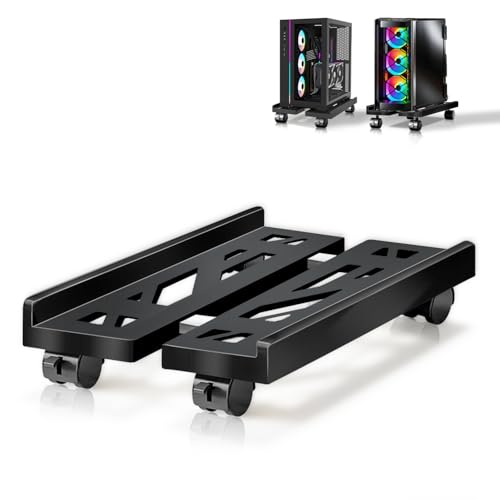
Hmfmdy PC Stand Mobile CPU Stand Adjustable Rolling Black
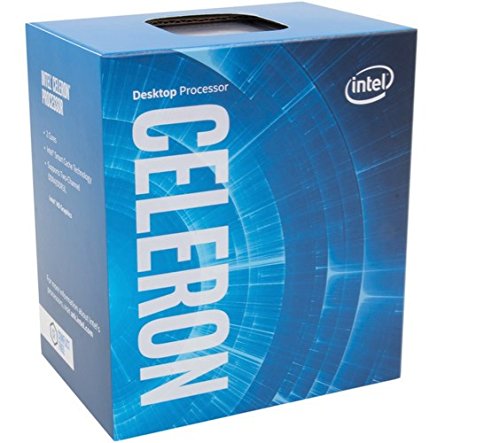
Intel CPU BX80662G3900 Celeron G3900 LGA1151 Skylake Retail

YBING Computer Tower Stand 2 Tier Metal Mobile Cart Black
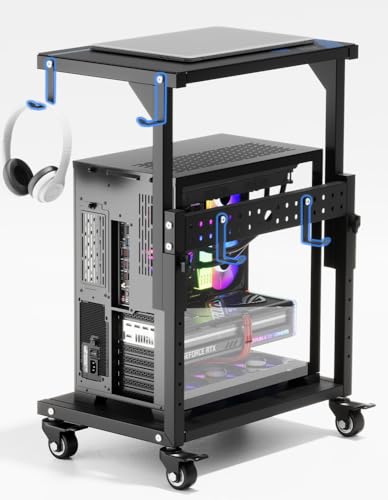
ZUAVIALA Computer Tower Stand 6 Level Adjustable Black

CABTE Computer Tower Stand Cooling Fan Adjustable Mobile Holder

Intel Core i5-560M SLBTS 2.66GHz Socket G1 Mobile CPU

Intel Core i5-3210M 2.5GHz Socket G2 Mobile CPU OEM
More Details On Our Top Picks
Daily floor cleaning and rear-port access become less awkward with a rolling platform under your tower. The Hmfmdy stand uses an adjustable width, so you can set the side supports around a range of desktop cases rather than forcing a narrow chassis into a fixed tray.
The four caster wheels suit a home office where the tower needs occasional repositioning, while two locking casters help hold it in place during cable work. You may find the 15.7-inch length restrictive for unusually deep cases, so measure your chassis first.
Strong Points
- Width adjustment from 7.87 to 12.2 inches accommodates many standard tower shapes.
- Rolling mobility makes vacuuming and rear-panel access easier.
- Locking wheels provide a steadier parked position.
- Raising the tower off the floor can improve clearance around its lower vents.
Things To Consider
- Very deep cases may extend beyond the 15.7-inch platform length.
- Wheel tracks and adjustment points need occasional dust removal in carpeted rooms.
Key Specs
Who It Suits Best
Home-office users with a conventional desktop tower and limited space around the desk.
Another Choice May Suit
YBING’s two-tier metal cart suits you more when a printer shelf and larger tower clearance matter.
Socket compatibility matters more than the Celeron name here. The G3900 uses Intel’s Skylake design, two processing cores, two threads, and a 2.80 GHz clock, making it a sensible service part for a basic LGA1151 desktop used for documents, browsing, or point-of-sale tasks.
Integrated Intel HD Graphics 510 can support a simple display setup without a separate graphics card. For multitasking-heavy work, you may find the two-thread design limiting, and the 51 W thermal design power means your existing cooling solution still needs to match the platform.
Upsides
- LGA1151 fit targets a clearly defined generation of desktop motherboards.
- 2.80 GHz operation suits routine office software and light home computing.
- Integrated graphics can simplify a basic replacement build.
Trade Offs
- Two cores and two threads leave less headroom for demanding modern applications.
- Skylake-era compatibility requires careful motherboard and memory checks before installation.
Technical Sheet
Made For
You’ll get the best fit as a desktop repairer restoring an LGA1151 office computer for straightforward workloads.
Look Elsewhere When
Intel Core i5-3210M suits older notebook service more closely because it is a mobile Socket G2 processor.
A second shelf changes the role of a tower stand, giving you a place for a printer, documents, or accessories beside the computer. The YBING uses a two-level metal layout, and each shelf is specified to support up to 40 pounds, which fits a home office with several compact devices.
Its rolling design helps during floor cleaning or cable changes, while locking casters add control once the cart reaches its position. Compared with the Hmfmdy stand, it takes more vertical and horizontal planning, and carpet can make any small caster cart harder to steer.
Highlights
- Two tiers create useful storage without adding another side table.
- Metal construction suits regular office equipment handling.
- Stated 40-pound capacity per shelf gives you a clear load reference.
- Rolling access helps you reach cables and clean beneath the setup.
- The lower shelf supports towers under 22 inches long, 11 inches wide, and 18 inches high.
Minor Gripes
- The two-tier frame needs more clearance than a single-platform stand.
- Keep shelf surfaces clear of dust so casters and tower vents remain easier to maintain.
Feature Snapshot
Right Fit For
Small offices, classrooms, and study areas that need tower mobility plus a surface for a printer or papers.
Consider Something Else When
CABTE suits you more when airflow underneath the tower matters more than having a second shelf.
Desk height is the deciding detail with the ZUAVIALA stand. Six height positions cover 21.34 to 28.3 inches, allowing you to place a printer, soundbar, papers, or another accessory above the tower while keeping the arrangement aligned with a taller desk.
The metal frame is specified for an 88-pound upper shelf and a 110-pound lower shelf, giving this cart a more substantial role than Hmfmdy’s compact platform. You may find the larger structure excessive beside a narrow desk, but gaming rooms and shared workstations can make better use of its storage capacity.
Bright Spots
- Six height settings make desk matching more flexible.
- High stated shelf capacities suit heavier office equipment.
- The upper platform turns unused vertical space into storage.
- Metal construction is a sensible choice for a permanent office arrangement.
Room For Improvement
- The larger frame needs careful measuring around desk legs and nearby cabinets.
- Adjustable joints and casters can collect dust, so periodic cleaning helps preserve smooth movement.
- Assembly takes more attention than a basic single-level riser.
At A Glance
Best Suited To
You’ll appreciate this stand most in a gaming office or shared workstation that needs adjustable height and two strong shelves.
Not Your Match When
Hmfmdy is a better fit for you when a compact under-desk platform matters more than storage capacity.
A built-in bottom fan gives CABTE a distinct purpose beyond mobility. Active airflow means the fan moves air beneath the tower, while the raised platform leaves space between the case and floor, a useful arrangement for a desktop in a warm gaming room or busy classroom.
Four 360-degree swivel casters help you turn the tower into position, and two locking wheels can hold it during use. The honest trade-off is added complexity: you’ll need to keep the fan area clear of dust and confirm that the fan’s power arrangement suits your setup.
Standout Traits
- Integrated cooling fan adds airflow beneath the case.
- Raised support improves clearance from the floor.
- Full-swivel casters make directional changes easier in tight rooms.
- Two locking casters help keep the cart stationary during cable work.
Points To Note
- Fan openings need regular dust attention in carpeted or pet-heavy rooms.
- Noise and cable placement may matter in a quiet study area.
Quick Facts
Who Will Love This
This choice fits desktop users who want a mobile tower platform with added airflow beneath the case.
Swap It Out When
ZUAVIALA suits you more when you need strong two-shelf storage and adjustable desk height instead of a fan.
Older laptop repairs depend on matching the exact processor socket, not just choosing a familiar Core label. The i5-560M uses Socket G1 with a 988-pin layout, two cores, a 2.66 GHz clock, and 3 MB of cache, so it targets a narrow group of legacy notebooks.
For a compatible laptop used for writing, basic browsing, or light media work, the part can make sense as a direct service option. You may find the platform too old for a broader upgrade plan, and installation requires careful handling of the socket, thermal material, and cooling assembly.
Best Bits
- Socket G1 identification helps you target the correct notebook platform.
- Two cores and 3 MB cache suit routine older-laptop workloads.
- Its compact mobile format fits notebook repair rather than desktop builds.
Small Caveats
- Socket and pin compatibility must be confirmed before disassembly.
- Legacy laptop servicing may require fresh thermal material and careful heatsink cleaning.
- Modern software demands can exceed this older dual-core platform.
Details At A Glance
Built With In Mind
This processor is aimed at repair-focused users restoring a compatible first-generation Core laptop.
Reach For A Different Pick When
Intel Core i5-3210M is a better fit for you when your notebook uses Socket G2 rather than Socket G1.
Socket G2 separates this processor from the i5-560M, making it the more relevant path for a different generation of older notebooks. The i5-3210M provides two cores, a 2.50 GHz base speed, 3 MB cache, Intel HD Graphics 4000, and a 35 W thermal design power.
That combination fits an older laptop used for office documents, browsing, and local media playback, provided the motherboard supports the part. OEM packaging can mean a more component-focused purchase, so you’ll need to account for the existing heatsink, cooling fan, and installation materials during a repair.
Positives
- Socket G2 gives you a clear compatibility target.
- Integrated HD Graphics 4000 can handle ordinary display duties without a separate graphics device.
- 35 W thermal design power suits the lower-power expectations of a notebook platform.
- 3 MB cache and dual-core processing remain useful for basic everyday laptop work.
Areas To Watch
- OEM packaging may require you to reuse or source the correct cooling hardware.
- Older notebooks can have limited memory, storage, and firmware support beyond the processor swap.
Core Details
Whose Shelf It Belongs On
This processor suits you as a repair hobbyist or technician servicing a compatible Socket G2 notebook.
Where A Sibling Pick Shines
Intel Core i5-560M is the stronger match for you when your older laptop specifically requires Socket G1 and its 988-pin arrangement.
How To Choose The Right Mobile Cpus
Start With The Hardware Match
A processor upgrade begins with the socket, chipset, and laptop or desktop generation. Socket G1 and Socket G2 are physical processor interfaces, meaning the chip must match the motherboard’s layout before clock speed or Core branding matters. The i5-560M and i5-3210M target different notebook platforms, while the G3900 uses desktop LGA1151.
Write down the exact computer model, existing processor, socket, and supported memory type. A physically similar chip can still fail to work because firmware, power delivery, or chipset support differs.
Separate Laptop Parts From Tower Accessories
The first, third, fourth, fifth, and item one are rolling tower stands, not processors. A stand changes placement, clearance, and access around your computer, but it won’t change processing speed. That distinction matters during a workstation refresh, since a mobility problem calls for a cart while a failed or outdated chip calls for a compatible CPU.
For a cramped home office, compare platform width, case depth, shelf height, caster behavior, and storage. A single-level stand keeps the footprint modest, while a two-tier frame adds useful equipment space at the cost of more room.
Read Core Counts Alongside Clock Speed
Clock speed describes how quickly a processor’s cycles run, while cores are separate processing units that handle work. Two cores at 2.80 GHz can feel responsive for documents and light browsing, yet demanding multitasking may expose the limits of two threads. Cache, integrated graphics, and thermal design power also affect how a replacement fits the existing system.
For older laptops, thermal design power helps you assess cooling expectations. A 35 W mobile chip and a 51 W desktop chip belong to different physical environments, so matching the cooling assembly matters.
Plan The Installation
Desktop processors generally require motherboard access, compatible cooling, and appropriate memory support. Notebook replacements are more delicate because the processor sits near compact cooling hardware and tightly routed components. You’ll want the correct thermal material, a clean work surface, and a clear record of screw locations before opening the chassis.
Rolling stands also benefit from basic preparation. Measure the tower, desk clearance, cable length, and floor surface, then lock the casters before reconnecting peripherals.
Things Worth Knowing First
Mistakes Worth Dodging
The common mistake is treating “mobile CPU” as a single category. A rolling mobile CPU stand holds a computer tower, while a mobile processor is the silicon component inside a laptop. Check the item type, socket, dimensions, and intended platform before you compare features.
You’ll also want to avoid guessing from processor names alone. Confirm the motherboard generation and cooling arrangement, especially for the Socket G1, Socket G2, and LGA1151 options here.
The Upgrade Payoff
Higher-tier stands add features such as multiple shelves, height adjustment, or an integrated fan. Those additions make sense for a shared workstation, a larger gaming tower, or a room where airflow and equipment storage matter.
Higher-tier processors generally offer more cores, newer architecture, or broader platform support, but the three CPUs here are older service parts. Spending more on a processor only pays off when the computer can use it and the improvement solves a specific workload problem.
Final Verdict
You can narrow this list quickly by identifying the problem first. Hmfmdy works for a compact rolling tower platform, YBING adds a second shelf, ZUAVIALA brings height and load flexibility, and CABTE focuses on airflow. For laptop repairs, the socket decides between Intel Core i5-560M and Intel Core i5-3210M, while the Celeron G3900 belongs to compatible desktop systems. Measure carefully, confirm platform support, and choose the item that fits your actual workspace or repair plan.
