
A good all-in-one can clear clutter without making your desk feel stripped down. For home offices, family spaces, and work-from-home setups, the real question is simple: do you want a bigger screen, easier setup, and fewer loose cables, or a compact box with more ports and flexibility?
The eight picks below cover both camps. You’ll see entry-level desktops for basic daily use, larger 27-inch models for shared spaces, and a mini PC for anyone who wants the screen and computer separated.
A Fast Look At The Shortlist

HP 2025 22″ FHD All-in-One Desktop Computer

Lenovo IdeaCentre All-in-One Desktop Computer

24″ All-in-One Desktop PC with Windows 11

GMKtec Mini PC Ryzen 5 3500U 16GB RAM 512 SSD

Lenovo IdeaCentre 24″ FHD All-in-One Desktop
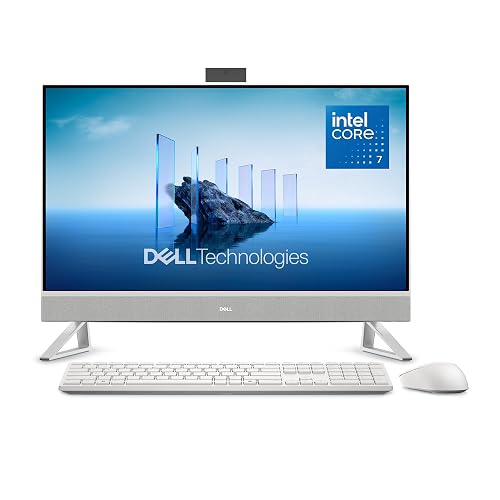
Dell 27″ All-in-One Desktop
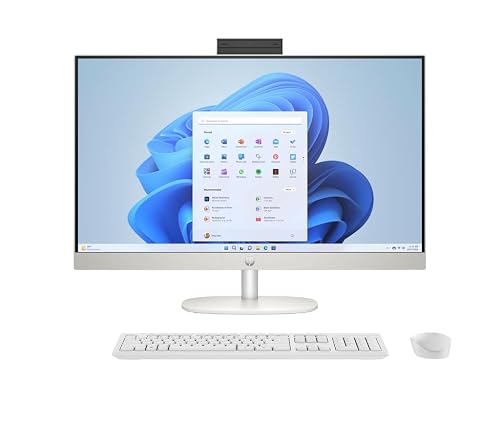
HP 27 inch All-in-One Desktop PC
More Details On Our Top Picks
The 22-inch screen keeps this HP nicely compact for a bedroom desk, dorm corner, or a kitchen counter that doubles as a family command center. The 13th Gen Intel quad-core processor, 8GB DDR5 memory, and 128GB of storage point to a machine made for web work, school tasks, and light multitasking rather than heavy creative projects.
That smaller storage tier is the main trade-off, so cloud storage or an external drive will matter more here than on the Lenovo and Dell picks later in the list. On the plus side, HDMI, Type-C, Wi-Fi, an HD webcam, and Windows 11 Pro make it a tidy starter setup for someone who wants less fuss and a cleaner desk.
Strong Points
- 22-inch footprint fits small desks without crowding your space.
- DDR5 memory helps everyday switching feel more responsive.
- HDMI and Type-C add flexible connection options.
- HD webcam suits video calls from a home office or study nook.
- Windows 11 Pro is useful for work-minded setups that need extra system controls.
Things To Consider
- 128GB storage fills faster than the 512GB and 1TB models in this roundup.
- The 22-inch display leaves less room for side-by-side windows.
- Heavy multitasking or large photo libraries call for a roomier option.
Feature Snapshot
Who It Suits Best
Students, light home-office users, and anyone setting up a simple shared workstation will get the most from this compact HP.
Swap It Out When
Lenovo IdeaCentre All-in-One Desktop Computer suits you better if you want a 24-inch screen and 512GB of storage for a less cramped daily setup.
This Lenovo shifts the balance toward screen comfort, which matters in a family room or a work corner where you stay on the machine for long stretches. The 24-inch FHD panel uses anti-glare IPS, meaning the display is built to cut reflections and keep viewing angles more forgiving than a basic glossy panel.
Storage jumps to 512GB SSD, so you get more breathing room for documents, downloads, and a photo library than the HP 22-inch option offers. Wi-Fi 6 and Bluetooth 5.2 round out a setup that feels ready for a printer, headset, or wireless mouse without much setup drama.
What We Like
- 24-inch FHD display gives you more room for side-by-side work.
- Anti-glare IPS panel helps in bright rooms and near windows.
- 512GB SSD leaves more space for apps and files.
- Wi-Fi 6 and Bluetooth 5.2 fit a modern wireless desk.
- Clean all-in-one design keeps cabling lighter than a tower setup.
Minor Gripes
- 8GB memory is fine for daily use, but power multitaskers may want more.
- The larger screen takes up more desk width than the HP 22-inch model.
- Owners who store lots of video files may still outgrow 512GB over time.
Quick Facts
Made For
Home users who want a larger screen without jumping to a premium workstation feel should find this Lenovo very practical.
Another Choice May Suit
Dell 27″ All-in-One Desktop works better for you if a larger 27-inch panel matters more than Lenovo’s smaller footprint and 24-inch screen.
This Core Innovations model keeps the formula stripped down, which can be exactly right for a spare room, a student desk, or a household machine that mostly handles browsing and everyday documents. The 24-inch size gives you a bit more breathing room than the HP 22-inch pick, while staying more compact than the 27-inch Dell options.
The trade-off is obvious from the bare-bones naming: you’re looking at a simpler setup with fewer clues about extras, so it suits shoppers who value a straightforward desktop over feature-heavy trim. That honesty can be useful, especially in a busy kitchen or shared space where you just want the machine to stay out of the way.
Upsides
- 24-inch panel gives a useful middle ground for desk space.
- Windows 11 keeps the software side current.
- Simple design works well in no-frills setups.
- Less visual clutter than a tower-and-monitor pair.
Points To Note
- Source details are sparse, so you should expect a basic configuration.
- Light-duty use is the safer fit than heavy multitasking.
- Storage, memory, and ports are not spelled out here.
Core Details
Whose Shelf It Belongs On
Minimalists, students, and anyone setting up a second family computer will appreciate how plain and easy this one feels.
Where A Sibling Pick Shines
Lenovo IdeaCentre All-in-One Desktop Computer fits better for you if you want more confirmed storage and a clearer set of wireless features.
Compared with the all-in-one desktops above, this GMKtec gives you the computer in a much smaller box, which is useful when your monitor choice is already set. Ryzen 5 3500U, 16GB of memory, and a 512GB SSD make it more flexible than the simplest desktops here, and that extra breathing room shows up in heavier tab use or office multitasking.
The real draw is the port spread: 2.5GbE LAN, HDMI 2.1, USB-C, DisplayPort, Wi-Fi, Bluetooth, and support for triple 4K display setups. That makes it a smart fit for someone building a neat desk or a small home server-style station, though it does ask you to manage your own monitor, keyboard, and cabling.
Reasons To Buy
- Very small footprint leaves the desk open for other gear.
- 16GB RAM suits busier workdays than 8GB systems.
- 512GB SSD gives comfortable everyday storage headroom.
- Triple-display support helps with trading screens or work dashboards.
- 2.5GbE LAN is useful for faster wired networking where supported.
Areas To Watch
- You supply the display, so the total setup takes more planning.
- Small boxes can collect dust around vents, so placement matters.
- It fits best in desk-based setups, not a grab-and-go role.
Feature Rundown
Built With In Mind
Desk-bound users who already own a monitor and want more port flexibility should find this mini PC a sensible fit.
Reach For A Different Pick When
Dell 27″ All-in-One Desktop fits you better if you want an all-in-one screen and computer in a single unit with less setup work.
The 27-inch panel is the first thing you notice, and that larger canvas pays off in shared rooms, recipe browsing, schoolwork, or any setup where text size matters. Core 5 120U, 16GB DDR5, and a 512GB SSD put this Dell in a comfortable middle lane, with enough muscle for normal family use and less friction than the smaller 8GB machines.
It also arrives with keyboard and mouse included, which keeps the first-day setup simple. Wi-Fi 6E and Bluetooth make the wireless side feel current, though the larger body asks for more desk depth than the Lenovo 24-inch model.
Highlights
- 27-inch FHD screen is easy on the eyes for long sessions.
- 16GB DDR5 supports broader multitasking than 8GB entries.
- 512GB SSD gives decent room for everyday files and software.
- Keyboard and mouse are included, so setup starts neatly.
- Wi-Fi 6E and Bluetooth fit a modern home desk.
Room For Improvement
- The larger base needs more desk depth than 24-inch options.
- It may feel like more machine than a casual browser really needs.
- Owners who want a very compact setup may prefer HP’s 22-inch pick.
Details At A Glance
Best Suited To
Families, home-office users, and anyone who likes a larger screen without moving to a separate monitor setup will feel at home here.
Look Elsewhere When
HP 2025 22″ FHD All-in-One Desktop Computer makes more sense for you if desk space is tight and a smaller footprint matters most.
This Lenovo looks a lot like the earlier 24-inch model, but the jump to 16GB of memory changes the feel for anyone who keeps several browser tabs, documents, and chat windows open at once. The 512GB SSD keeps storage practical, and the Intel Graphics are enough for everyday visual tasks without pretending this is a gaming machine.
In a home office or family study corner, that extra memory can make the system feel less boxed in during busy afternoons. The trade-off is that the screen size stays at 24 inches, so you still get a more modest footprint than the Dell 27-inch picks.
Best Bits
- 16GB memory gives more room for multitasking than the 8GB Lenovo above.
- 512GB SSD provides solid everyday storage.
- 24-inch size stays manageable on smaller desks.
- Wi-Fi 6 supports modern wireless home networks.
Softer Spots
- The 24-inch format still feels smaller than the 27-inch Dell options.
- Intel Graphics are fine for daily work, not demanding creative workloads.
- Owners who want touchscreen input should look to the HP 27-inch model instead.
Feature Card
The Right Fit
Home-office users who want a compact all-in-one with more memory than entry machines should feel good about this Lenovo.
Skip It When
HP 27 inch All-in-One Desktop PC suits you better if a touchscreen and larger 27-inch panel matter more than this Lenovo’s smaller frame.
This Dell is the closest thing here to a step-up desktop that still keeps the all-in-one shape tidy. Intel Core 7 150U, 16GB memory, and a 1TB PCIe NVMe SSD give it the strongest storage headroom in the list, which matters for households that keep lots of files on one machine or dislike constant cleanup.
It also includes McAfee+ Premium and 15-month mail-in service, though the real value for many shoppers is the faster-feeling hardware mix. Compared with the earlier Dell 27-inch model, this one makes more sense for heavier everyday use, not because it looks fancier, but because it gives you more internal breathing room.
Positives
- 1TB SSD offers the most storage headroom in this roundup.
- Core 7 150U gives the broadest performance margin among these Dell units.
- 27-inch panel keeps the work area roomy and easy to scan.
- 16GB memory supports busier home-office routines.
- Included keyboard and mouse keep setup straightforward.
Trade Offs
- It takes more desk depth than the 24-inch Lenovo options.
- The bundled extras are useful, though not everyone needs them.
- Users who only browse casually may not need this much storage.
Technical Sheet
Who Will Love This
Busy home-office users, large-file households, and anyone who wants more breathing room from both the screen and the storage should look here first.
Where Shoppers Go Wrong
Dell 27″ All-in-One Desktop with Intel Core 5 120U is the safer fit for lighter day-to-day use and a lower-commitment setup.
The touchscreen sets this HP apart right away, and that matters more than it sounds in a family room or shared office. A 27-inch FHD panel, Ryzen 5 7520U, 16GB memory, and a 1TB SSD make it easy to move between browsing, streaming, document work, and casual task switching without feeling cramped.
Built-in speakers are another useful touch, especially when you want fewer extras on the desk. The honest read is that the touchscreen and big storage are the main reasons to pay attention here, while the trade-off is simple, it’s a larger machine that fits best on a proper desk rather than a tiny nook.
Bright Spots
- Touchscreen input adds a more direct way to navigate.
- 1TB SSD gives generous storage for a home hub.
- 16GB memory supports several everyday tasks without strain.
- Built-in speakers help keep the desk cleaner.
- Windows 11 Pro makes it suitable for work-oriented setups.
Small Caveats
- The 27-inch body needs a stable, wider desk surface.
- Touch input is useful, though not everyone uses it often.
- Users who want a smaller frame may prefer the Lenovo 24-inch picks.
Core Details
Perfect Match For
Families and home-office users who want a roomy touchscreen all-in-one with strong storage should feel comfortable here.
Where Another Pick Suits Better
Lenovo IdeaCentre 24″ FHD All-in-One Desktop fits you better if you want a smaller footprint and can live without the touchscreen.
How To Choose The Right Price Alls In One Computer
Screen Size And Desk Fit
The screen sets the tone before the processor ever matters. A 22-inch model like the HP makes sense for tight desks and side tables, while 24-inch machines give you a steadier middle ground for schoolwork and office tasks. A 27-inch all-in-one feels more open for spreadsheets, video calls, and family use, but it also needs more depth on the desk.
Memory, Storage, And Daily Pace
RAM, short for random access memory, affects how comfortably the machine handles open apps at once. 8GB suits lighter browsing and document work, while 16GB feels safer for busier days with more tabs and background apps. Storage matters just as much, because 128GB fills quickly, 512GB suits most homes well, and 1TB gives you real breathing room for photos, downloads, and software.
All-In-One Or Mini PC
An all-in-one keeps the screen and computer in a single body, so the desk looks cleaner and setup stays simple. A mini PC like the GMKtec works better when you already own a monitor and want more port flexibility or a smaller computer box. The trade-off is straightforward, all-in-ones are easier to live with, while mini PCs ask for more pieces and planning.
Ports, Wireless, And Everyday Accessories
HDMI, Type-C, Wi-Fi, Bluetooth, and Ethernet each solve a different annoyance. HDMI and Type-C help with external displays and newer devices, Wi-Fi 6 or Wi-Fi 6E helps the network side, and Bluetooth keeps a mouse, headset, or keyboard from eating up cables. Keyboard and mouse bundles also matter more than people expect, because a ready-to-go setup saves a trip through accessory aisles.
Before You Click Around
Common Shopping Slip Ups
One common miss is focusing only on screen size and ignoring storage. A roomy display still feels cramped when the drive is too small for your files, and that shows up fast in homes that keep photos, downloads, and school documents in one place. Another slip is treating 8GB memory as enough for every setup, because busier households usually feel the limit sooner.
Where The Extra Money Goes
Higher-tier models usually spend more on a larger panel, more memory, faster storage, and better connectivity. You also see it in better day-to-day feel, since a 1TB SSD and 16GB memory pair can handle messier real life with less fuss than basic entry hardware. Paying up starts to make sense once the machine becomes a main family hub or a work-from-home station.
Frequently Asked Questions
What makes an all-in-one different from a desktop tower?
An all-in-one combines the screen and computer into one body, so the desk stays cleaner. A tower setup separates those parts and usually gives you more upgrade flexibility later.
Is 8GB of memory enough for everyday use?
8GB works for browsing, email, streaming, and documents. Busy multitaskers usually feel more comfortable with 16GB.
How much storage should you look for?
128GB fits very light use, but it can feel tight fast. 512GB is the safer middle ground for most homes, while 1TB suits people who keep lots of files locally.
Do larger screens always mean a better choice?
Not always, because larger screens also need more desk space. A 27-inch model feels easier to work on, but a 22-inch or 24-inch option can fit a smaller room better.
Is a mini PC a good substitute for an all-in-one?
A mini PC works well when you already own a display and want a smaller computer box. An all-in-one suits you better when you want the simplest setup with fewer separate pieces.
Closing Thoughts
The right pick here depends less on brand and more on how your desk gets used every day. Small-space setups lean toward the HP 22-inch or Core Innovations option, while the 24-inch Lenovo models feel like the safest middle ground. For bigger family stations, the 27-inch Dell and HP units bring more comfort, and the GMKtec mini PC makes sense for a monitor-first desk. Choose the screen size and storage that match your routine, and the rest gets a lot easier.



