
You need a processor that fits your motherboard, workload, and upgrade plans without wasting money on power you won’t use. This shortlist covers modern gaming chips, high-thread-count options for creation work, and older processors suited to carefully planned refurbishments. You’ll also find practical cautions about sockets, cooling, memory, and OEM packaging, so your next desktop build is easier to plan.
The Shortlist at a Glance

AMD Ryzen 9 5900XT Processor
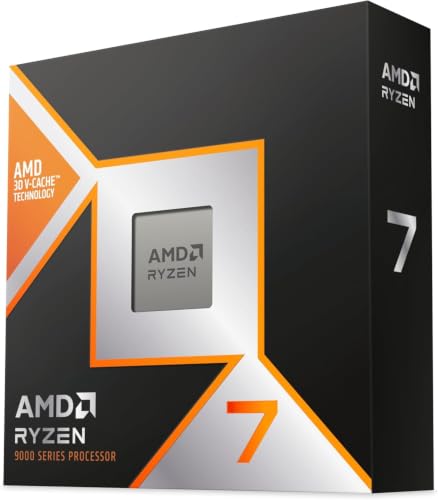
AMD Ryzen 7 9850X3D Desktop Processor

AMD Ryzen 7 5800X3D Desktop Processor

Intel Core Ultra 7 270K Plus Processor

Intel Core 2 Duo E6700 Processor LGA 775

Intel Core i3-12100 Desktop Processor
Intel Core i3-10105 LGA1200 Processor
More Details On Our Top Picks
Sixteen cores and 32 threads give this AM4 processor plenty of room for video work, compiling, streaming, and gaming from the same desktop. A thread is a stream of work a core can process, so the high count matters during heavy multitasking, not just quick office tasks.
The 4.8 GHz boost ceiling and 72 MB cache suit demanding software, while DDR4-3200 and PCIe 4.0 keep the platform familiar for an existing AM4 build. You may find the lack of an included cooler adds planning work, especially for sustained rendering, but the unlocked design gives experienced builders room to tune it.
Strong Points
- Sixteen cores support demanding creative workloads and frequent multitasking.
- Thirty-two threads help keep streaming, editing, and background tasks moving together.
- AM4 and DDR4 support can reduce the parts needed for a platform refresh.
- Unlocked operation appeals to enthusiasts who understand manual tuning.
- PCIe 4.0 supports compatible storage and graphics hardware.
Things To Consider
- A separate cooler is required, and sustained workloads call for suitable airflow.
- AM4 limits your future platform path compared with newer socket designs.
Key Specs
Who It Suits Best
Choose it for an AM4 desktop handling editing, streaming, coding, and gaming without a complete platform rebuild.
Consider Something Else When
AMD Ryzen 7 9850X3D Desktop Processor suits dedicated high-refresh gaming systems that prioritize gaming-focused design over extra cores.
Gaming-focused desktops need a processor that can feed a fast graphics card without turning every background task into a distraction. The Ryzen 7 9850X3D is built around that priority, making it a natural match for high-refresh play and carefully balanced enthusiast systems.
You may find the eight-core layout less attractive for extensive rendering than the 5900XT’s 16 cores, yet gaming specialists often value cache behavior and responsive cores more than raw thread count. Plan the motherboard, memory, and cooling around the current platform details shown on the listing.
What You Like About It
- Gaming-first positioning makes its purpose easy to understand.
- Eight cores provide a sensible base for gaming and everyday desktop work.
- Its newer design gives fresh-build enthusiasts a focused upgrade route.
Worth Noting
- Eight cores may feel limiting beside the Ryzen 9 5900XT during major creator workloads.
- Platform compatibility deserves careful checking before installation.
- A suitable cooler and case airflow should be planned separately.
At A Glance
Made For
High-refresh gaming enthusiasts who want a modern, gaming-centered desktop foundation.
Not Your Match When
Intel Core Ultra 7 270K Plus Processor is a better fit for creators who want 24 total cores and broad DDR5 and PCIe support.
For an existing AM4 gaming desktop, the Ryzen 7 5800X3D offers a targeted way to gain a large 96 MB L3 cache without moving to a new memory standard. L3 cache is fast storage built into the processor, and its generous capacity can help game data stay close to the cores.
Eight cores and 16 threads remain useful for gaming, streaming, and daily applications, while the 4.5 GHz boost rating keeps active software responsive. The honest trade-off is age: the AM4 socket and DDR4-3200 support are convenient for an upgrade, but less flexible for a brand-new system.
Highlights
- Large 96 MB L3 cache is well matched to gaming workloads.
- Eight cores and 16 threads handle gaming plus moderate background work.
- AM4 compatibility can make an upgrade less disruptive for existing systems.
- PCIe 4.0 support works with compatible B550 and X570 boards.
Trade Offs
- A cooler is not included, so installation planning matters.
- Its older platform gives new-build shoppers less room for later expansion.
Feature Snapshot
Right Fit For
AM4 desktop owners who mainly game and want a meaningful processor upgrade without replacing the entire platform.
Reach For A Different Pick When
AMD Ryzen 9 5900XT Processor suits you more when video production, compiling, or heavy multitasking outweighs gaming specialization.
Intel’s split-core layout gives you eight P-cores for demanding primary tasks and 16 E-cores for lighter parallel work, totaling 24 cores. That arrangement suits a desktop used for gaming, editing, compression, and background utilities, though the motherboard choice becomes part of the project.
The LGA1851 socket, Intel 800 Series chipset requirement, DDR5 support, and PCIe 5.0 connectivity point toward a new enthusiast build rather than a casual swap. Depending on your case and workload, the listed 125W base power also makes cooling and airflow worth planning before assembly.
Upsides
- Twenty-four cores give creators substantial parallel processing capacity.
- P-core and E-core separation suits mixed gaming and productivity workloads.
- DDR5 support provides a current memory path for a new desktop.
- PCIe 5.0 and 4.0 support accommodate current and future-compatible expansion hardware.
- Up to 5.5 GHz supports responsive active applications.
Room For Improvement
- LGA1851 requires a compatible Intel 800 Series motherboard.
- DDR5 and a separate cooling plan can raise the complexity of the build.
- The 125W base power favors a case with deliberate airflow planning.
Technical Sheet
Who Will Love This
Enthusiast creators and gamers planning a new DDR5 desktop with substantial multitasking needs.
Where A Sibling Pick Shines
AMD Ryzen 7 5800X3D Desktop Processor is a better fit for AM4 owners seeking a focused gaming upgrade with existing DDR4 hardware.
Older repair projects have different priorities from a new gaming build. The Core 2 Duo E6700 targets Socket T, also known as LGA 775, with two cores, a 2.66 GHz clock, and a 1066 MHz front-side bus.
That makes it relevant for restoring a compatible office tower, educational system, or period-correct desktop. You may find the 4 MB L2 cache and dual-core layout adequate for light legacy software, but modern multitasking will feel constrained beside the Core i3-10105.
Plus Points
- Exact LGA 775 support helps restore compatible older desktops.
- Two-core operation suits basic legacy software and simple office tasks.
- The 2.66 GHz clock matches the needs of period-specific repair work.
Minor Gripes
- Legacy motherboard compatibility must be confirmed before installation.
- OEM packaging may require extra care during storage and handling.
- Modern applications and multitasking can exceed its modest processing layout.
- Replacement thermal material and a compatible cooler may be part of the restoration work.
Quick Facts
Whose Shelf It Belongs On
Refurbishers and hobbyists restoring a compatible LGA 775 computer for light legacy use.
Swap It Out When
Intel Core i3-12100 Desktop Processor suits a new home or office desktop far better than this legacy chip.
Four cores make the Core i3-12100 a straightforward option for schoolwork, office applications, browsing, media playback, and modest desktop tasks. Its UHD Graphics 730 can also simplify a basic build that doesn’t need a separate graphics card for everyday display output.
The LGA 1700 socket gives this chip a more current platform position than the i3-10105, while the 4.3 GHz ceiling supports quick bursts of activity. This OEM tray version excludes retail packaging and a cooler, so you’ll need to verify the motherboard and arrange cooling before putting the system together.
Bright Spots
- Four cores suit everyday home, school, and office workloads.
- UHD Graphics 730 can support a simple display-focused desktop build.
- LGA 1700 offers a newer platform path than the older LGA 1200 option.
- Up to 4.3 GHz helps applications feel responsive during short tasks.
Points To Note
- OEM tray packaging does not include a cooler.
- Four cores are less suitable for extensive rendering or sustained heavy multitasking.
Feature Rundown
Best Suited To
Home, school, and office desktops where straightforward daily responsiveness matters more than heavy creator throughput.
A Better Fit Elsewhere
Intel Core Ultra 7 270K Plus Processor suits you more for demanding creation work, enthusiast gaming, and a new DDR5 platform.
Four cores and eight threads give the Core i3-10105 a sensible role in an older general-purpose desktop. Its 3.7 GHz base frequency and 4.4 GHz turbo ceiling suit office software, browsing, media, and light multitasking without aiming at demanding creator workloads.
Compared with the Core 2 Duo E6700, this chip offers a much more practical everyday layout, but its LGA 1200 socket makes it a poor match for a new LGA 1700 build. In most home offices, that distinction matters more than the clock number, so verify the motherboard before planning an installation.
Best Bits
- Four cores and eight threads handle ordinary multitasking more comfortably than dual-core legacy hardware.
- 3.7 GHz base speed supports consistent everyday operation.
- 4.4 GHz turbo operation helps short tasks finish responsively.
- Its LGA 1200 fit can refresh a compatible older desktop.
Small Caveats
- LGA 1200 limits the upgrade path compared with newer desktop sockets.
- Six MB of cache and four cores are modest for current creation workloads.
- Motherboard firmware and socket compatibility deserve attention before installation.
Core Details
Who Should Grab It
Home-office users refreshing an existing LGA 1200 desktop for browsing, documents, streaming, and light multitasking.
Another Choice May Suit
Intel Core i3-12100 Desktop Processor is a better fit for a newer LGA 1700 system with basic graphics needs.
How To Choose the Right Price Performance Cpus
Match the Chip to Your Workload
Gaming, office work, and content creation place different demands on a processor. High-refresh gaming often benefits from strong active cores and generous cache, while video encoding, 3D work, and compiling gain more from additional cores and threads. The Ryzen 7 5800X3D and Ryzen 7 9850X3D target gaming priorities, whereas the Ryzen 9 5900XT and Core Ultra 7 270K Plus make more sense for mixed heavy workloads.
Four cores can cover browsing, documents, streaming, and school software. Your workload expands the requirement quickly once you add recording, rendering, large spreadsheets, or several virtual machines.
Check the Socket Before Anything Else
A processor socket is the physical and electrical connection between the chip and motherboard. AM4, LGA 1200, LGA 1700, and LGA1851 are not interchangeable, so a lower-cost processor becomes a poor choice when it forces an expensive board and memory change.
You should also check memory support. The AM4 selections use DDR4-3200, the newer Intel option uses DDR5, and the LGA 1200 and LGA 775 choices belong to older platform generations.
Plan Cooling and Expansion
A cooler removes heat from the processor, and sustained workloads place more demand on that system than short bursts. Several items here exclude the cooler, including the Ryzen 9 5900XT, Ryzen 7 5800X3D, and the Core i3-12100 tray version. Case airflow, cooler clearance, and mounting support deserve attention before assembly.
PCIe describes the high-speed connection used by graphics cards and storage devices. PCIe 4.0 is relevant to the AM4 choices, while the Core Ultra 7 270K Plus supports PCIe 5.0 and 4.0 for a newer enthusiast platform.
Things Worth Knowing First
Mistakes Worth Dodging
Socket confusion causes many avoidable build problems. Match the processor number to the motherboard’s socket and chipset, then confirm memory type before ordering parts.
OEM or tray packaging can also change what arrives in the box. Check for cooling equipment, retail packaging, and the exact processor version so your installation plan matches the listing.
Where the Extra Money Goes
Higher-tier processors generally add cores, threads, cache, newer connectivity, or specialized gaming design. Those additions matter most during long renders, frequent multitasking, high-refresh gaming, and other demanding sessions.
You’ll gain more from spending up when your workload uses those resources regularly. Basic office desktops usually benefit more from socket compatibility, adequate cooling, and sensible memory than from a high-core-count chip.
Closing Remarks
Your strongest choice depends on the platform already on your desk and the work you expect from it. The Ryzen 7 5800X3D makes sense for an AM4 gaming upgrade, while the Ryzen 9 5900XT serves mixed creation and gaming workloads. Intel’s Core Ultra 7 270K Plus suits a fresh DDR5 enthusiast build, and the Core i3 options cover more modest desktops. Match the socket, cooling plan, memory, and workload first, then choose the processor that fits those details cleanly.
