
You’re likely looking to revive an older desktop, replace a failed chip, or finish a Socket 775 restoration without guessing at compatibility. This list covers complete CPUs, cooler mounting parts, and protection covers, so you can match the item to the actual problem inside your system. Core 2 Quad and Core 2 Duo options suit practical desktop repairs, while the mounting hardware helps you secure a cooler or protect an exposed socket during storage. Check your motherboard manual and existing cooler before choosing, since Socket 775 parts can still differ in chipset support, mounting design, and condition.
The Shortlist At A Glance

InLine Socket 775 Mounting Kit
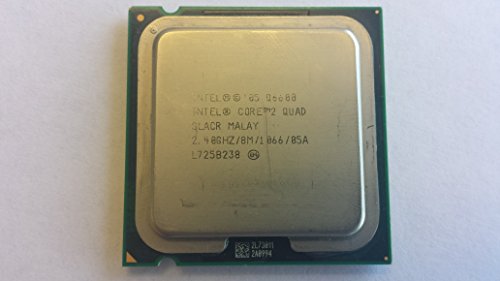
Intel Core 2 Quad Q6600 Socket 775 CPU

ZZHXSM LGA 775 CPU Fan Mounting Pins 10Pcs
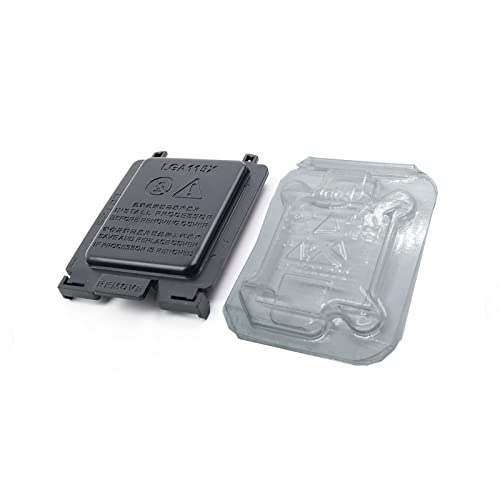
YEGAFE LGA115X LGA1200 Socket Covers 5Pcs

Intel Core 2 Duo E8500 Socket 775 CPU

E8400 Socket 775 Core 2 Duo CPU 10PC

Intel Celeron D 336 Socket 775 CPU
More Details On Our Top Picks
Cooler mounting failures can stop an otherwise usable legacy desktop, and this compact InLine kit focuses on that exact repair. You get plastic mounting pieces arranged for Intel P4 Socket 775 cooler attachment, which suits a bench repair or a replacement motherboard project.
The kit takes less storage space than a complete cooling assembly, so it makes sense for you to keep beside spare processors and screws. You may find the plastic construction adequate for a careful installation, though repeated removal calls for a gentle hand.
Strong Points
- Targets the cooler-to-motherboard mounting problem rather than replacing a working CPU.
- Small package dimensions make drawer storage easy in a repair workspace.
- Plastic parts avoid adding unnecessary metal hardware around the socket area.
- Useful for restoring an older system that already has a compatible cooler.
Things To Consider
- Plastic fasteners need careful pressure during fitting and removal.
- The listing identifies an international product, so packaging or instructions may differ from local stock.
Key Specs
Who It Suits Best
You’ll find the best fit here as a DIY restorer repairing a Socket 775 desktop cooler mount.
Consider Something Else When
Choose ZZHXSM LGA 775 CPU Fan Mounting Pins 10Pcs instead when you want a larger supply of replacement fasteners.
Four processing cores give the Q6600 a clear role in a legacy desktop that handles several tasks at once. Its 2.40 GHz clock, 8 MB cache, and 1066 MHz system bus make it a more substantial upgrade path than the dual-core E8500 for older multitasking setups.
For file conversion, older creative software, or a home PC with several open applications, the extra cores may feel more useful than a higher clock alone. The honest read is that platform age still limits modern software support, and you’ll need a compatible board and cooler.
What We Like
- Quad-core layout gives legacy multitasking a wider workload margin.
- 8 MB of cache supports repeated access to frequently used data.
- Socket 775 compatibility suits targeted motherboard repairs.
- Useful for you when replacing a lower-tier chip without changing the whole platform.
- Accidental-damage coverage options may be available through the listing, with plan terms requiring careful review.
Trade Offs
- Older architecture limits its role in current applications.
- Used CPU listings call for socket, firmware, and cooler checks before installation.
Feature Snapshot
Made For
You’ll benefit most as a legacy-PC owner who needs more multitasking capacity from an existing Socket 775 system.
Not Your Match When
Intel Core 2 Duo E8500 Socket 775 CPU suits you better for a simpler, higher-clock dual-core replacement.
A missing or damaged push-pin can leave a compatible CPU cooler loose, and this 10-piece set gives you replacement hardware without adding another processor to the repair. The plastic push-screw design is aimed at Intel LGA 775 cooling fans, with related fit references for LGA 1155 and 1156 hardware.
That quantity is handy for you as a repair hobbyist because a dropped pin won’t end the project. You may find installation straightforward on a clean motherboard, although matching the pin shape to your cooler remains essential.
Highlights
- Ten pieces provide useful spares for repeated maintenance.
- Black and white plastic makes the parts easy to spot on a workbench.
- Push-fastener format supports quick cooler replacement.
Minor Gripes
- Pins are supplied without the cooler or other mounting hardware.
- Plastic durability depends on avoiding excessive twisting during removal.
- Compatibility still needs checking against the exact fan frame.
Quick Facts
Right Fit For
You’ll appreciate this set as a hands-on repairer maintaining several older Socket 775 desktops.
Look Elsewhere When
InLine Socket 775 Mounting Kit fits you better for a focused cooler-mount replacement kit.
Socket covers matter during motherboard storage, transport, and CPU swaps because exposed contact pins are easy to bend. YEGAFE combines five motherboard socket covers with five processor protection boxes, giving you separate protection for both sides of a removed chip.
The compatibility range includes LGA 775, 1150, 1151, 1155, 1156, and 1200, so the set suits a mixed legacy-parts drawer better than a single-purpose cover. You may find the set most useful in a repair shop or home lab where processors regularly leave their boards.
Upsides
- Five socket covers help protect stored motherboards.
- Five processor cases reduce loose-chip clutter during a rebuild.
- Broad listed socket support improves usefulness across several Intel platforms.
- Separate covers and boxes make organization easier between projects.
Points To Note
- The set protects removed hardware but does not replace careful handling.
- Fit should be confirmed against the exact socket before storage.
Details At A Glance
Who Will Love This
You’re the right match as a technician, collector, or hobbyist storing multiple Intel motherboards and CPUs.
A Better Fit Elsewhere
Intel Core 2 Quad Q6600 Socket 775 CPU suits you more when your immediate need is working processing hardware.
The E8500 takes a different route from the Q6600, using two cores but a higher 3.16 GHz clock. That combination suits you when a legacy desktop mainly handles office software, browsing, media playback, and light utility work rather than many demanding tasks at once.
A 1333 MHz bus and 6 MB L2 cache round out the platform fit, while Enhanced Intel SpeedStep Technology can adjust operating behavior around workload demands. Depending on your motherboard firmware and cooler, this chip may be a tidy replacement, but its two-core design is less suited to heavy multitasking.
Bright Spots
- 3.16 GHz frequency supports responsive everyday legacy computing.
- 1333 MHz bus matches the needs of compatible Socket 775 platforms.
- 6 MB cache helps with repeated desktop operations.
- SpeedStep technology supports workload-aware processor operation.
Room For Improvement
- Two cores provide less multitasking headroom than the Q6600.
- Used-chip condition means you should inspect contacts and confirm board support.
Technical Sheet
Best Suited To
You’ll get the closest fit as a home-office user refreshing a compatible Socket 775 desktop for basic daily tasks.
Swap It Out When
Intel Core 2 Quad Q6600 Socket 775 CPU suits you better for heavier multitasking and older threaded applications.
For a repair drawer holding several older systems, the E8400 offers a familiar dual-core path at 3.0 GHz with a 1333 MHz bus and 6 MB cache. The listing identifies these chips as used, so this choice makes more sense for practical restoration than for a pristine showcase build.
Its 65-watt power figure can help you match the processor to an existing cooling setup, although you still need to confirm motherboard support and inspect each unit. Compared with the E8500, the E8400 gives up some clock speed while keeping the same broad Socket 775 role.
Plus Points
- 3.0 GHz operation suits basic desktop restoration.
- Six megabytes of cache support common legacy applications.
- Ten-unit quantity is useful for repair shops or multi-PC projects.
Small Caveats
- Used condition can mean varied cosmetic or operational history across units.
- Bulk quantity is unnecessary for a single-PC repair.
- You’ll need a compatible Socket 775 board and cooling solution.
- Lower clock speed makes the E8500 more appealing for a one-chip desktop refresh.
Core Details
Whose Shelf It Belongs On
You’re best suited to this multipack as a repair professional or hobbyist maintaining several Socket 775 computers.
Where A Sibling Pick Shines
Intel Core 2 Duo E8500 Socket 775 CPU fits you better for one desktop that benefits from its higher 3.16 GHz clock.
The Celeron D 336 belongs in a very specific repair scenario: replacing a basic Socket 775 chip in an older office computer or archival machine. Its 2.8 GHz clock is respectable for simple tasks, but the 533 MHz system bus and 256 KB cache place it below the Core 2 options for broader workloads.
You may find it adequate for a period-correct restoration or a machine running lightweight software. The smaller cache means you shouldn’t expect the same responsiveness as the E8500, and careful cooler cleaning remains sensible for any aging desktop platform.
Best Bits
- Socket 775 format fits targeted legacy replacements.
- 2.8 GHz clock supports basic office and archival use.
Areas To Watch
- 256 KB cache is modest beside the 6 MB cache in the E8500.
- 533 MHz bus narrows its practical role on older systems.
- A basic CPU cooler and compatible board still need to be available.
Feature Rundown
Who Should Grab It
You’ll suit this CPU best as a restorer preserving a simple Socket 775 office or period-correct computer.
Another Choice May Suit
E8400 Socket 775 Core 2 Duo CPU 10PC is a better fit for you when you need several stronger dual-core replacements.
How To Choose The Right Processors For 775 Socket
Start With Exact Platform Fit
Socket 775 identifies the physical interface, the contact arrangement that connects the CPU to the motherboard. It doesn’t tell you whether every Socket 775 chip works in every board, so you need the motherboard model, chipset, BIOS support, and front-side bus requirements before installation.
A Celeron D 336 uses a 533 MHz system bus, while the Core 2 Duo E8500 lists 1333 MHz. That difference matters because an older board may accept the socket but lack the firmware or electrical support for a newer processor.
Match Cores To Your Workload
Core count describes how many independent processing units share the chip. Two cores suit light office work, older media software, and simple home tasks, while the Q6600’s four cores make more sense for multitasking across several legacy applications.
Clock speed still matters, especially in lightly threaded programs. The E8500’s 3.16 GHz figure is higher than the Q6600’s 2.40 GHz, but the Q6600 can handle more parallel work, so your software should decide the direction.
Check Cooling And Mounting
A processor upgrade isn’t complete without a compatible cooler and secure mounting hardware. The InLine kit targets a focused mounting repair, while ZZHXSM’s ten pins make more sense for repeated service work or several machines.
Clean old thermal compound from the cooler and processor contact surfaces according to the cooler maker’s guidance, then confirm the fan frame matches the mounting pins. A loose cooler can interrupt a restoration, so don’t treat the fasteners as an afterthought.
Consider Condition And Quantity
Older CPUs often appear as individual replacement parts or used multipacks. A single E8500 suits one desktop, while the E8400 multipack fits a repair bench with several matching systems.
Inspect listing details, model markings, contact pads, and return terms before committing to a used part. Protection hardware also deserves attention: YEGAFE’s covers help you store removed boards and CPUs, but they don’t compensate for careless handling.
Things Worth Knowing First
Mistakes Worth Dodging
Socket matching alone isn’t enough. Compare the motherboard’s supported bus speed, BIOS version, chipset, and processor list before choosing a Q6600, E8500, E8400, or Celeron D 336.
You also need to distinguish a CPU from mounting hardware. InLine and ZZHXSM parts secure a cooler, while YEGAFE covers protect stored components, so neither replaces the processor itself.
Where The Extra Money Goes
Higher-tier Socket 775 CPUs generally offer more cores, larger cache, or a faster bus. The Q6600’s four cores and 8 MB cache give you a stronger multitasking route than the Celeron D 336, while the E8500 favors higher clock speed.
Spending more makes sense for a workhorse legacy desktop that runs several applications. A period restoration or simple office machine can remain better matched to a lower-tier chip, especially with a confirmed board fit.
Final Verdict
You can approach Socket 775 restoration in three ways: choose the Q6600 for heavier legacy multitasking, select the E8500 for higher-clock dual-core work, or use the E8400 multipack for repeated repairs. The mounting kits solve cooler attachment problems, while the YEGAFE set helps protect stored boards and processors. Your motherboard model, firmware, cooler, and workload should guide the final choice. For a simple period-correct system, the Celeron D 336 remains a focused option, but broader everyday use points toward the Core 2 lineup.
