
You can still build or refresh an older AM3+ desktop without replacing every major component. The challenge is matching the processor, motherboard, memory, power needs, and your actual workload, especially for gaming, multitasking, or a low-cost home workstation. This shortlist covers eight-core and six-core FX options, plus a compatible Gigabyte motherboard and A10 alternative for systems that need a broader platform decision. You’ll find the strongest fit for daily computing, tuning, compact upgrades, and legacy builds.
The Shortlist At A Glance




More Details On Our Top Picks
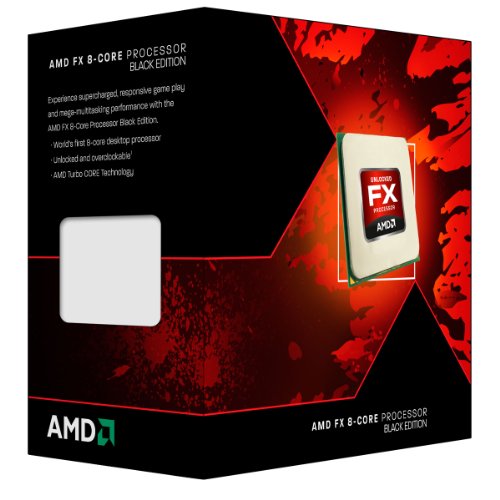
Eight cores give you a sensible route into heavier multitasking, especially across older desktops that still use AM3+. The 3.3 GHz operating frequency and unlocked design suit home editing, several open applications, and light game streaming better than a basic dual-core replacement.
Compared with the six-core AMD FX 6100, this option gives you more parallel headroom. You may find the older platform needs careful cooler cleaning and sensible airflow during sustained workloads, so this choice suits hands-on owners more than plug-and-forget office setups.
Strong Points
- Eight cores help keep browsers, office software, and background tasks moving together.
- Unlocked operation gives experienced desktop owners room to tune performance.
- The AM3+ socket works with compatible legacy motherboards.
- The 95W rating helps you plan cooling and power around a clearly stated thermal class.
Things To Consider
- Older AM3+ hardware can require BIOS checking before installation.
- Overclocking increases cooling demands, and dust buildup around the heatsink can become a maintenance concern.
Key Specs
Who It Suits Best
You’ll get the most value from this processor in a refurbished AM3+ desktop used for multitasking, older games, and light content work.
Where Another Pick Suits Better
Choose AMD FX-8320E for a similar eight-core build where a lower-frequency efficiency focus matters more than tuning flexibility.
For a family desktop handling schoolwork, video playback, office apps, and background downloads, the FX-8320E gives you eight cores without moving away from AM3+. The source details identify a 3.20 GHz processor, 95W power rating, and 4 GHz overclocking speed, which creates a clear path from routine use to enthusiast tuning.
That lower listed operating frequency separates this pick from the FX-8300’s 3.3 GHz figure, while the eight-core layout keeps multitasking attractive. In most home systems, you’ll want a clean case interior and a cooler matched to the processor’s workload rather than relying on an aging cooling setup.
What We Like
- Eight cores give you useful application-level multitasking capacity.
- The 95W rating makes cooling and power planning straightforward.
- The listed 4 GHz overclocking speed appeals to experienced system builders.
Trade Offs
- Its 3.20 GHz listed frequency may feel less appealing for lightly threaded tasks than the FX-8300.
- Overclocking requires compatible board settings, stronger cooling, and regular dust removal.
- Legacy motherboard support still needs a BIOS check before you install it.
At A Glance
Made For
This processor fits you best as a practical eight-core replacement for a home, office, or light gaming desktop with a compatible AM3+ board.
Consider Something Else When
AMD FX-8300 suits you better for a slightly higher listed base frequency and a more direct performance-oriented upgrade.
Six cores make the FX 6100 a more modest step for an older desktop, yet the 3.3 GHz base and 3.9 GHz overdrive figures keep the specification easy to understand. You can use that balance for web work, office software, media playback, and older games without moving straight to an eight-core chip.
Compared with AMD FX-8120, you give up two cores but may simplify a lighter upgrade. Depending on your case airflow, the 95W power figure still calls for a clean heatsink and sensible ventilation during long gaming sessions.
Highlights
- Six cores provide a useful middle ground for everyday desktop use.
- The 3.3 GHz base figure supports responsive routine computing.
- Listed 3.9 GHz overdrive adds headroom for short bursts.
- Its AM3+ socket keeps it relevant to compatible legacy systems.
- Separate L2 and L3 cache figures help you compare it with other FX options.
Minor Gripes
- Six cores leave less multitasking room than the eight-core choices.
- You’ll need to confirm motherboard support before installation.
Technical Sheet
Right Fit For
You’ll suit this processor best as a beginner-friendly replacement for a light-use AM3+ desktop or older gaming machine.
Look Elsewhere When
AMD FX-8320E is a stronger match for you when video work, frequent multitasking, or heavier background loads matter.
Unlocked operation gives you a reason to consider the FX-8150 beyond a routine replacement. The eight-core layout and dynamic Turbo Core behavior suit demanding multitasking, especially across older workstations used for archiving, media tasks, and several active applications.
Compared with the FX-6100, you gain two cores and a more enthusiast-focused design. The honest read is that tuning adds setup work, heat, and maintenance, so this processor makes more sense in a well-ventilated desktop than a cramped case.
Upsides
- Eight cores help you spread demanding workloads across more processing resources.
- The unlocked design gives you control over manual performance tuning.
- Turbo Core can raise speed dynamically for the active workload.
- Bulldozer architecture supports the model’s multitasking focus.
Room For Improvement
- Manual tuning increases cooling and airflow demands.
- Older platform parts can make installation and BIOS matching less straightforward.
- You’ll want to clean the cooler regularly during sustained heavy use.
Feature Snapshot
Who Will Love This
You’ll appreciate this choice most as an enthusiast who enjoys tuning an AM3+ desktop for multitasking and older games.
Not Your Match When
AMD FX 6100 is a better fit for you when the desktop handles lighter tasks and you want a simpler six-core upgrade.
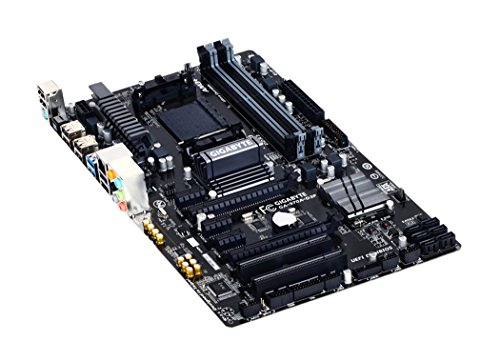
You don’t get a processor here, you get the platform that lets several processors in this list work together. The GA-970A-D3P supports AM3+ FX chips plus AM3 Phenom II and Athlon II processors, making it useful for a new legacy build or a board replacement.
Four DDR3 sockets support up to 32GB, while six SATA III ports give you room for several storage drives. Compared with choosing AMD FX-8300 alone, this board demands more installation planning, but you gain a clearer foundation for a complete AM3+ system.
Standout Traits
- Four DDR3 DIMM sockets support up to 32GB of system memory.
- Six SATA III ports help you arrange multiple storage devices.
- Gigabit LAN supports wired networking for desktops and home servers.
- Multiple PCI Express and PCI slots support varied expansion needs.
- Compatibility spans FX, Phenom II, and Athlon II processor families.
Points To Note
- You’ll need an ATX-compatible case and DDR3 memory.
- The board uses an older platform, so storage and operating-system planning deserves attention.
- Installation takes longer than a processor-only refresh because you must reconnect the full system.
Quick Facts
Built With In Mind
This board suits you as a hands-on builder assembling or repairing an AM3+ desktop with DDR3 memory and multiple expansion cards.
Swap It Out When
AMD FX-8300 is the better fit for you when your existing motherboard already supports AM3+ and you only need a processor upgrade.
AMD’s FX-8120 gives you the same eight-core class and unlocked approach that attracts enthusiasts to the FX-8150. Its Bulldozer architecture and Turbo Core feature target multitasking, so you can run several older productivity or media applications together on a compatible AM3+ board.
You may find the FX-8150 a more appealing tuning step, while this model makes sense for a system centered on experimentation rather than maximum refinement. Keep the cooler accessible, because sustained workloads and manual adjustments can make regular dust cleaning part of ownership.
Bright Spots
- Eight cores suit parallel workloads and heavy application switching.
- Unlocked operation gives you room to experiment with system tuning.
- Turbo Core can raise operating speed according to workload demands.
Areas To Watch
- The older architecture may not suit modern software expectations.
- Manual tuning needs compatible board settings and capable cooling.
- Legacy installation may involve BIOS checks and careful component matching.
- Cooling hardware and case airflow deserve extra attention in long sessions.
Core Details
Best Suited To
You’ll suit the FX-8120 best as an enthusiast maintaining an older AM3+ workstation for multitasking and hands-on tuning.
Reach For A Different Pick When
AMD FX-8150 is a stronger fit for you when you want the more performance-focused eight-core option in this shortlist.
The A10 7870K gives you a different upgrade route from the FX family, with a Black Edition design and socket-focused compatibility. Its positioning around everyday performance and online gaming makes it more suitable for a straightforward home build than a workstation centered on eight-core multitasking.
Compared with AMD FX-6100, this option may appeal to you when platform compatibility and simple gaming use matter more than matching the FX naming scheme. Check the exact motherboard socket and firmware support before installation, because the AM3 label does not automatically make every AM3+ board compatible.
Reasons To Buy
- Black Edition branding signals an enthusiast-oriented design.
- Socket compatibility supports a simpler upgrade path within the right platform.
Honest Caveats
- The listing provides fewer technical details than the FX processor options.
- Exact motherboard compatibility needs careful checking before you install it.
- Its use case leans toward everyday gaming rather than heavy workstation loads.
Feature Rundown
Whose Shelf It Belongs On
This processor suits you as a casual gamer or home user planning a straightforward compatible legacy desktop.
Another Choice May Suit
AMD FX-6100 fits you better for a clearly specified six-core AM3+ processor and broader multitasking detail.
How To Choose The Right Processors For Am3 Socket
Start With Socket And Firmware
AM3 and AM3+ are related but not interchangeable labels. Match the processor socket to your motherboard manual, then check firmware support before removing your existing chip. The Gigabyte GA-970A-D3P is the clearest platform choice here because its listed compatibility includes AM3+ FX, Phenom II, and Athlon II families.
A desktop that already runs an AM3+ board can usually make a processor-only refresh more practical than a complete rebuild. You’ll still need compatible memory, a suitable cooler, and enough case clearance for installation.
Match Cores To Your Workload
Core count describes how many processing units can work through tasks at the same time. Six cores, as found on AMD FX 6100, suit office software, web browsing, media playback, and older games. Eight cores, used by the FX-8300, FX-8320E, FX-8120, and FX-8150, give you more breathing room for video work, file compression, streaming, or several demanding applications.
More cores don’t automatically make every program faster. Lightly threaded software may respond more to operating frequency, while parallel workloads benefit from additional cores.
Treat Frequency As One Piece Of The Puzzle
Base frequency shows a stated normal operating point, while overdrive or Turbo Core describes a higher level available under suitable workload conditions. AMD FX 6100 lists 3.3 GHz base and 3.9 GHz overdrive, while FX-8300 lists 3.3 GHz operation. Those figures help comparison, but motherboard settings, cooling, software, and workload shape real-world results.
You’ll gain more from a balanced processor, memory, storage, and graphics setup than from chasing one number.
Plan Cooling And Maintenance
The listed 95W rating on several FX models helps you select a cooler and power setup, but sustained tuning can increase practical heat output. Keep the case vents clear, inspect the heatsink for dust, and avoid placing an older tower in a cramped cabinet. A clean airflow path matters during long gaming sessions or repeated rendering work.
Unlocked models such as FX-8300, FX-8120, and FX-8150 suit experienced owners who accept extra setup and maintenance. For a simpler path, use the processor at its listed settings with a compatible cooling solution.
Things Worth Knowing First
Wrong Turns To Avoid
You can lose time by treating every AM3 label as interchangeable. Confirm the exact socket, motherboard firmware, DDR3 support, cooler mounting, and case fit before you order a replacement.
You’ll also want to check whether the listing is for a processor or a motherboard. The Gigabyte GA-970A-D3P can host compatible chips, but it doesn’t replace the processor itself.
Where The Extra Money Goes
Higher-tier choices in this group generally give you more cores, unlocked tuning, or a fuller platform foundation. The FX-8150 and FX-8120 target hands-on enthusiasts, while the FX-8300 and FX-8320E focus on eight-core desktop use.
Paying more makes sense when you regularly multitask, edit media, or plan to tune settings. A six-core FX 6100 remains a more sensible match for light home computing.
Closing Remarks
You can still create a capable legacy desktop around the right AM3 or AM3+ hardware, but compatibility deserves more attention than the model name alone. Choose AMD FX-6100 for lighter work, an eight-core FX processor for broader multitasking, or the Gigabyte GA-970A-D3P when you need the motherboard foundation too. The A10 7870K offers a separate route for a simple gaming-focused build. Match the socket, memory, cooling, and workload first, then choose the processor that fits your existing system.
