
Office work rarely demands the same silicon muscle as rendering or gaming. Spreadsheets, browser tabs, and video calls mostly need responsive single-thread performance paired with enough memory headroom to keep things smooth under load. The picks here range from bare CPUs for custom builds to fully assembled towers ready to plug in and turn on.
The Shortlist At A Glance

Intel Core i3-12100F 12th Gen Desktop Processor

Dell OptiPlex 5060 Desktop (Renewed)

Intel Core i3-12100 Quad-core Processor Retail Pack

Dell Tower Desktop Intel Core Ultra 7-265

HP Pro Tower 290 G9 Business Desktop
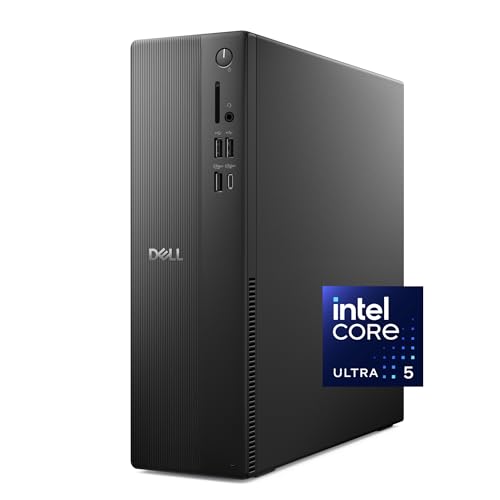
Dell Slim Desktop Intel Core Ultra 5-225
More Details On Our Top Picks
Building a basic office rig from scratch starts with a chip like this. The i3-12100F drops into LGA1700 motherboards using Intel’s 600-series chipset, giving you a modern platform without a premium outlay. That socket compatibility matters because it keeps the door open for future CPU upgrades without swapping the board.
Unlike the prebuilt towers on this list, this is a bare processor. You supply the motherboard, RAM (the platform handles both DDR4 and DDR5), cooling, and graphics. The “F” suffix means no integrated graphics, so a dedicated card is mandatory even for display output. At 58 W base power, thermal demands stay modest.
Strong Points
- Supports both DDR4 and DDR5 memory, letting you reuse older RAM or adopt newer standards
- PCIe 5.0 and 4.0 lanes provide fast storage and expansion headroom for office peripherals
- Low 58 W base power keeps the cooling requirement manageable in compact cases
- LGA1700 socket opens a viable upgrade path to higher-tier 12th-gen chips later
Things To Consider
- No integrated graphics means you must budget for a discrete GPU, even for basic display output
- Only four cores will show their age sooner in heavy multitasking environments compared to six-core alternatives
- The included RM1 stock cooler is functional but owners commonly report it runs noisy under sustained load
Feature Snapshot
Right Fit For
Cost-conscious DIY builders assembling a budget office PC who already own or plan to buy a dedicated graphics card.
A Better Fit Elsewhere
Shoppers wanting integrated graphics should step up to the Intel Core i3-12100 Retail Pack, which skips the need for a discrete GPU entirely.
Not everyone wants to source parts and assemble a machine. This renewed OptiPlex 5060 arrives as a complete system, ready to handle email, spreadsheets, and web-based apps from the moment it boots. The i5-8500 brings six cores to the table, which is a step up from the quad-core i3-12100F in pure parallel workload handling.
Storage is split across a 500 GB SSD for the operating system and a 1 TB HDD for bulk files. That dual-drive approach keeps boot times snappy while giving you room for archived documents. Built-in Wi-Fi and Bluetooth round out the connectivity. You may find the older 8th-gen platform less upgrade-friendly than the LGA1700 socket on the first pick, though.
Highlights
- Six-core i5 processor handles moderate multitasking better than entry-level quad-core chips
- 16 GB of DDR4 RAM keeps dozens of browser tabs and office apps responsive simultaneously
- Dual-drive configuration separates fast boot storage from high-capacity file archiving
- Included Wi-Fi and Bluetooth eliminate the need for separate adapter dongles
Trade Offs
- Renewed condition means cosmetic wear is possible and battery-backed components may show age
- The 8th-gen platform is several generations old, limiting future CPU upgrade options
Who Will Love This
Small offices or home workers who need a plug-and-play desktop without spending time on component selection or assembly.
Consider Something Else When
Shoppers wanting a modern platform with longer upgrade runway should look at the HP Pro Tower 290 G9, which uses a newer 12th-gen Intel chip and ships with Windows 11 Pro.
This is the sibling chip to the i3-12100F from the first pick, sharing the same 3.3 GHz base clock and four-core layout. The critical difference sits in the integrated graphics. Where the “F” model forces you to buy a discrete GPU, this retail-pack version includes Intel’s built-in graphics silicon.
For a standard office build, that one change simplifies everything. You plug a monitor straight into the motherboard’s video output and skip the dedicated card entirely. The retail packaging also typically includes a stock cooler, saving another small purchase. You give up the PCIe lanes that a discrete GPU would occupy, assuming your workload stays within document editing and browser-based tools.
Plus Points
- Integrated graphics eliminate the need for a discrete GPU, cutting build cost and complexity
- Retail packaging generally includes a stock cooler, simplifying first-time builds
- Same 12th-gen architecture as the “F” variant keeps single-thread performance identical
Small Caveats
- Integrated graphics share system memory, slightly reducing available RAM under heavy display workloads
- Four cores limit headroom for aggressive multitasking or future software that scales beyond four threads
- The stock cooler included in retail packs is adequate but can become audible during sustained workloads
Best Suited To
DIY builders assembling a straightforward office PC who want to skip buying a separate graphics card.
Reach For A Different Pick When
Anyone needing a complete system right out of the box will prefer the Dell OptiPlex 5060, which arrives preassembled with RAM, storage, and Windows installed.
Stepping well beyond the quad-core territory of the first three picks, this Dell tower runs Intel’s Core Ultra 7-265 processor. That Series 2 chip brings built-in AI acceleration to the desktop, a feature absent from the 12th-gen i3 options. For office workers juggling large datasets or local AI tools, that dedicated neural processing hardware can offload background tasks.
The 32 GB of RAM paired with a 1 TB NVMe SSD means this system rarely stalls. Wi-Fi 6 and Bluetooth handle wireless connectivity. DisplayPort output supports one 4K monitor or four FHD displays via daisy chaining. That multi-monitor capacity suits financial workspaces or content review stations.
Upsides
- Core Ultra 7 processor with built-in AI acceleration handles demanding productivity workloads
- 32 GB of RAM provides substantial headroom for heavy multitasking and large file manipulation
- 1 TB NVMe SSD delivers fast boot and load times alongside generous storage capacity
- Wi-Fi 6 support ensures stable wireless connectivity in crowded office network environments
- DisplayPort daisy chaining supports up to four FHD monitors for expansive workspace configurations
Points To Note
- The tower form factor occupies more desk or floor space than slim alternatives
- Intel UHD graphics are sufficient for office work but lack dedicated GPU power for rendering tasks
Quick Facts
Built With In Mind
Power users running intensive productivity software, local AI tools, and multi-monitor configurations.
Swap It Out When
Shoppers with standard document and browser workloads will find the HP Pro Tower 290 G9 delivers sufficient performance at a lower tier.
Sitting between the budget OptiPlex and the premium Dell Ultra tower, this HP Pro Tower targets small business environments. Its 12th-gen Intel quad-core processor reaches 4.3 GHz with Turbo Boost, matching the clock ceiling of higher-tier chips for short bursts. HP positions this model as outperforming older 9th-gen i7 processors in everyday workloads.
The dual-storage approach mirrors the OptiPlex strategy: a 256 GB PCIe SSD for the system and a 1 TB HDD for files. You get 16 GB of RAM, Wi-Fi, and Windows 11 Pro. The Pro license adds business-oriented features like BitLocker encryption and remote desktop capabilities. Dual-monitor support with 4K output, plus VGA and HDMI ports, covers most office display configurations. A built-in DVD-RW drive is a nod to legacy workflows.
Bright Spots
- Windows 11 Pro includes BitLocker encryption and remote desktop for business security needs
- Dual-monitor support with 4K output via HDMI and VGA covers mixed display setups
- Dual-drive storage separates fast system access from high-capacity file storage
- Built-in DVD-RW drive supports legacy media reading without a separate peripheral
Room For Improvement
- Quad-core processor limits parallel multitasking compared to the six-core or eight-core alternatives on this list
- 256 GB SSD fills quickly once system files and applications are installed
Who Should Grab It
Small business operators who need a secure, multi-monitor workstation with business-grade Windows features straight out of the box.
Not Your Match When
Power users needing AI acceleration and 32 GB of memory should move up to the Dell Tower Desktop Intel Core Ultra 7-265 for substantially more headroom.
Sharing the same Series 2 architecture as the Ultra 7 tower above, this slim desktop runs the Core Ultra 5-225. The lower tier trades some processing muscle for a dramatically smaller footprint. That space-saving design fits reception desks, shared workspaces, or tight home offices where a full tower is impractical.
You still get 16 GB of DDR5 memory, a step up from the DDR4 in the OptiPlex and HP Pro Tower. Storage lands at 512 GB of SSD capacity, sitting between the HP’s 256 GB system drive and the Ultra 7’s 1 TB. Wi-Fi 6 and Bluetooth handle wireless peripherals. The DisplayPort supports one 4K or four FHD monitors via daisy chaining, matching the Ultra 7’s multi-monitor capability.
Reasons To Buy
- Slim form factor fits tight desk spaces where a standard tower will not
- DDR5 memory provides higher bandwidth than DDR4 alternatives on this list
- Core Ultra 5 Series 2 chip includes AI acceleration for productivity task assistance
Honest Caveats
- 512 GB SSD may fill quickly without secondary HDD storage for large file archives
- The slim chassis limits internal expansion options compared to the full-size Dell tower
- Intel UHD graphics handle office displays but lack power for graphics-intensive applications
Core Details
The Right Fit
Workers in space-constrained environments who want modern DDR5 memory and AI-assisted performance in a compact chassis.
Where A Sibling Pick Shines
Shoppers needing maximum processing power and 32 GB of memory should choose the Dell Tower Desktop Intel Core Ultra 7-265, which trades footprint for performance.
What Matters Most Before Choosing Processors For Office Work
Core Count And Clock Speed
Office applications lean heavily on single-thread performance. A higher base clock speed keeps document editing and browser sessions responsive. Four cores handle standard productivity suites, while six or more cores help with heavy multitasking across large spreadsheets and video calls.
Integrated Versus Dedicated Graphics
Chips with built-in graphics simplify your build and cut costs. You skip purchasing a separate GPU for basic display output. Dedicated graphics matter only for rendering, CAD, or multi-monitor setups beyond what integrated silicon supports.
Platform And Memory Support
Newer sockets like LGA1700 support both DDR4 and DDR5 memory. That flexibility lets you start with cheaper DDR4 and upgrade later. DDR5 provides higher bandwidth, which helps when running multiple memory-intensive applications simultaneously.
Prebuilt Versus Custom Assembly
Bare processors suit DIY builders who want component control. Prebuilt towers save time and arrive ready to boot. Your comfort level with assembly and desire for future upgradeability should drive this decision.
Before You Click Buy
Traps First Timers Fall Into
Shoppers often buy a processor without checking motherboard socket compatibility. An LGA1700 chip will not fit an older LGA1200 board, and returning installed components is difficult. Another common misstep is choosing the “F” variant without realizing integrated graphics are disabled, leaving the system without display output until a discrete GPU is installed.
The Case For Spending Up
Higher-tier chips like Intel’s Core Ultra Series 2 add built-in AI acceleration hardware. That dedicated neural processing unit offloads background tasks and supports emerging productivity tools. The upgrade pays off for power users running local AI applications or managing large datasets, but standard document workloads rarely justify the premium.
Frequently Asked Questions
Do I need a dedicated graphics card for office work?
Most office tasks run fine on integrated graphics built into the processor. A dedicated GPU becomes necessary only for CAD, video editing, or multi-monitor setups exceeding integrated display limits.
What is the difference between DDR4 and DDR5 for office use?
DDR5 offers higher memory bandwidth than DDR4, helping with multitasking across large files. For basic document editing, DDR4 remains sufficient and typically costs less.
Is a four-core processor enough for office applications?
Four cores handle standard productivity suites, email, and web browsing comfortably. Six or more cores benefit users running heavy spreadsheets, video conferencing, and multiple applications simultaneously.
What does “renewed” mean for a desktop computer?
Renewed desktops are preowned systems restored to working condition, often with replaced components. They function like new but may show cosmetic wear and carry shorter coverage periods.
Does Windows 11 Pro matter for office work?
Windows 11 Pro includes BitLocker encryption and remote desktop features absent from the Home edition. Businesses handling sensitive data or requiring remote access benefit from the Pro license.
The Takeaway
Matching the right processor to your office workload comes down to honest assessment of your daily tasks. Quad-core chips handle documents and browsing without strain, while six-core or AI-accelerated options earn their keep for heavier multitasking. Prebuilt towers save time, and bare CPUs reward careful builders. Pick the tier that fits your actual workflow, not the spec sheet that looks impressive on paper.
