
Building or upgrading a gaming rig on a tight budget means squeezing maximum frames from every dollar. Quad-core processors remain relevant for 1080p gaming, esports titles, and systems where a discrete graphics card carries the heavy lifting. Whether you are assembling a first PC, reviving an older motherboard, or building a compact LAN rig, choosing the right silicon matters. Socket compatibility, thermal design power (TDP), and included cooling can make or break your experience.
The Shortlist At A Glance

AMD Ryzen 9 5900XT 16-Core Desktop Processor

AMD Ryzen 3 3300X 4-Core Desktop Processor

AMD A12-9800 Quad-Core Processor with Radeon R7 Graphics

Intel Core i7-3770 Quad-Core Processor (Renewed)

Intel Core i7-4770 Quad-Core Desktop Processor (Renewed)
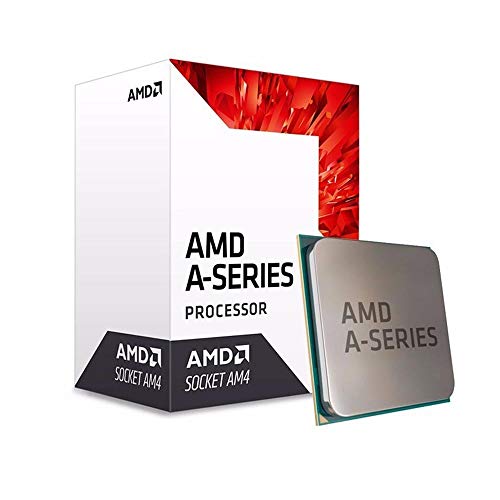
AMD A8-9600 Quad-Core Processor with Radeon R7 Graphics
More Details On Our Top Picks
Stepping beyond quad-core territory, this 16-core, 32-thread chip targets shoppers who need serious multitasking headroom alongside their gaming sessions. Zen 3 architecture delivers strong instructions-per-clock, meaning each core does more work per cycle than older designs. You benefit from PCIe 4.0 support, which doubles bandwidth to compatible graphics cards and NVMe drives compared to PCIe 3.0. For a streaming-plus-gaming workflow, the extra cores handle encoding without dropping frames in your game.
The catch is thermal management. AMD ships this processor without a cooler, so you need to budget for a capable aftermarket solution. A decent dual-tower air cooler or a 240mm all-in-one liquid setup keeps temperatures in check during sustained loads. Owners commonly report that DDR4-3200 memory hits a sweet spot for price-to-bandwidth ratio on this platform. The AM4 socket compatibility means you can drop this into most recent AMD motherboards with a BIOS update.
Strong Points
- 16 cores and 32 threads handle streaming, rendering, and gaming simultaneously without bottlenecking.
- 72 MB of combined cache keeps fed data close to the cores, reducing latency in CPU-heavy game scenes.
- Unlocked multiplier gives you manual control over clock speeds for performance tuning.
- PCIe 4.0 support future-proofs your build for next-generation storage and GPUs.
- AM4 socket compatibility lets you upgrade existing compatible motherboards instead of buying new boards.
Worth Noting
- No included cooler forces an extra purchase, adding to your total build cost.
- High core count goes underutilized in games that rely heavily on single-thread performance.
- A BIOS update may be required on older AM4 boards before the chip will POST, which can frustrate first-time builders.
Quick Facts
Best Suited To
Content creators and streamers who need a single machine for gaming, video encoding, and heavy multitasking will get the most from this processor.
Consider Something Else When
Your budget is tight and gaming is your only priority, in which case the AMD Ryzen 3 3300X delivers similar gaming frame rates for far less money.
Here is a true quad-core chip that earns its keep in budget 1080p builds. Four cores and eight threads give you enough parallelism for modern games that expect at least four logical processors. Unlike the A-series APUs later in this list, the 3300X targets shoppers who plan to pair it with a discrete graphics card. The included Wraith Stealth cooler handles stock thermal loads adequately, saving you an immediate cooler purchase.
Where this chip shines is value-to-performance ratio. You get Zen 2 architecture, which brought a significant jump in instructions-per-clock over first-generation Ryzen. Overclocking headroom exists thanks to the unlocked multiplier, though you will hit a thermal wall quickly with the stock cooler. For esports titles and older AAA games, depending on your graphics card pairing, this processor holds its own without creating a bottleneck.
Highlights
- Included Wraith Stealth cooler eliminates the need for an immediate aftermarket cooling purchase.
- Unlocked multiplier allows manual frequency tuning for shoppers who enjoy tweaking their system.
- Four physical cores and eight threads meet the minimum requirements for most current game launches.
- AM4 socket compatibility opens up a wide range of affordable motherboard options.
Trade Offs
- Requires a discrete graphics card, as this chip has no integrated video output.
- Stock cooler noise levels increase noticeably under sustained gaming loads, which may bother quiet-build enthusiasts.
- Four cores will struggle with heavy background applications running alongside modern games.
Right Fit For
Budget-conscious builders assembling a 1080p gaming rig with a dedicated graphics card will find this chip hits a compelling price-to-performance point.
Not Your Match When
You need integrated graphics for a build without a discrete GPU, making the AMD A12-9800 a more suitable starting point.
This Bristol Ridge APU takes a different approach by baking Radeon R7 graphics directly into the processor die. An APU (Accelerated Processing Unit) combines CPU and GPU on one chip, letting you build a functioning system without buying a separate graphics card. For casual games, older titles, and multimedia consumption, the integrated graphics handle the workload. The 65-watt TDP keeps power draw and heat output modest, making it suitable for small-form-factor cases.
Unlike the Ryzen 3 3300X, this chip uses the older Bristol Ridge architecture, meaning lower per-core performance. You will feel that gap in CPU-heavy titles. The trade-off is convenience: plug into any compatible AM4 motherboard, add RAM, and you have a working display output. Owners commonly report that fast dual-channel DDR4 memory significantly improves integrated graphics performance, so do not skimp on RAM speed.
Plus Points
- Integrated Radeon R7 graphics eliminate the need for a separate graphics card in basic builds.
- 65-watt TDP keeps thermals manageable for compact or low-airflow cases.
- AM4 socket compatibility provides a straightforward upgrade path to newer Ryzen processors later.
Points To Note
- Older Bristol Ridge architecture delivers noticeably lower single-thread speed compared to Zen-based chips.
- Integrated graphics will not run modern AAA titles at playable frame rates without heavy settings reductions.
- Fast, dual-channel memory is essential for APU performance, adding a hidden cost to the build.
Who Will Love This
Shoppers building a basic family PC or a compact media center that handles light gaming and video playback without a dedicated GPU will appreciate the simplicity.
Look Elsewhere When
Your goal is competitive esports at high frame rates, where the Intel Core i7-4770 paired with a discrete card delivers smoother performance.
For shoppers reviving an aging LGA 1155 motherboard, this renewed Ivy Bridge chip offers a straightforward drop-in upgrade path. A base clock of 3.4 GHz with turbo up to 3.9 GHz provides respectable speed for a processor of this era. The 8 MB Intel Smart Cache serves all four cores, reducing memory latency in game engines that thread their workloads. As a renewed part, it has been inspected and restored to working condition, which keeps costs down compared to tracking down new old stock.
Realistically, this is a salvage-tier upgrade. You are not building a new system around this chip in 2026. The value proposition is giving an older PC a second life for light gaming or as a secondary machine. The integrated graphics base frequency of 650 MHz handles basic display output, though you will want a discrete card for any actual gaming. The 5 GT/s DMI (Direct Media Interface) link speed between the CPU and chipset is a generational bottleneck that no amount of tuning will fix.
Bright Spots
- Drop-in compatibility with existing LGA 1155 motherboards saves the cost of a full platform swap.
- 8 MB of shared cache helps reduce latency in older game engines.
- Renewed status provides a functional part at a lower cost than hunting for rare new inventory.
- Turbo boost up to 3.9 GHz gives single-threaded tasks a speed kick when needed.
Small Caveats
- LGA 1155 platform is obsolete, meaning no upgrade path beyond this generation.
- Renewed stock carries inherent variability in thermal paste condition and overall chip longevity.
- Outdated architecture struggles with modern game engines that expect higher instructions-per-clock.
Feature Snapshot
Whose Shelf It Belongs On
Anyone nursing an older LGA 1155 system who needs a functional processor replacement without rebuilding their entire PC will find this renewed chip practical.
A Better Fit Elsewhere
You already have an LGA 1150 board sitting empty, making the Intel Core i7-4770 a newer and slightly faster alternative for that specific socket.
One generation newer than the i7-3770, this Haswell part occupies a similar niche for LGA 1150 motherboard owners. The 3.4 GHz base clock and 8 MB cache match its predecessor on paper, but architectural improvements give it a slight edge in efficiency. For shoppers with an existing LGA 1150 board, this is the natural ceiling for that platform. The renewed status means it has been professionally inspected and restored to working order.
You are still looking at legacy performance. Modern quad-core processors outpace this chip significantly in both single-thread and multi-thread workloads. The appeal is purely pragmatic: it costs less than a full platform migration and breathes life into a board you already own. In a gaming context, assuming you pair it with a modest discrete card, it will run older titles and esports games acceptably.
Reasons To Buy
- Direct compatibility with LGA 1150 motherboards avoids a full system rebuild.
- Haswell architecture offers slightly better power efficiency than the preceding Ivy Bridge generation.
- Renewed inspection process provides a working chip at a fraction of vintage new-stock pricing.
Softer Spots
- No meaningful upgrade path exists beyond this chip on the LGA 1150 platform.
- Thermal paste on renewed units may show signs of aging, requiring cleaning and repasting for optimal thermals.
- Integrated graphics lack the horsepower for any serious gaming without a discrete card.
Built With In Mind
Owners of existing LGA 1150 systems who need a reliable, inspected replacement processor for light gaming or general computing tasks fit this chip perfectly.
Reach For A Different Pick When
You are building fresh on a modern socket, where the AMD Ryzen 3 3300X offers dramatically better per-core performance and a viable upgrade path.
Sitting a tier below the A12-9800, this A8-9600 targets the most budget-conscious builds. The 3.1 GHz operating frequency and Radeon R7 integrated graphics put it in similar territory: functional display output without a discrete card. Bristol Ridge architecture means the same older core design, so expectations should be tempered. This is a chip for basic computing, media playback, and very light gaming.
The value here is sheer affordability. For a family office machine or a kid’s first PC, it handles web browsing, video streaming, and simple 2D games without complaint. The AM4 socket does provide a theoretical upgrade path to Ryzen processors, though you will want to verify your motherboard’s BIOS supports newer chips before planning that route. DirectX 12 support means the integrated graphics understand modern rendering APIs, even if the hardware lacks the raw power to exploit them fully.
Best Bits
- Integrated Radeon R7 graphics provide display output without purchasing a separate GPU.
- AM4 socket offers a path to newer Ryzen processors for future upgrades.
- DirectX 12 compatibility ensures basic support for modern rendering pipelines.
Room For Improvement
- 3.1 GHz base clock and older architecture result in sluggish performance in CPU-heavy tasks.
- Integrated graphics struggle with anything beyond casual or older game titles.
- Motherboard BIOS support for upgrading to Ryzen varies, requiring research before planning a future swap.
Spec Overview
Who Should Grab It
Shoppers assembling an ultra-budget family or office PC for basic media consumption and web tasks will find this chip meets those needs inexpensively.
Swap It Out When
You want playable frame rates in modern games, where spending slightly more on the AMD Ryzen 3 3300X with a discrete card delivers a vastly superior experience.
What Matters Most Before Choosing Quad-Core Cpus For Gaming
Socket and Motherboard Compatibility
The single most critical attribute is socket compatibility. A processor only fits into the motherboard socket it was designed for. AM4 chips will not seat into LGA 1150 boards, and vice versa. Before purchasing, identify your motherboard model and verify its CPU support list on the manufacturer website. Some boards require a BIOS update before accepting a newer generation processor, which may require an older compatible chip to perform the update.
Core Count Versus Architecture
Raw core count tells only part of the story. A modern four-core Zen 2 processor outperforms an older eight-core chip in many gaming scenarios because of higher instructions-per-clock. Architecture determines how much work each core accomplishes per clock cycle. For gaming, prioritize newer architectures with fewer cores over older designs with more cores. Single-thread speed still dominates game engine performance.
Integrated Graphics Versus Discrete Cards
Processors with integrated graphics (APUs) let you build a functioning system without a separate graphics card. This works for budget builds and media PCs. For actual gaming, a discrete graphics card is almost always necessary for playable frame rates in modern titles. Plan your budget accordingly: an APU saves money upfront, but you will likely add a dedicated card later for better gaming performance.
TDP and Cooling Requirements
Thermal Design Power (TDP), measured in watts, indicates how much heat the processor generates under load. Higher TDP requires more robust cooling. A 65-watt chip can run on a stock cooler in most cases. A 105-watt chip needs substantial aftermarket cooling. Match your cooling solution to your processor’s TDP to avoid thermal throttling, which reduces clock speeds and hurts gaming performance.
Before You Click Buy
Traps First Timers Fall Into
The most common mistake is buying a processor without checking motherboard BIOS compatibility. A chip physically fits but will not boot until the board runs a compatible firmware version. Another frequent issue is overlooking cooler inclusion. Some processors ship without cooling, and forgetting to add one to your cart leaves you unable to complete your build. Always verify what is included in the box before finalizing your purchase.
When Paying More Pays Off
Spending up moves you to newer architectures with better instructions-per-clock, which translates directly to higher frame rates in CPU-bound games. More expensive chips also tend to include larger caches, which reduce latency in game engines that stream large datasets. The upgrade is worth it for competitive gamers chasing high refresh rates, where every millisecond of frame delivery matters.
Frequently Asked Questions
Is a quad-core processor enough for modern gaming in 2026?
Four cores meet the minimum requirement for most current titles, especially paired with a solid discrete graphics card. You may see lower frame rates in heavily threaded games or when running background applications alongside your game.
What does “unlocked” mean for a desktop processor?
Unlocked refers to an unlocked multiplier, which allows you to manually increase the clock speed beyond factory settings. This gives you control over performance tuning, though it requires adequate cooling to manage the additional heat.
Do I need a separate graphics card with these processors?
Processors with integrated graphics, like the AMD A-series APUs, can produce display output without a dedicated card. Chips like the Ryzen 3 3300X lack integrated graphics and require a discrete card for any video output.
Can I upgrade from an AMD A-series APU to a Ryzen processor on the same motherboard?
Both use the AM4 socket, so a physical upgrade is possible. You must verify that your specific motherboard supports the newer Ryzen chip and update your BIOS accordingly before making the swap.
What is TDP and why does it matter for my build?
TDP stands for Thermal Design Power, representing the maximum heat a processor generates under typical load. It guides your cooling solution choice, ensuring your cooler can dissipate enough heat to prevent thermal throttling during gaming sessions.
Bottom Line
Choosing the right quad-core processor comes down to matching the chip to your existing platform and gaming goals. Budget builders with discrete cards will find strong value in the Ryzen 3 3300X. Shoppers reviving older Intel boards have practical renewed options in the i7-3770 and i7-4770. For integrated graphics builds, the AMD A-series APUs offer simplicity without a separate GPU purchase. Identify your socket, check your BIOS, and pair your chip with adequate cooling for a build that delivers where it counts.
