
Keeping an older Intel LGA 775 build alive takes patience and the right replacement parts. Whether you are nursing a legacy workstation, rebuilding a retro gaming rig, or simply replacing a dead fan on a family PC, finding compatible processors and coolers for this aging socket can feel like a scavenger hunt. You need parts that match the mounting hole layout, thermal output, and BIOS support of boards that stopped shipping a decade ago. This roundup covers actual CPUs, heatsinks, fans, and mounting hardware that keep these systems running.
The Shortlist At A Glance
DS leddess 120MM CPU Fan with Fixed RGB
Thermalfly Delta 6 CPU Cooler

QINIZX Adjustable Motherboard Backplate Kit
Intel Core 2 Quad Q6700 Socket 775 CPU

Intel Socket 775 Copper Core Heatsink and Fan
ZZHXSM 12PCS Heatsink Plastic Push Pins
More Details On Our Top Picks
Not every legacy build needs to look dated. DS leddess brings a 120mm fan with a fixed RGB ring to the Socket 775 ecosystem, spanning compatibility across several Intel generations including LGA 775, 1155, 1151, and 1366. The aluminum extruded heatsink uses a 40mm fin design, and the fan spins at 1500 RPM, which sits firmly in entry-level territory for airflow. That fixed RGB lighting means the colors stay constant rather than cycling through patterns, giving the case a clean accent glow without needing a motherboard controller.
For a family PC or a light retro build that sees web browsing and document work, the airflow should handle modest thermal loads fine. You may find it underpowered for sustained heavy workloads, though, since 1500 RPM moves less air than the stock Intel cooler on the Q6700. The installation uses the standard push-pin mechanism. Those pins can be fiddly on older boards where the mounting holes have widened over years of cooler swaps, so having spare pins from the ZZHXSM kit on hand is smart insurance.
Highlights
- 120mm fan diameter covers a large heatsink area for steady, broad airflow across entry-level processors
- Fixed RGB ring adds visual flair without requiring software control or a compatible RGB header
- Multi-socket compatibility spans LGA 775 through 1366, making it useful across several legacy Intel generations
- Aluminum extruded heatsink keeps the unit lightweight and easy to mount on older boards
Things To Consider
- 1500 RPM fan speed sits at the lower end, which may struggle with high-TDP Socket 775 chips under sustained load
- Fixed RGB means no color customization or synchronization with other case lighting
Quick Facts
Who Will Love This
Shoppers building a visually styled, light-duty legacy Intel system who want basic cooling with a decorative accent will appreciate this fan most.
Where A Sibling Pick Shines
For cooling higher-wattage Socket 775 chips like the Q6700, the Intel Copper Core Heatsink and Fan moves significantly more air at 3400 RPM.
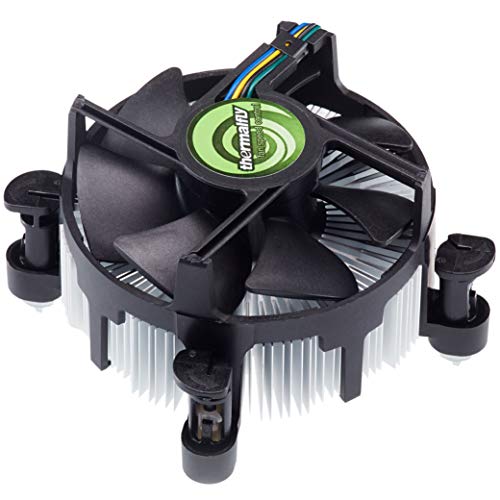
Stepping up from the DS leddess entry-level fan, the Thermalfly Delta 6 targets a broader thermal range with a 100W cooling capacity. That headroom matters for Socket 775 builds running Core 2 Quad processors, which can push 105W under load. The heatsink uses a high-density 120-fin design, packing more surface area into the same footprint to improve heat dissipation without dramatically increasing size. A 90mm fan with a 4-pin PWM connector handles airflow, letting the motherboard adjust fan speed dynamically based on temperature rather than running at a constant rate.
Thermalfly pre-applies thermal grease, which removes the guesswork for first-time installers who may not have paste on hand. One important compatibility note: the Delta 6 does not support BTX form-factor motherboards, which follow a different fastener hole layout than standard ATX Intel boards. BTX cases were briefly common in prebuilt systems from the mid-2000s, so verifying your board layout before ordering saves a return cycle. The mounting hardware covers LGA 775, 1156, 1155, 1151, 1150, and 1200.
Strong Points
- 100W cooling capacity handles Core 2 Quad thermal output with margin to spare
- High-density 120-fin heatsink stack increases surface area for faster heat dissipation
- 4-pin PWM fan connector allows automatic speed adjustment based on CPU temperature
- Pre-applied thermal grease simplifies installation for first-time builders
- Broad socket coverage from LGA 775 through 1200 adds reuse value across multiple legacy builds
Minor Gripes
- No BTX motherboard support, which rules out certain prebuilt cases from the Socket 775 era
- 90mm fan is smaller than the 120mm DS leddess unit, potentially producing more audible noise at peak RPM
- Pre-applied paste is single-use, so remounting after a mistake requires your own thermal compound
Right Fit For
System builders upgrading cooling on a Socket 775 or 115x Intel board running mid-range to higher-wattage processors will find the Delta 6 hits a practical balance of capacity and price.
Look Elsewhere When
Your motherboard uses the BTX form factor, in which case the QINIZX Adjustable Backplate Kit paired with a compatible cooler offers a more flexible mounting path.
Sometimes the problem is not the cooler itself but the mounting hardware underneath the motherboard. The QINIZX backplate kit solves a common Socket 775 headache: the original plastic push-pin fasteners break or lose tension after years of thermal cycling. This adjustable metal backplate replaces that fragile stock setup with a screw-and-spring system that pulls the heatsink down with consistent, even pressure. The hole distance adjusts to match several Intel socket layouts, including LGA 775 at 7.2cm pitch, plus 115x and 1366 variants.
One detail worth noting: this kit is designed to work specifically with Intel original plastic buckle-style stock coolers and similar spring-screw radiators. Third-party tower coolers with their own proprietary backplates will not integrate with it. For a standard Intel box cooler or a replacement heatsink like the Delta 6, this backplate provides a more durable foundation than aging plastic pins. You will need to remove the motherboard from the case for installation, which adds time but results in a noticeably firmer mount.
Upsides
- Adjustable hole spacing adapts to LGA 775, 115x, and 1366 sockets with a single bracket
- Screw-and-spring fastening system applies even mounting pressure across the heatsink for better thermal contact
- Metal backplate resists the cracking and fatigue that plague aging plastic stock fasteners
Room For Improvement
- Installation requires full motherboard removal, which adds time compared to push-pin replacement
- Only compatible with Intel stock-style coolers and similar spring-screw designs, not all aftermarket towers
Feature Snapshot
Made For
Tinkerers restoring older Intel systems who need a reliable replacement for broken or fatigued stock plastic push-pin mounts will benefit most from this kit.
A Better Fit Elsewhere
For a cooler that includes its own mounting hardware out of the box, the Thermalfly Delta 6 arrives with pre-applied paste and a full fastening setup, skipping the need for a separate backplate.
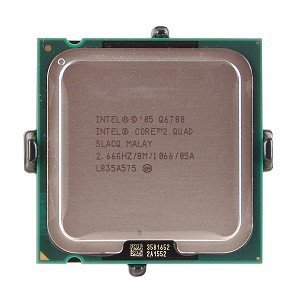
This is the actual processor that many Socket 775 builders are hunting for. The Intel Core 2 Quad Q6700 runs at 2.66 GHz across four cores with an 8MB L2 cache, making it one of the stronger chips available for this socket. The 1066 MHz front-side bus speed matches what most P35, P45, and G41-era motherboards expect, so BIOS compatibility is generally straightforward. With a 105W thermal design power, this CPU demands a cooler that can handle serious heat output, not just a basic entry-level fan.
For a retro gaming build running period-appropriate titles, the Q6700 delivers enough parallelism to handle early multi-threaded workloads and games from the late 2000s smoothly. The 8MB of shared L2 cache helps reduce memory latency, which matters on a platform where the memory controller lives in the northbridge rather than on the CPU die. You will need to verify your motherboard supports quad-core processors, since some entry-level boards maxed out at Core 2 Duo. Pairing this chip with the Thermalfly Delta 6 covers the 105W TDP with its 100W rated cooler, though some headroom would be ideal.
Reasons To Buy
- Quad-core architecture handles multi-threaded tasks from the late 2000s era with genuine competence
- 8MB L2 cache reduces memory round-trips, improving responsiveness on a platform with older memory controllers
- 1066 MHz bus speed matches widely available P35 and P45 chipset motherboards for broad compatibility
Points To Note
- 105W TDP requires a capable cooler, ruling out basic entry-level fans like the DS leddess 1500 RPM unit
- Some budget Socket 775 motherboards lack quad-core BIOS support and will not POST with this chip installed
Best Suited To
Retro gaming enthusiasts and legacy workstation upgraders who need the strongest available Socket 775 processor for period-appropriate builds are the right match here.
Swap It Out When
Your board lacks quad-core support or you only need basic computing, in which case pairing the Delta 6 cooler with a lower-wattage dual-core chip avoids unnecessary thermal demands.
When a stock Intel plastic push-pin cooler fails on a Socket 775 board, this is the replacement that matches the original factory design. The copper core embedded in aluminum fins pulls heat away from the processor die quickly, and the 3.5-inch ball bearing fan spins up to 3400 RPM, moving nearly 62 cubic feet of air per minute. That airflow volume is substantial, easily handling the 95W TDP rating this heatsink was designed for. Unlike the DS leddess entry-level fan at 1500 RPM, this unit more than doubles the rotational speed for serious thermal headroom.
The 4-pin connector supports PWM speed control, so the fan ramps up under load and quiets down at idle rather than running full blast constantly. Ball bearing construction tends to outlast sleeve bearings in thermally demanding environments, which matters on a system that may already be running warm due to its age. The copper core makes this heatsink heavier than all-aluminum alternatives, and the original push-pin mounting system can be tricky to seat properly. Having the ZZHXSM spare pins available helps when the old fasteners have gone brittle.
Bright Spots
- Copper core transfers heat from the CPU die faster than all-aluminum designs, improving thermal response under sudden load spikes
- 3400 RPM fan moves up to 61.78 CFM, providing substantial airflow for 95W TDP processors
- Ball bearing motor design offers longer service life than sleeve bearings in high-temperature environments
- 4-pin PWM connector enables automatic fan speed adjustment based on real-time CPU temperature
Small Caveats
- Push-pin mounting can be difficult to seat on older boards where holes have widened, often requiring spare replacement pins
- 3400 RPM at full speed produces noticeable noise compared to larger, slower-spinning 120mm fans
Core Details
Who Should Grab It
Shoppers replacing a failed stock Intel cooler on a Socket 775 system running 95W processors will find this is the closest match to the original factory thermal solution.
Consider Something Else When
You want a cooler that includes its own mounting hardware and pre-applied paste, in which case the Thermalfly Delta 6 arrives ready to install with a fresh fastening setup.
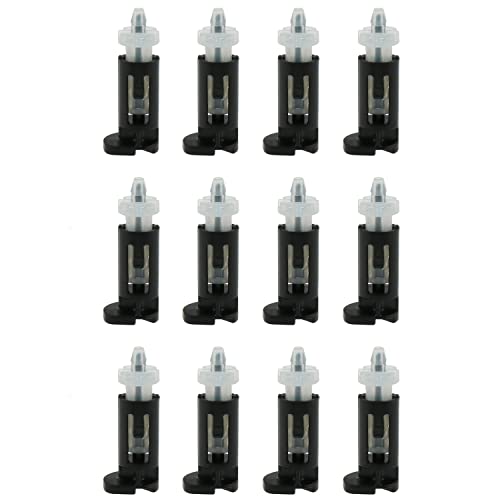
The smallest item on this list solves one of the most frequent Socket 775 maintenance problems. Those plastic push pins that secure the stock Intel heatsink to the motherboard become brittle and snap after years of heat exposure. ZZHXSM provides a pack of 12 replacement plastic rivets designed specifically for LGA 775 socket cooler mounting. The industrial-grade plastic construction matches the dimensions of the original Intel fasteners, so they slide into the existing motherboard holes without modification.
For anyone reusing the Intel Copper Core Heatsink or any stock Socket 775 cooler, having these spares on hand turns a frustrating installation into a five-minute job. The push-pin design works by expanding a split plastic shaft through the motherboard hole, locking the heatsink in place with spring tension. Over time, repeated removal and reinstallation weakens that split shaft until it no longer holds firmly. Replacing all four pins at once ensures even mounting pressure, which directly affects thermal transfer quality.
Plus Points
- 12-piece count provides enough pins for multiple cooler reinstalls or several system repairs
- Industrial-grade plastic matches original Intel pin dimensions for proper fitment in standard LGA 775 holes
- Lightweight and compact design keeps shipping and storage simple
Softer Spots
- Plastic construction still fatigues over time, meaning these are consumable parts rather than permanent upgrades
- Only compatible with push-pin style stock coolers, not screw-mount designs like the QINIZX backplate system
Built With In Mind
Anyone performing maintenance on a Socket 775 system with original push-pin coolers who needs reliable spare fasteners will find these pins are an inexpensive but essential consumable.
Reach For A Different Pick When
You want a permanent mounting upgrade rather than a like-for-consumable replacement, in which case the QINIZX Adjustable Backplate Kit converts push-pin mounting to a durable screw-and-spring system.
What Matters Most Before Choosing Socket 775 Components
Thermal Design Power Matching
Every Socket 775 processor has a thermal design power rating measured in watts, and your cooler must handle that number. The Q6700 runs at 105W, which means entry-level fans like the DS leddess at 1500 RPM will likely struggle under sustained load. Match the cooler capacity to your CPU wattage with headroom to spare. A 100W-rated cooler on a 105W chip leaves no margin for dust buildup or thermal paste degradation over time.
Socket And Board Compatibility
Socket 775 covers a wide range of Intel chipsets, but physical fitment is only part of the equation. Your motherboard BIOS must recognize the specific processor you install. Some entry-level G31 and G41 boards never received quad-core microcode updates and will refuse to POST with a Q6700 installed. Check your board manual or manufacturer support page for a CPU support list before purchasing any processor.
Mounting Hardware Condition
The plastic push-pin system Intel used on Socket 775 stock coolers is the Achilles heel of the platform. Pins crack, lose tension, and fail to hold the heatsink flush against the CPU integrated heat spreader. Poor contact means poor thermal transfer, which means throttling or shutdowns. Inspect the pins on any reused cooler before installation, and keep spare pins or a metal backplate upgrade ready.
Fan Connector Type
Coolers with 4-pin PWM connectors allow the motherboard to adjust fan speed based on temperature, which keeps noise down at idle and ramps cooling under load. Older 3-pin fans run at constant speed. Most Socket 775 boards support both, but PWM is preferable for balancing acoustics and cooling.
Before You Click Buy
Traps First Timers Fall Into
The most common mistake is buying a cooler without checking the thermal design power rating against the target CPU. A 95W cooler will technically fit a 105W processor, but it will run the fan at maximum speed constantly and still may not prevent thermal throttling. Another frequent issue is assuming all Socket 775 motherboards support all Socket 775 processors. Entry-level boards from the era often lack BIOS support for quad-core chips, even though the physical socket matches. Always verify the CPU support list for your specific board model before purchasing a processor.
The Upgrade Payoff
Spending more on Socket 775 components pays off in two areas: cooling capacity and mounting durability. A copper-core heatsink like the Intel stock replacement transfers heat faster than all-aluminum designs, and the ball bearing fan outlasts cheaper sleeve bearing alternatives. Upgrading from plastic push pins to a metal screw-and-spring backplate system transforms the mounting reliability of any stock-style cooler, eliminating the most common failure point on these legacy systems.
Frequently Asked Questions
Will any Socket 775 cooler fit any Socket 775 motherboard?
Physically, the mounting hole layout is standardized across LGA 775 boards, so coolers designed for this socket should fit. However, BTX form-factor motherboards use a different hole pattern, so coolers like the Thermalfly Delta 6 will not mount on those boards.
Can I use a Socket 775 CPU on a newer motherboard?
No, Socket 775 processors are physically and electrically incompatible with newer Intel sockets like LGA 1150 or 1200. The pin layout, voltage requirements, and chipset support differ entirely between generations.
How do I know if my motherboard supports a Core 2 Quad processor?
Check the CPU support list on your motherboard manufacturer website for your specific board model. Boards using P35, P45, and later G41 chipsets generally support quad-core processors, while earlier entry-level chipsets may not have received the necessary BIOS updates.
What is the difference between a 3-pin and 4-pin CPU fan connector?
A 3-pin connector runs the fan at constant voltage and speed, while a 4-pin PWM connector allows the motherboard to dynamically adjust fan speed based on CPU temperature. PWM fans are quieter at idle and ramp up automatically under load.
Are plastic push pins reliable for long-term use?
Plastic push pins work adequately when new but become brittle over years of heat exposure. They are consumable parts that eventually lose tension, which is why spare pins or a metal backplate upgrade are worth keeping on hand for older systems.
Bottom Line
Keeping a Socket 775 system running in 2026 comes down to matching thermal capacity, verifying BIOS support, and replacing aging mounting hardware before it fails. The Q6700 remains a strong processor for retro builds, but it needs a cooler that can handle 105W without breaking a sweat. Whether you choose the copper-core Intel replacement, the Thermalfly Delta 6 with its pre-applied paste, or simply refresh your push pins, the right parts keep these legacy machines productive for years to come.
